www.inavi.com
I 27
Chapter 02 I Basic
Start upgrade.
When an upgrade le exists in the micro SD card, an upgrade can be carried out.
After completing the upgrade, the program automatically restarts.
Basic Operation
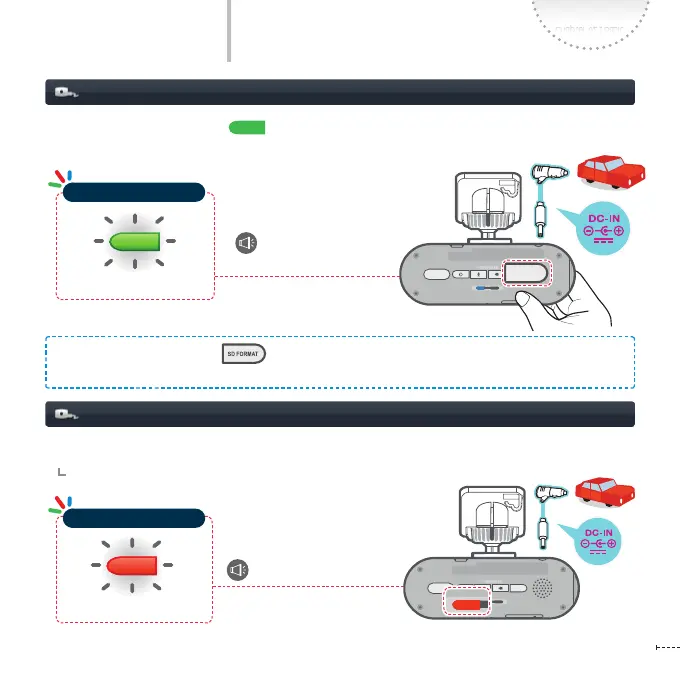
Formatting Micro SD Card
Program Upgrade
- Press the SD Memory Format ( ) button for a few seconds and then the operation status LED
blinks in green and the Micro SD card can be formatted.
REC
GPS
SD FORM AT
STATE
micro SD
REC
GPS
SD FORM AT
STATE
micro SD
REC
GPS
SD FORM AT
STATE
micro SD
REC
GPS
SD FORM AT
STATE
micro SD
REC
GPS
SD FORM AT
STATE
micro SD
REC
GPS
SD FORM AT
STATE
micro SD
Blinking
Formatting the micro
SD memory card.
REC
GPS
SD FORM AT
STATE
micro SD
REC
GPS
SD FORM AT
STATE
micro SD
REC
GPS
SD FORM AT
STATE
micro SD
REC
GPS
SD FORMAT
STATE
micro SD
Blinking
Press the SD Memory Format button shortly and photo shooting is started with a ‘click’ sound.
- The photo is saved in the Photo folder.
Operation Status LED
Operation Status LED



 To Next Page