64 I
www.inavi.com
Customer Center
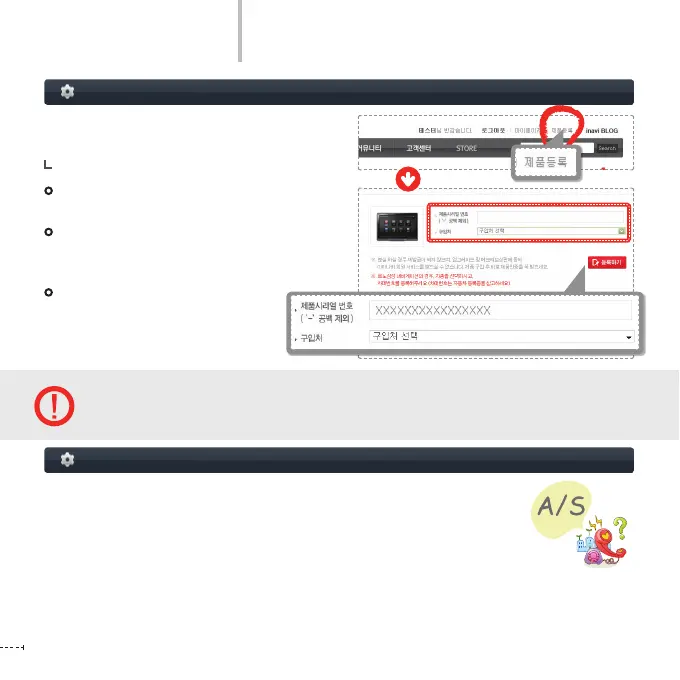
Press the Register Product menu on the right
upper side of the home page.
If you are new to this Web site, please join us rst.
You can view the list of product registration in the
site only when you are logged into the site.
The serial number required for registering your
product is on the side of the product or the
Product Warranty of the user manual.
After completing your product
registration, you can download the
user manual, rmware, PC Viewer, etc.
Loss of the serial number is equivalent to loss of the product.
If you lose the serial number, it cannot be re-issued and no iNAVI member service such as upgrade can
be provided.
Product Registration
Thank you for purchasing THINKWARE iNAVI product.
Important data saved in the product, including storage data, should be regularly backed up
(or saved to another device). In some cases, you may inevitably delete data from the built-in
storage part. In this case, all data in the product may be deleted for A/S. Please note that you
MUST directly back up any important data before requesting A/S.
All products for which A/S is requested and are received by iNAVI Customer Center will be
considered as though they have been backed up by respective users and thus any additional backup will not be
carried out. Therefore, please keep in mind that THINKWARE is not liable for such deletions of data carried out in the
process of A/S.
Before requesting A/S...



 To Next Page