Quantium 410 Installation Manual Commissioning
Document Ref 909342-001 Rev 11 Page 6-5
6.2.2 ELECTRONIC CALIBRATION OF THE MPE PULSER
Refer to separate MPE Pulser Manual for more detailed information. Each
MPE pulser is required to be set up and configured independently.
IMPORTANT - To perform EC, the EC function must be turned ON and
the TC function must be switched OFF.
Connect the User Access Keypad (UAK) to the relevant Dipnet connection on
the Pulser Sealing Board and power up the UAK.
INITIAL SET UP
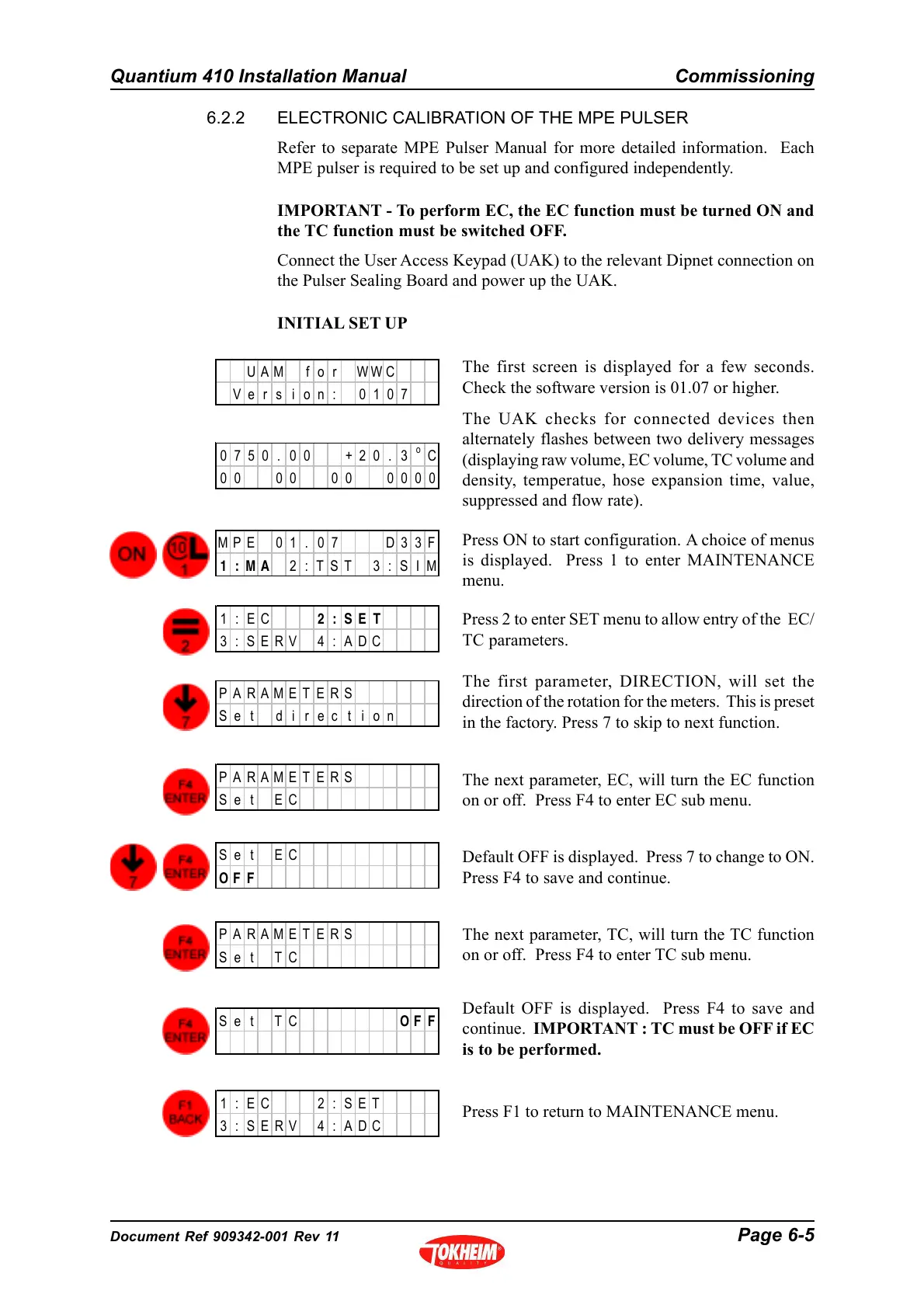
Press 2 to enter SET menu to allow entry of the EC/
TC parameters.
The first parameter, DIRECTION, will set the
direction of the rotation for the meters. This is preset
in the factory. Press 7 to skip to next function.
The next parameter, EC, will turn the EC function
on or off. Press F4 to enter EC sub menu.
Default OFF is displayed. Press 7 to change to ON.
Press F4 to save and continue.
The next parameter, TC, will turn the TC function
on or off. Press F4 to enter TC sub menu.
Default OFF is displayed. Press F4 to save and
continue. IMPORTANT : TC must be OFF if EC
is to be performed.
The first screen is displayed for a few seconds.
Check the software version is 01.07 or higher.
The UAK checks for connected devices then
alternately flashes between two delivery messages
(displaying raw volume, EC volume, TC volume and
density, temperatue, hose expansion time, value,
suppressed and flow rate).
Press ON to start configuration. A choice of menus
is displayed. Press 1 to enter MAINTENANCE
menu.
Press F1 to return to MAINTENANCE menu.
UAM f o r WWC
Ver s i on: 0107
0750. 00 +20. 3
o
C
00 00 00 0000
MPE 0 1 . 0 7 D3 3F
1:MA 2:TST 3:SIM
1:EC 2:SET
3 : SERV 4 : ADC
PARAMETERS
Se t d i rec t i on
PARAMETERS
Se t EC
Se t EC
OF F
PARAMETERS
Se t TC
Se t TC OF F
1 : EC 2 : SET
3 : SERV 4 : ADC



 To Next Page