13
COMPONENT NAMES AND FUNCTIONS
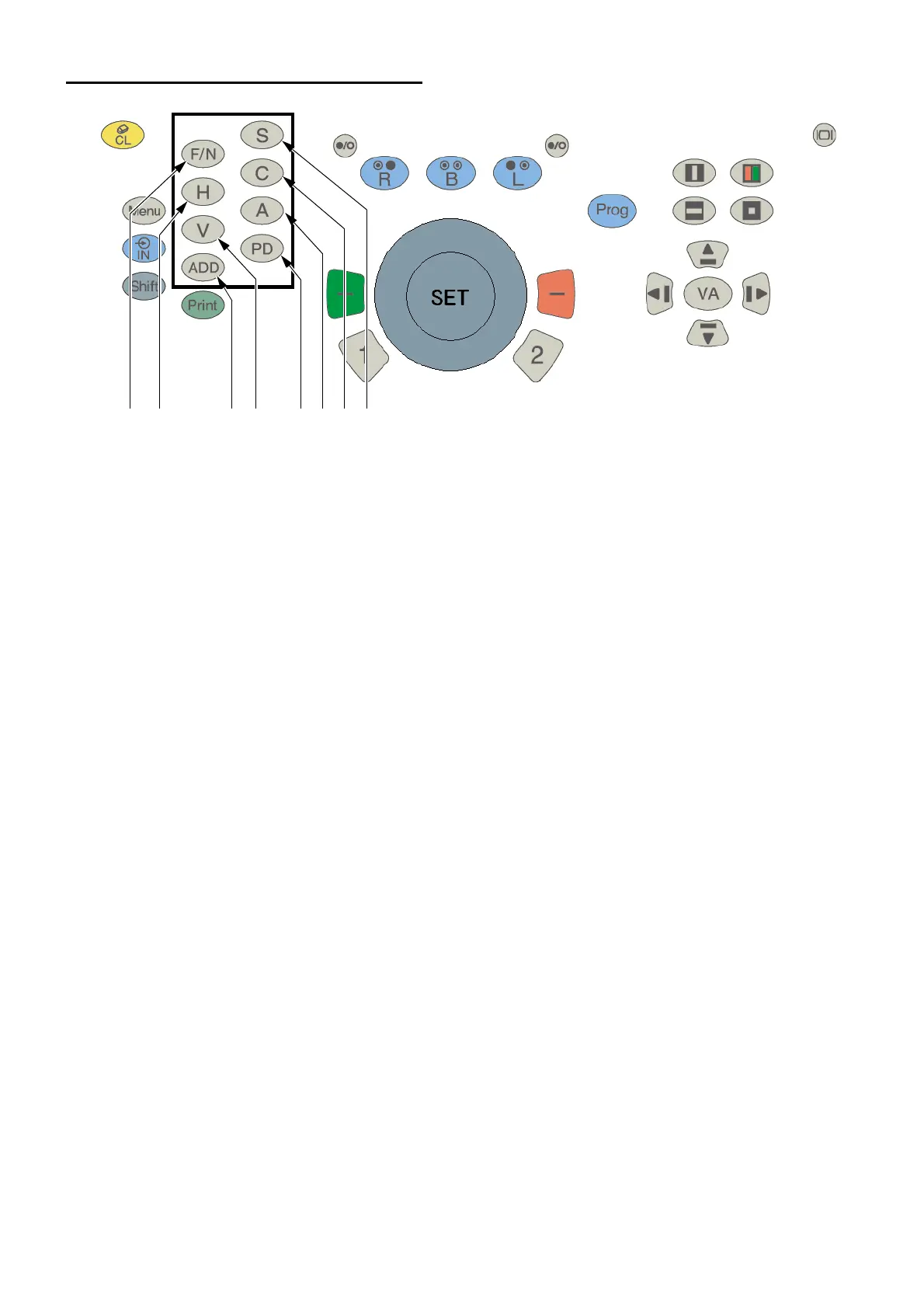
FUNCTION SELECTOR SWITCHES
(1) [F/N] switch
Change the far- and near-point test modes to each other. The current mode is displayed on the title
bar at the upper section on the screen.
When the power is ON and when the system is reset, the far-point test mode is automatically
accessed.
In the near-point measurement mode, the CV-5000 automatically changes to the near-point mode
and the spherical lens is set as the addition refractive power.
(2) [S] switch
The dial function is set to the spherical power operation mode.
In the near-point test, this switch is used to access the addition refractive power operation mode.
(3) [C] switch
The dial function is set to the astigmatic power operation mode.
(4) [A] switch
The dial function is set to the astigmatic axis operation mode.
(5) [PD] switch
The dial function is set to the PD operation mode.
(6) [ADD] switch
The dial function is set to the addition refractive power operation mode.
This switch works only in the near-point test.
(7) [H] switch
The dial function is set to the horizontal prism operation mode.
When the visual acuity is displayed, you can check the prism value.
(8) [V] switch
The dial function is set to the vertical prism operation mode.
When the visual acuity is displayed, you can check the prism value.
(1) (7) (6) (8) (5) (4) (3) (2)



 To Next Page