71
SETTING AND CHANGING THE SOFTWARE
Other
Set other items.
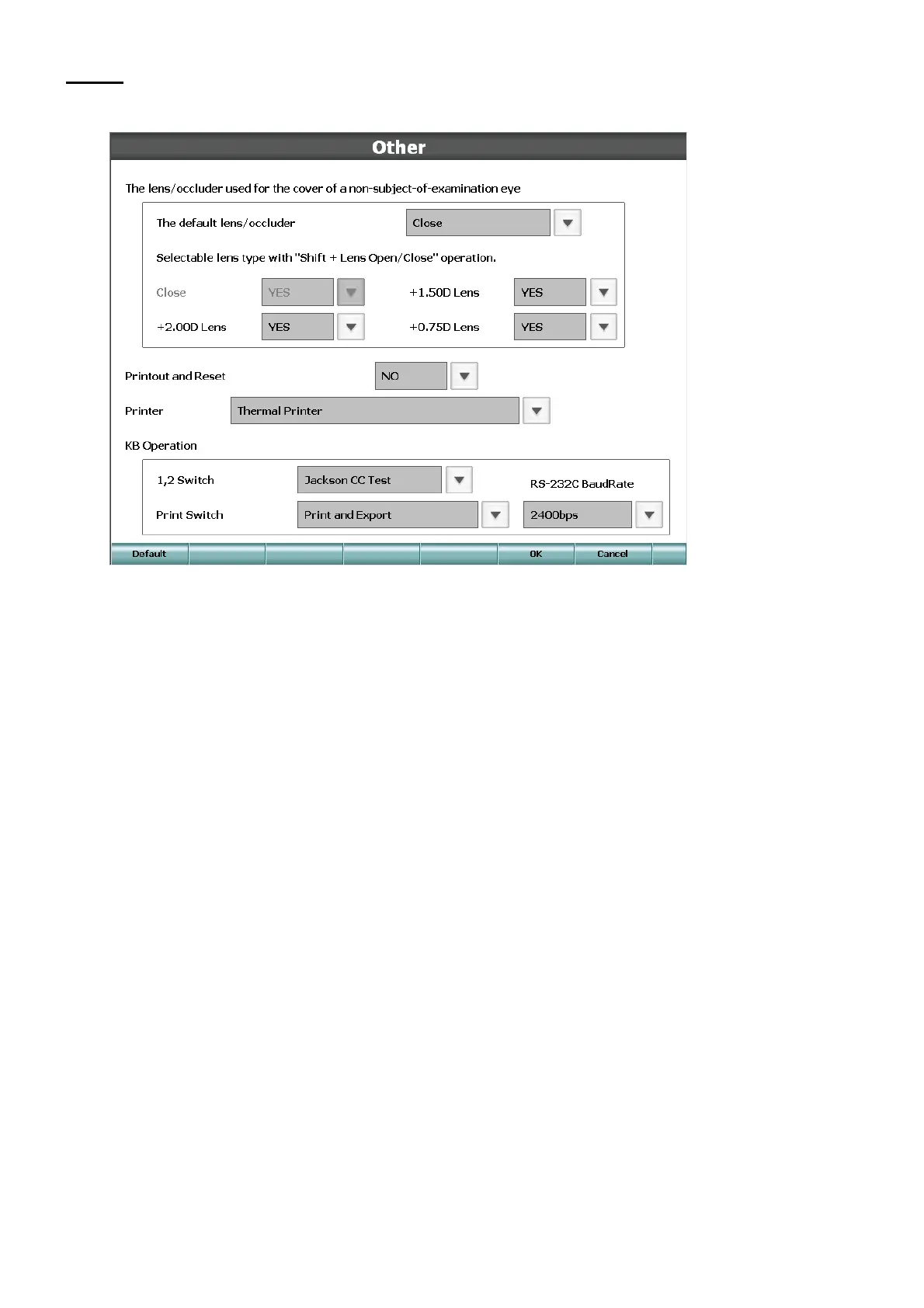
• The lens/occluder used for the cover of a non-subject-of-examination eye
When using the [Right eye open/close] and [Left eye open/close] switches, set the occluding plate/
lens to cover the untested eye.
The default lens/occluder
Set the occluding plate to be used when pressing the [Right eye open/close] and [Left eye open/
close] switches.
Selectable lens type with "Shift + Lens Open/Close" operation
Set the items of the occluding plate, which can be selected when touching the function button
[Occlude] or when pressing the [Shift] switch and the examination window switch together.
• Printout and Reset
Set whether the CV-5000 should be automatically reset after printing.
• Printer
Set which printer should be used when pressing the [Print] switch.
• KB Operation
1,2 Switch
Set which cross cylinder test should be done when pressing the [1] or [2] switch.
"Jackson CC test", "Topcon CC test" or "Smart CC test".
Print Switch
Set which operation should be done when pressing the [Print] switch.
"Printout only", "Export only" or "Print and Export".
RS-232C Baud Rate
Set the RS-232C baud rate for serial data export.
"2400bps" or "9600bps".



 To Next Page