Operation
Motorgrader System Five Operator’s Manual
2-18
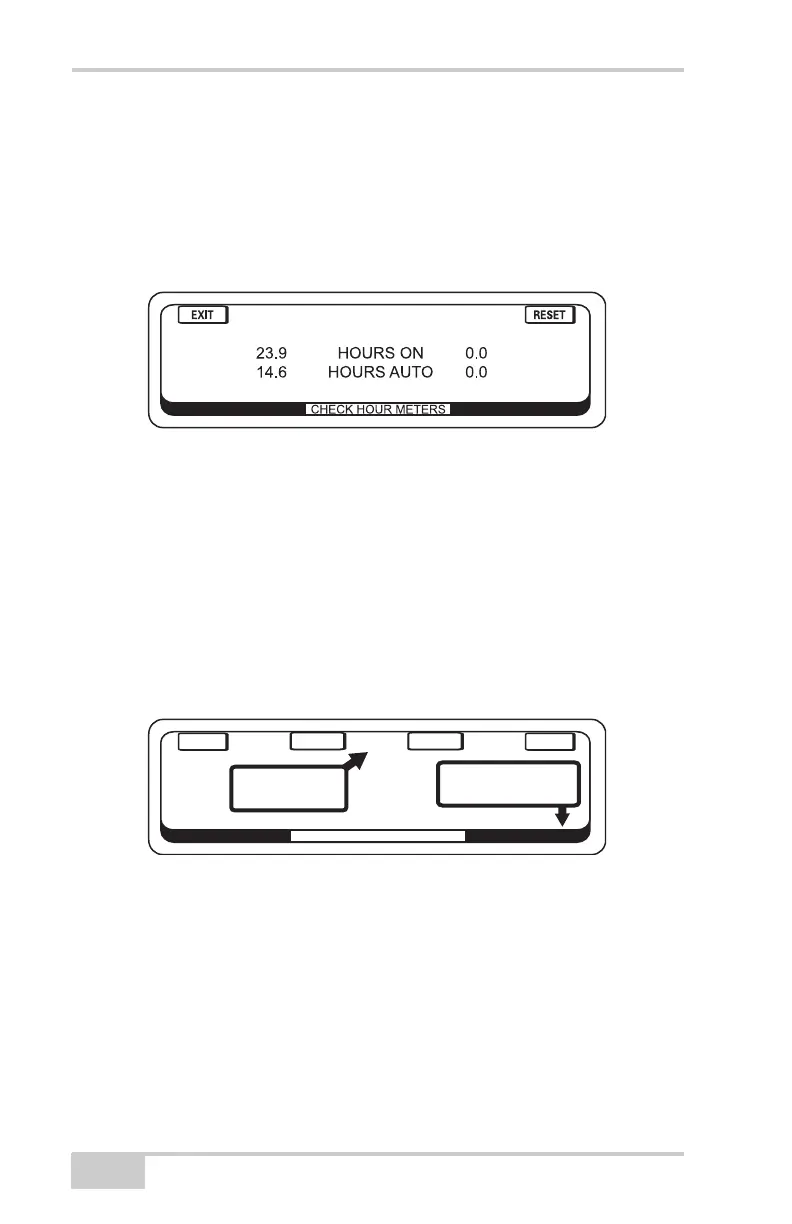
• Check Hourmeters
This screen informs how many hours the box has been on and
how many hours that it has been operating in the Automatic
Mode. There are also user resettable hour meters. These can be
reset to 0.0 by pressing the RESET button. When finished, press
the "EXIT" button.
Figure 2-24.
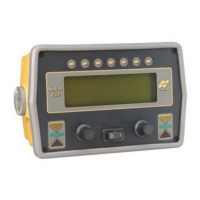
• Adjust LED Brightness
1. Press button above "BACKLIGHT BRIGHT" to brighten
up the backlight of the display.
2. Press button above "BACKLIGHT DIM" to dim the
backlight of the display.
3. Turn the right hand knob to increase/decrease the
brightness of LED's on the faceplate of the box.
4. Press the "ENTER" button to save the settings.
Figure 2-25.
ADJUST LED BRIGHTNESS
E
NT
E
R
E
XIT
B
A
CK
L
IG
H
T
BR
IG
H
T
B
A
CK
L
IG
H
T
D
IM
THESE CONTROL
THE BACKLIGHT
THIS KNOB ADJUST
THE LED BRIGHTNESS


 To Next Page