13-4
COMMANDER / EMBASSY
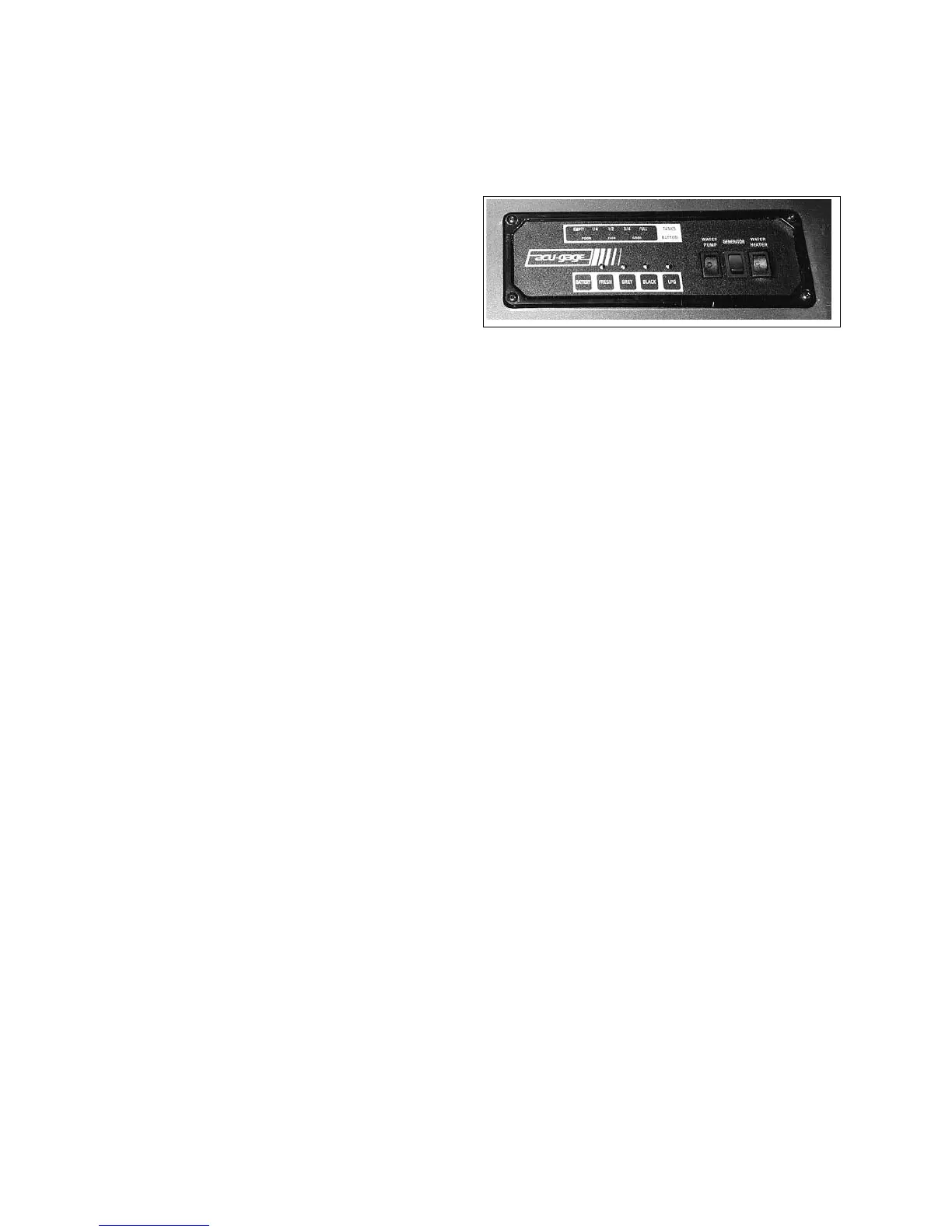
Fig. 13-5 MONITOR PANEL
13.4 MONITOR PANEL
The monitor panel, located above the entrance door,
covers four systems in your motorhome:
1. Battery:
Indicates the level of charge in the auxiliary bat-
tery.
2. Fresh Water:
Indicates the amount of fresh water in the
fresh water tank.
3. Grey Water:
Indicates the amount of waste in the grey water
holding tank.
4. Black Water:
Indicates the amount of waste in the black water
holding tank.
5. LPG:
Indicates the level of propane in the propane tank.
To check the level for any of the systems, press the button
for the system you are checking and read the level.
A. Water pump power switch.
B. Generator control switch.
C. Water Heater Ignitor switch.
CAUTION
Do not allow the holding tanks to overll as this could
cause waste to back up through the toilet or the bath-
tub/shower drain.
IMPORTANT
The master switch for the water pump is also located
on the monitor panel.
1.
2.
3. 4.
5.
b.
c.
a.
13.3 MICROWAVE OVEN
For complete instructions, refer to the Operating In-
structions in the Owner's Information Package.
Operating Tips:
1. Do not attempt to operate microwave oven with
the door open since this can result in harmful
exposure to microwave energy.
2. Do not defeat or tamper with the safety interlocks.
3. Do not place any object between the oven front
face and the door or allow cleaner residue to ac-
cumulate on sealing surfaces.
4. Do not operate the oven if it is damaged. Do not
operate if the oven door does not close prop-
erly (bent) or there is damage to the hinges and
latches (broken or loosened) or the door seals and
sealing surfaces.
5. The oven door should not be adjusted or repaired
by anyone except properly qualied service per-
sonnel.
6. Do not operate the microwave oven empty.
13-4
COMMANDER / EMBASSY
Fig. 13-5 MONITOR PANEL
13.4 MONITOR PANEL
The monitor panel, located above the entrance door,
covers four systems in your motorhome:
1. Battery:
Indicates the level of charge in the auxiliary bat-
tery.
2. Fresh Water:
Indicates the amount of fresh water in the
fresh water tank.
3. Grey Water:
Indicates the amount of waste in the grey water
holding tank.
4. Black Water:
Indicates the amount of waste in the black water
holding tank.
5. LPG:
Indicates the level of propane in the propane tank.
To check the level for any of the systems, press the button
for the system you are checking and read the level.
A. Water pump power switch.
B. Generator control switch.
C. Water Heater Ignitor switch.
CAUTION
Do not allow the holding tanks to overll as this could
cause waste to back up through the toilet or the bath-
tub/shower drain.
IMPORTANT
The master switch for the water pump is also located
on the monitor panel.
1.
2.
3. 4.
5.
b.
c.
a.
13.3 MICROWAVE OVEN
For complete instructions, refer to the Operating In-
structions in the Owner's Information Package.
Operating Tips:
1. Do not attempt to operate microwave oven with
the door open since this can result in harmful
exposure to microwave energy.
2. Do not defeat or tamper with the safety interlocks.
3. Do not place any object between the oven front
face and the door or allow cleaner residue to ac-
cumulate on sealing surfaces.
4. Do not operate the oven if it is damaged. Do not
operate if the oven door does not close prop-
erly (bent) or there is damage to the hinges and
latches (broken or loosened) or the door seals and
sealing surfaces.
5. The oven door should not be adjusted or repaired
by anyone except properly qualied service per-
sonnel.
6. Do not operate the microwave oven empty.



 To Next Page