TX9165 User Manual
TX9165-UM-EN-07 47
4.2.3 Relay Outputs Overview
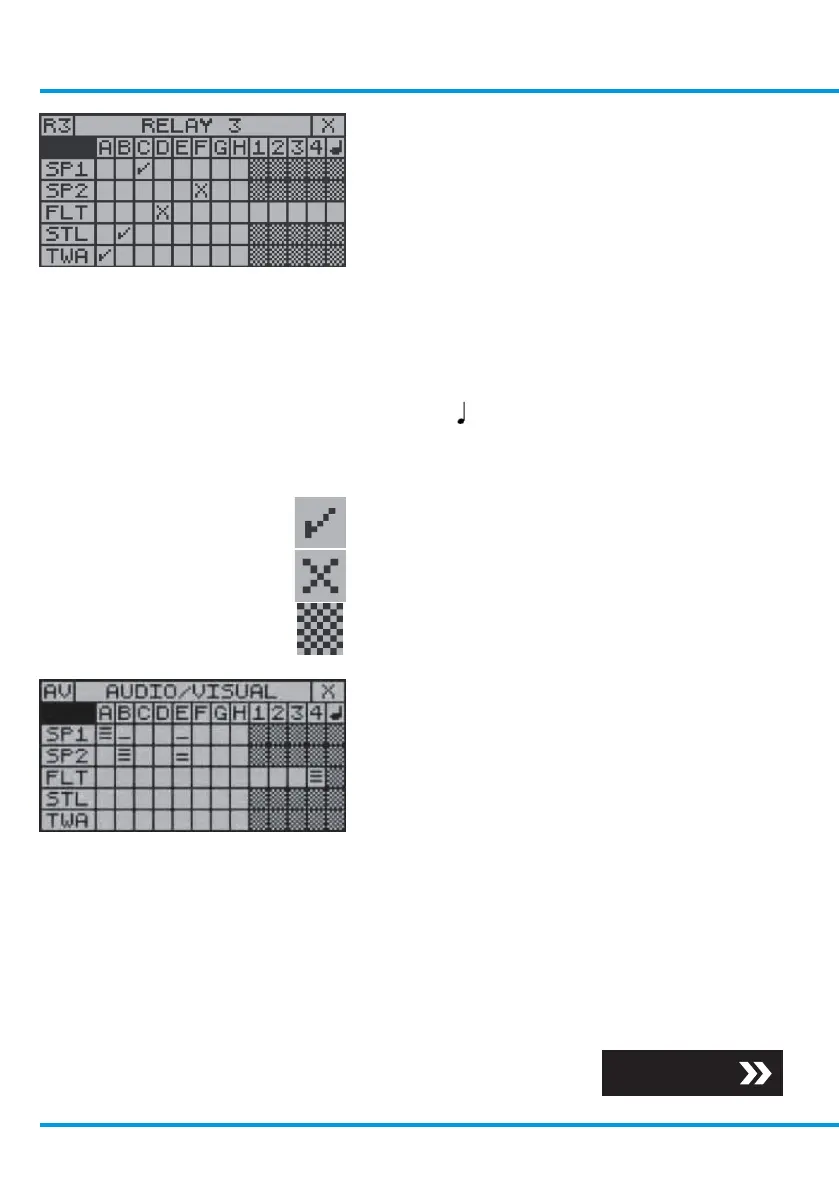
Information is displayed about the signals
that are assigned to this relay from the
sensing modules and other relay outputs.
Use the navigation keypad, scroll through the
Base Screens to Relay Outputs Overview.
Scroll to the Relay Channel you are
interested in and select OK.
• A to : Origin of incoming signal
• SP1 to TWA: Type of incoming signal
The screen prompts are as follows:
• The incoming signal is a Set function
• The incoming signal is a Reset function
• Non valid function
4.2.4 Audio/Visual Alarms
Overview
Information is displayed about the signals
that are assigned to this audio/visual alarm
from the sensing modules and the other
relay outputs.
Use the navigation keypad, scroll through the
Base Screens to the Audio/Visual Alarm
Overview and select OK.
The screen displays the severity level of the
incoming signal, one bar is lowest and three
bars is highest.
Section 6
www.trolex.com


 To Next Page