TX9165 User Manual
TX9165-UM-EN-07 67
4.4.4 Assign Exposure Alarm
When a toxic gas Sentro eModule equipped
with STEL and TWA processing is enabled at
a location, an additional menu item Exposure
will appear.
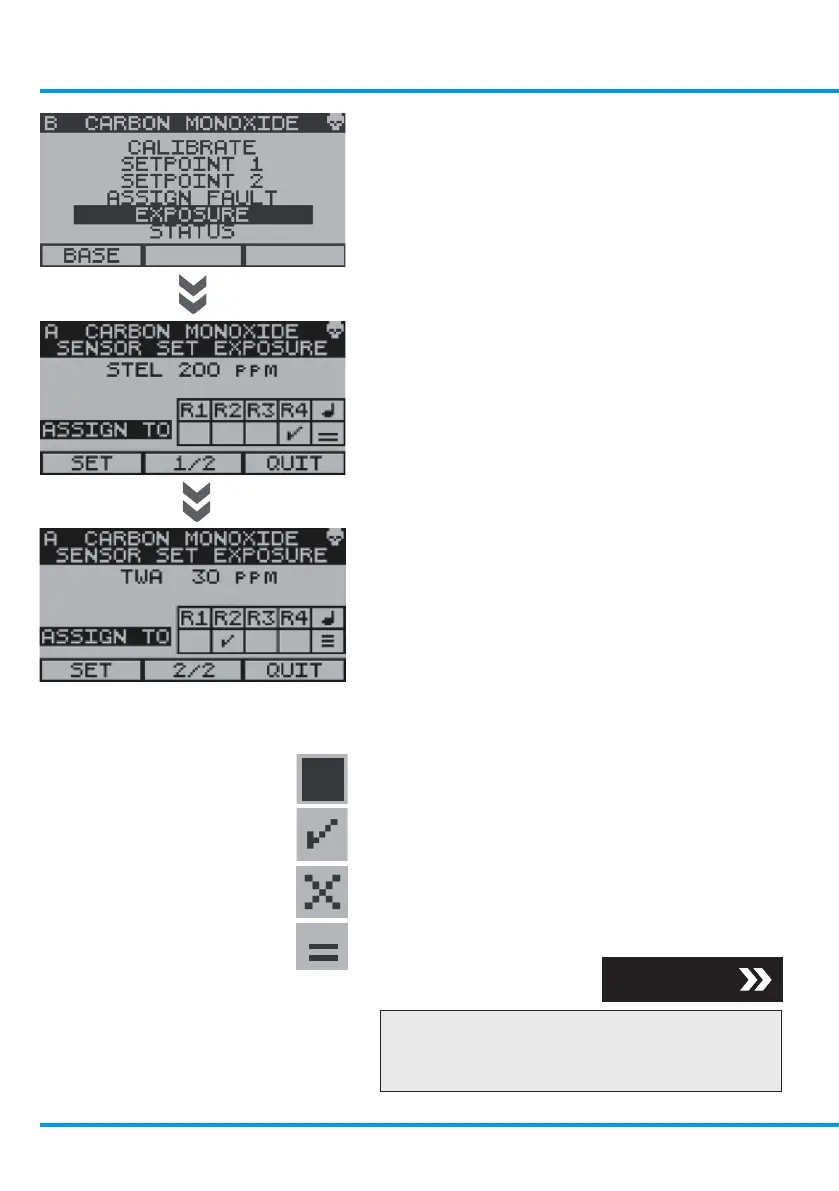
To Access Exposure
From the Sentro eModule Setup Menu,
use the navigation keypad, scroll to
Exposure and select OK.
If a Security Code has been enabled you will
be prompted to enter it, enter the Security
Code and select OK.
The preset limits of STEL and TWA can be
viewed. STEL and TWA alarm states can be
assigned to the following:
• Relay 1 output
• Relay 2 output
• Relay 3 output
• Relay 4 output
• The on-board audio/visual alarm
The screen prompts are as follows:
• Cursor
• Power-up the selected relay
• Reset a latched relay
• Audio alarm severity
Checkpoint
Reset the accumulated STEL and TWA data
in accordance with section 4.3.6.
Section 4.3.6
www.trolex.com


 To Next Page