72 TX9165-UM-EN-07
4.5.2 Setpoint 1 and Setpoint 2
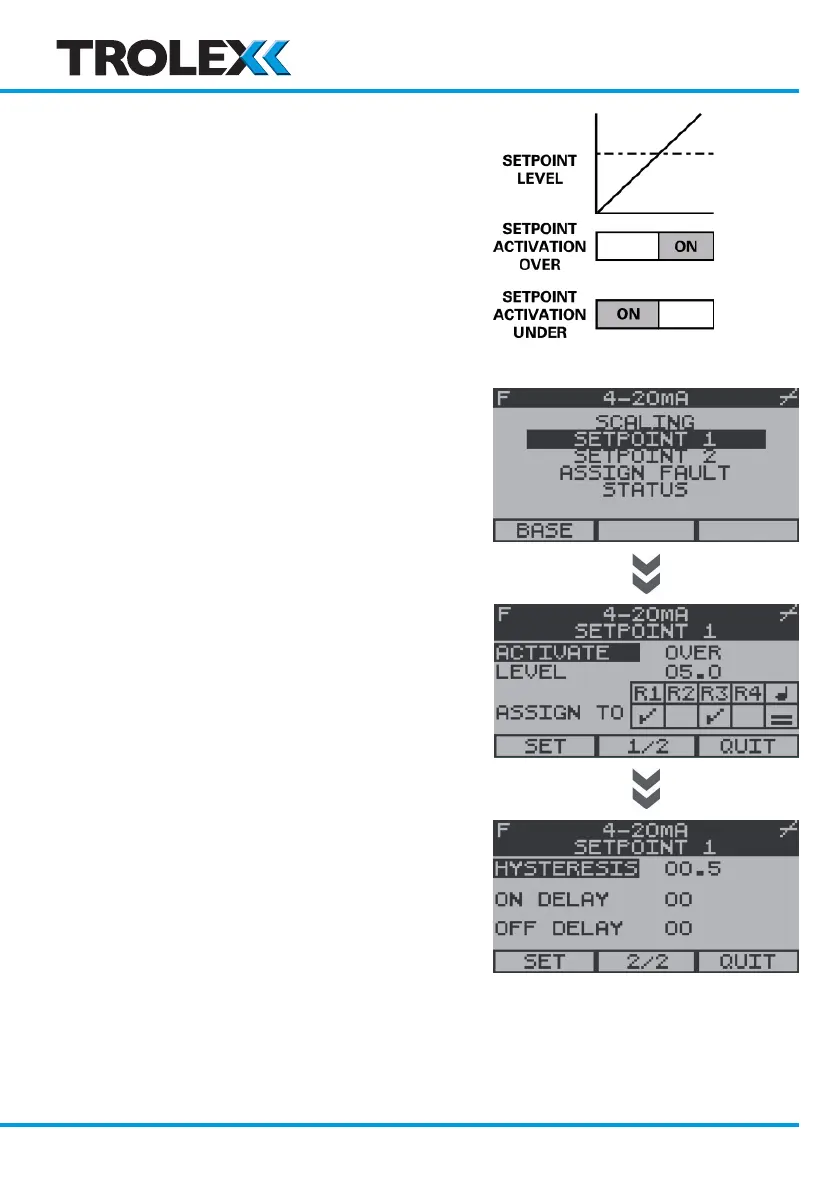
Each input channel E to H has two Setpoint
On alarm states - Setpoint 1 (SP1) (General
alarm) and Setpoint 2 (SP2) (High alarm).
To Access Setpoint 1 and Setpoint 2
From the Sentro rModule Setup Menu, use
the navigation keypad, scroll to Setpoint 1 or
Setpoint 2 and select OK.
If a Security Code has been enabled you will
be prompted to enter it, enter the Security
Code and select OK.
Activate
The Activate mode of Setpoints can be
setup to preference.
From the Setpoint 1 or Setpoint 2 Setup
Menu, use the navigation keypad, scroll to
Activate and select OK.
Use the navigation keypad, scroll to Over or
Under and select OK.
Use the navigation keypad, scroll to Set or
Quit and select OK.
Level
The operating Level of Setpoints can be
setup to preference.
From the Setpoint 1 or Setpoint 2 Setup
Menu, use the navigation keypad, scroll to
Level and select OK.
www.trolex.com


 To Next Page