70 TX9165-UM-EN-07
Checkpoint
The standard configuration for a Sentro
8 has rModules fitted in locations E to H.
It is possible that eModules are fitted in
locations E to H but this is a factory fitted
configuration. If you are unsure which
modules you have fitted to your Sentro 8,
look at the Sensor Inputs Overview for
channels group E to H and see if gas types
are displayed. If gas types are displayed
you have eModules fitted in channel group
E to H. If you are still unsure contact:
service@trolex.com for assistance.
4.5.1 Scaling
The various characteristics of the analogue
input signal scale values can be configured.
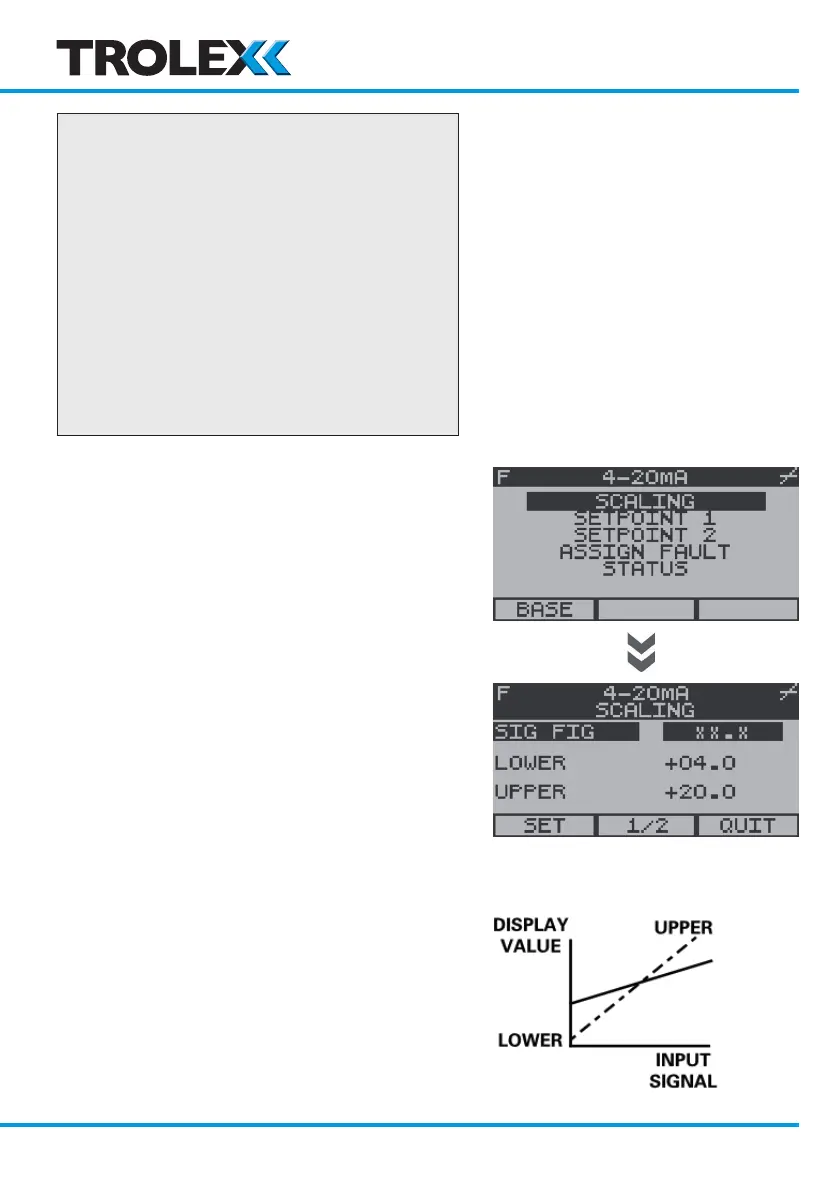
To Access Scaling
From the Sentro rModule Setup Menu, use
the navigation keypad, scroll to Scaling and
select OK.
If a Security Code has been enabled you will
be prompted to enter it, enter the Security
Code and select OK.
Sig Fig
The position of the decimal point can be
shifted along the displayed number to the
best Significant Figure to suit the particular
sensor signal being monitored and its
optimum measuring range.
This can be used to eliminate digit flicker and
redundant decimal places.
www.trolex.com


 To Next Page