88 TX9165-UM-EN-07
7.3 Service Replacement Sensing
Modules
Service replacement Sentro eModules and
rModules can be supplied by our Product
Support Department on a regular basis.
Contact: service@trolex.com for assistance.
Simply insert the replacement eModule or
rModule into the Sentro 8 and return the
original for calibration using the envelope
provided.
7.4 Replacing a Sentro Sensing
Module
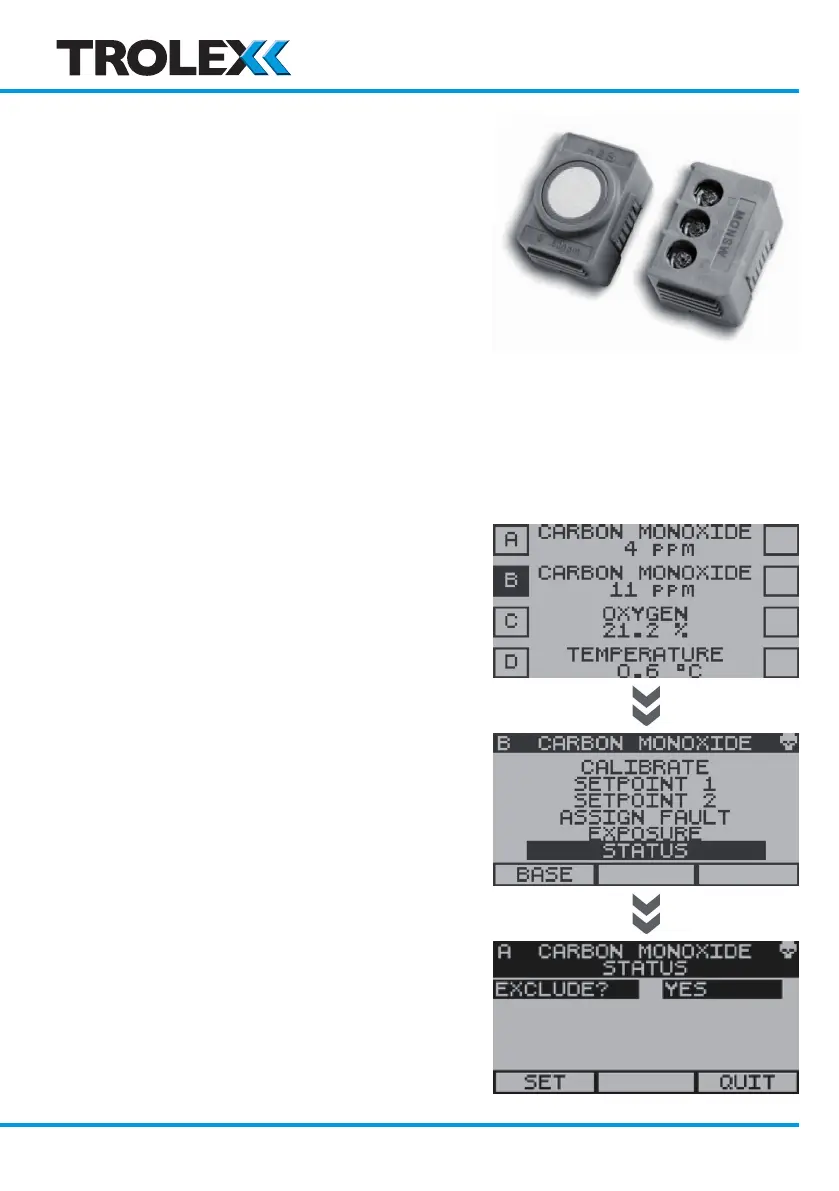
Identify the sensing module to be replaced.
To prevent a Fault condition being generated
when the sensing module is removed it is
necessary to Exclude the sensing module.
From the Base Screens, use the navigation
keypad, scroll to the required sensing
module, press and hold down the left arrow
on the navigation keypad.
Use the navigation keypad, scroll to Status
and select OK.
Select OK to access the Exclude Menu.
Use the navigation keypad, scroll to Ye s and
select OK.
Use the navigation keypad, scroll to Set or
Quit and select OK.
www.trolex.com


 To Next Page