50 TX9165-UM-EN-07
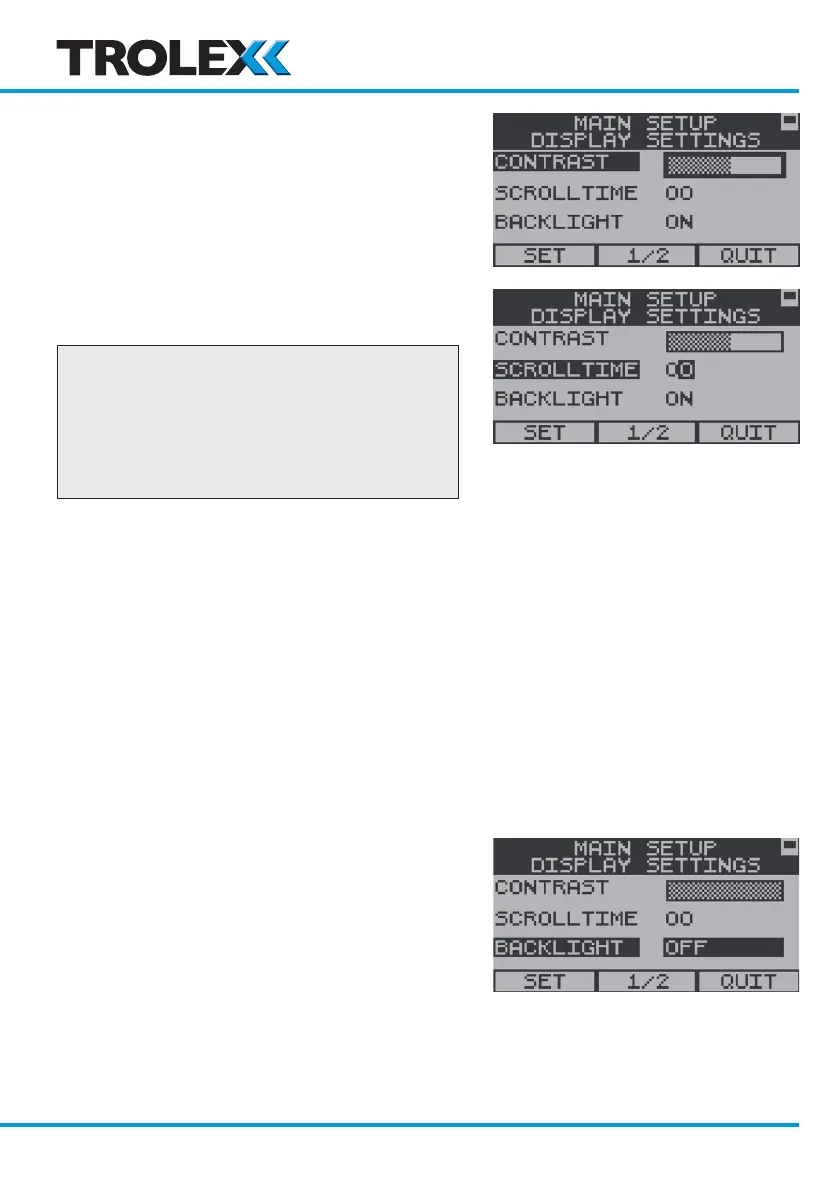
Use the navigation keypad, scroll left or
right to adjust the Display contrast level and
select OK.
Use the navigation keypad, scroll to Set or
Quit and select OK.
To Adjust the Display Scrolltime
Checkpoint
The Base Screen can be configured to
automatically scroll between the two
channel groups - A to D and E to H.
The time interval between scrolling is
adjustable and this is Scrolltime.
From the Display Settings Menu, use the
navigation keypad, scroll to Scrolltime and
select OK.
Use the navigation keypad, scroll up or down
on the first digit, scroll right to the second
digit, repeat for the second digit and select
OK.
Use the navigation keypad, scroll to Set or
Quit and select OK.
To Set the Display Backlight On/Off
From the Display Settings Menu, use the
navigation keypad scroll to Backlight and
select OK.
Use the navigation keypad, scroll up or down
to set the Backlight On or Off and select
OK.
Use the navigation keypad, scroll to Set or
Quit and select OK.
www.trolex.com


 To Next Page