TX9165 User Manual
TX9165-UM-EN-07 53
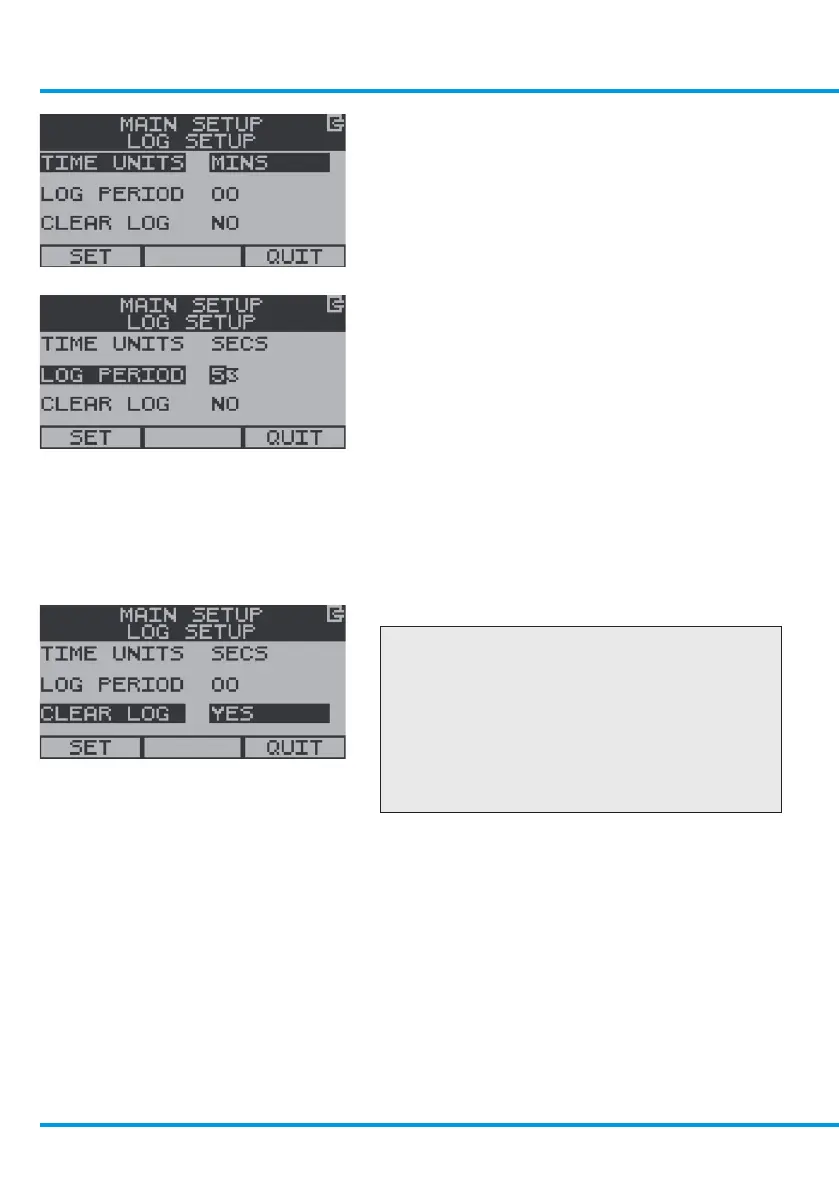
Use the navigation keypad, scroll up or down
to change the time units to Secs, Mins or
Hours and select OK.
Use the navigation keypad, scroll to Set or
Quit and select OK.
To Change the Log Period
From the Log Setup Menu, use the
navigation keypad, scroll to Log Period and
select OK.
Use the navigation keypad, scroll up or down
to change the Log Period digits and select
OK.
Use the navigation keypad, scroll to Set or
Quit and select OK.
To Clear the Log
Caution
Always clear the Log after any fundamental
changes have been made to the Sentro 8
Sensorstation.
• Replacement of eModule or rModule
• Change of Log Period
• Change of Remote Sensor
From the Log Setup Menu, use the
navigation keypad, scroll to Clear Log and
select OK.
Use the navigation keypad, scroll to Ye s or
No and select OK.
Use the navigation keypad, scroll to Set or
Quit and select OK.
www.trolex.com


 To Next Page