TX9165 User Manual
TX9165-UM-EN-07 61
Check
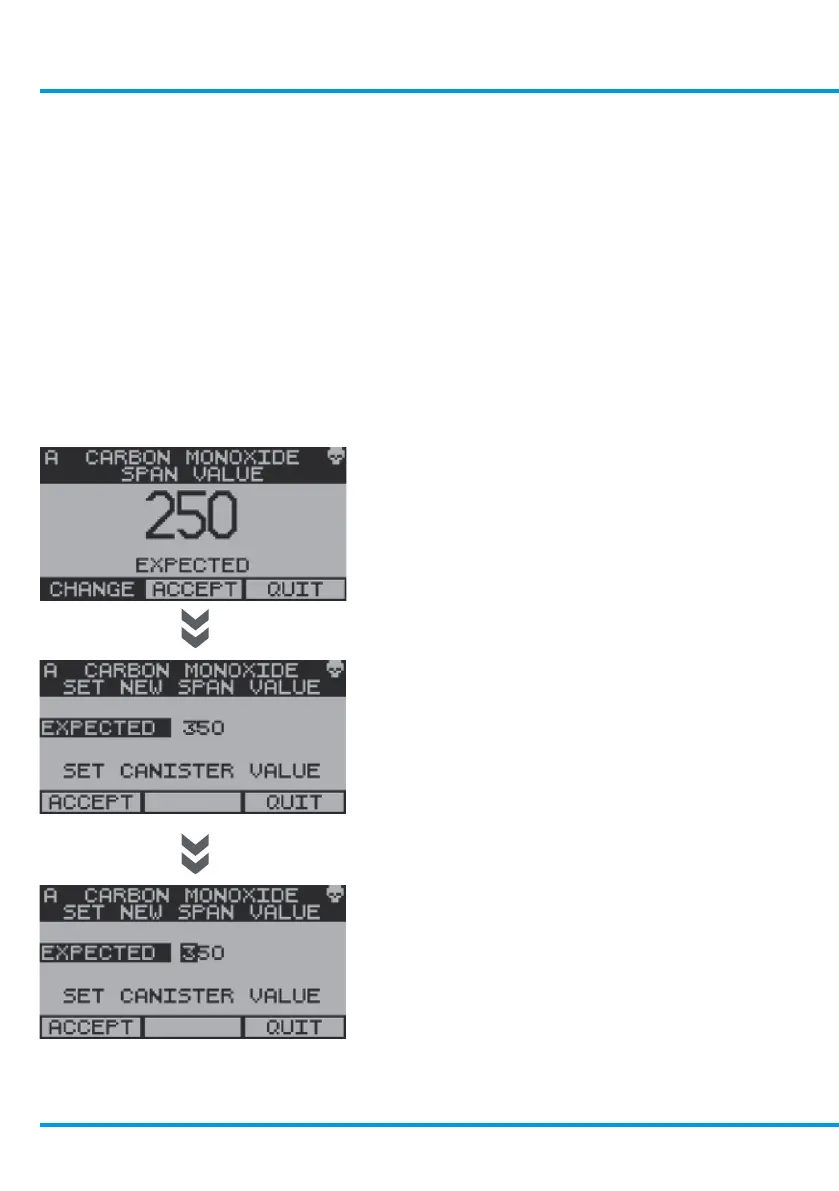
The screen displays the Span value
of calibration gas that the Sentro 8
Sensorstation expects to be used during
calibration.
Check the Span value of gas displayed
against the value on your calibration gas
cylinder.
If the two values match then proceed to the
Calibrate Span procedure.
If they do not match then Change the value
as follows:
Use the navigation keypad, scroll to Change
and select OK.
With Expected highlighted select OK.
Use the navigation keypad, scroll up or down
on the first digit to the required Span value
on your calibration gas cylinder. Scroll right
to the second digit. Repeat the above for the
second and third digit in Span and select
OK.
Scroll to Accept and select OK.
Continue with Calibrate Span as described
in the following section.
www.trolex.com


 To Next Page