KEYPAD
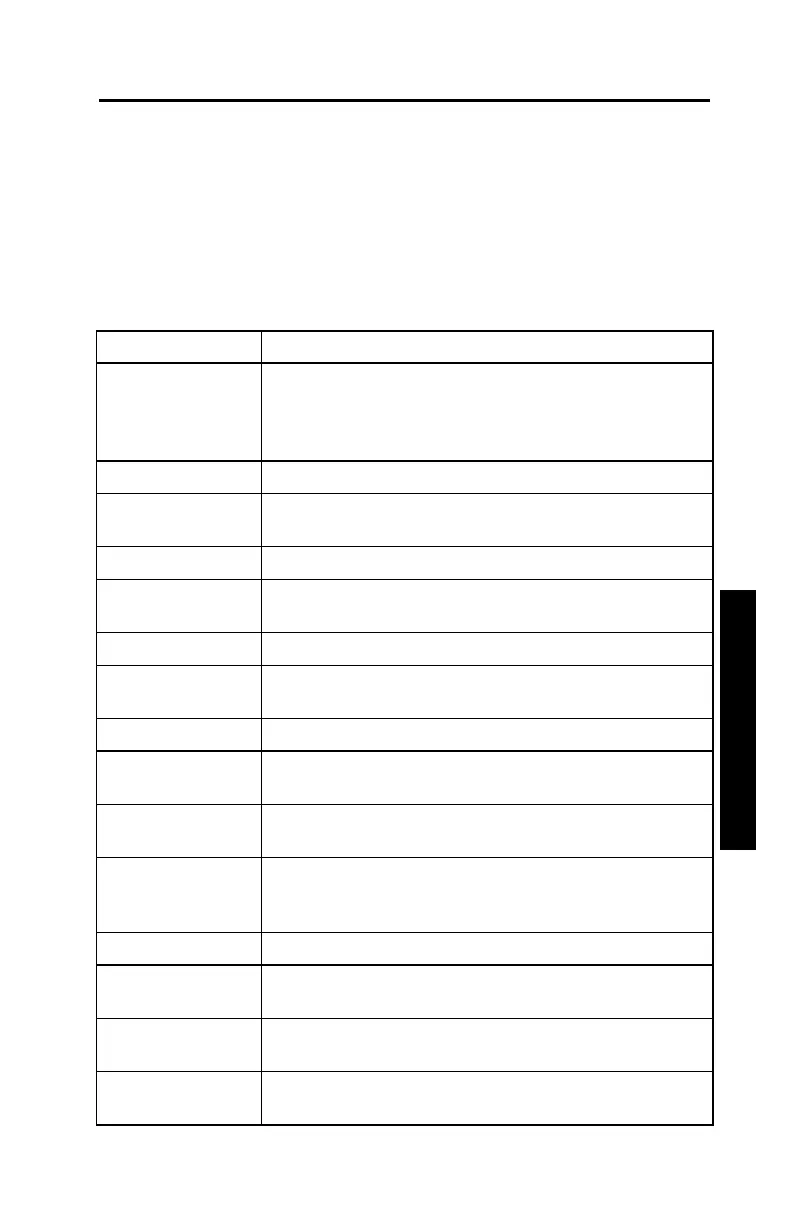
The Model 3450 keypad (Figure 3–2) allows the operator to access
the gauge software. Troxler designed the keypad for ease of use,
with large keys and an anti-glare coating. Pressing a function key
activates the function only if the gauge is in the Ready mode. Table
3–1 describes the function of each key.
Table 3–1. Model 3450 Keypad Functions
ON
Turn on the gauge display. Allows the operator to
use the gauge after a quick self-test. (When
prompted, press
ENTER
to go to the Ready
mode screen.)
OFF
Turn off the gauge.
ESC
Return the display to the Ready screen without
storing or updating the data.
SHIFT
Access the yellow letters and Space key.
PROJECT
Select or create a project file and view, print, or
erase project data file.
SPECIAL
Access the Special function menu.
STORE
Store the most recent data in the current project
file.
RECALL
Display the most recent data.
TARGET
Select, enter, or disable a Proctor, Marshall, or
Voidless density value.
OFFSET
Enable, disable, or change a wet density,
moisture, or trench offset.
MODE
Select the measurement mode. The gauge offers
three measurement modes: Soil, Asphalt, and
Thin Layer.
TIME
Select the count time.
THICKNESS
Enter the surface lift thickness when measuring in
the Thin Layer mode.
STANDARD
Take a standard count or view existing standard
counts.
CE
Clear the last data entered or, if no data was
entered, returns to the Ready screen.











 To Next Page