I
II
III
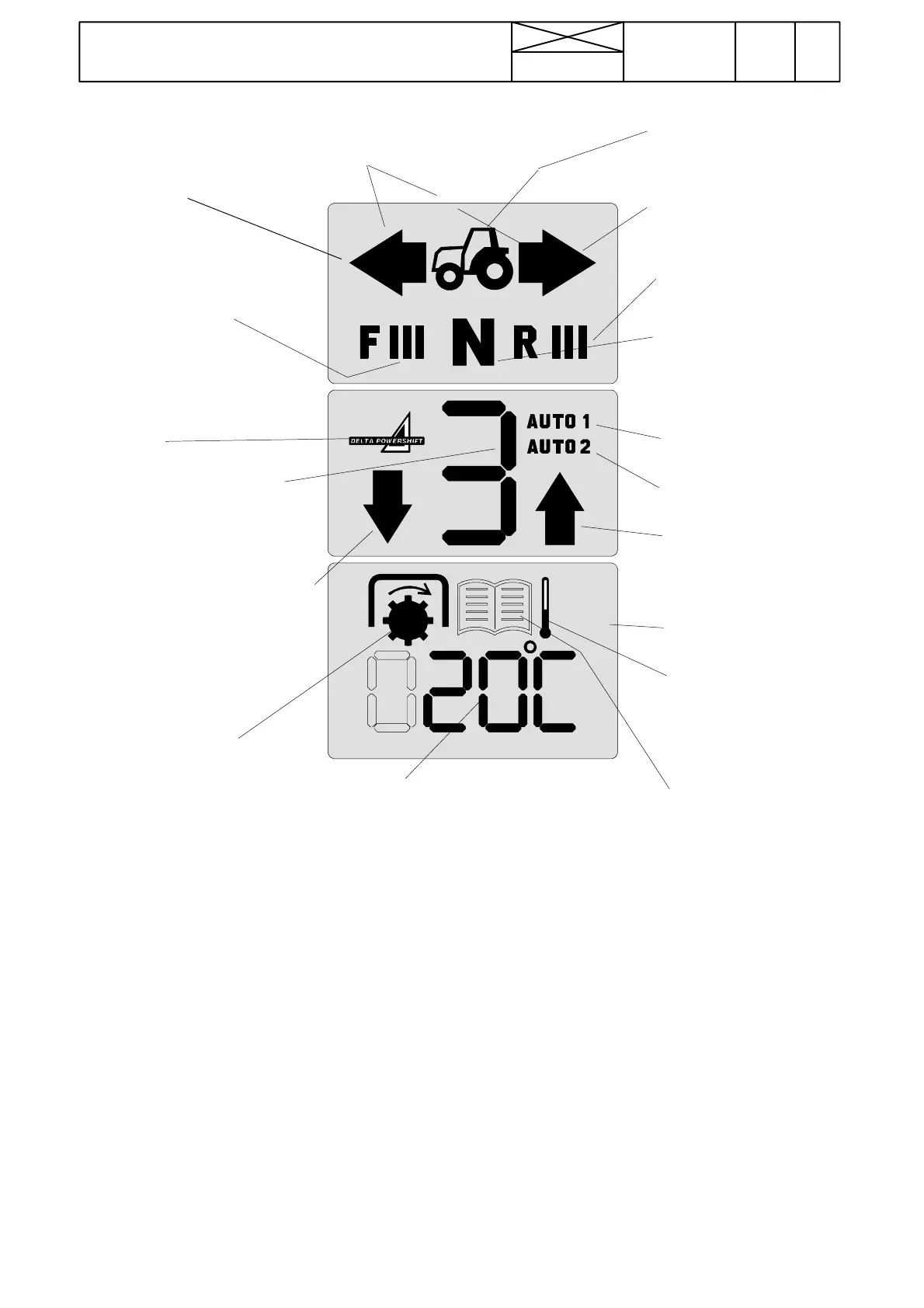
B.AC5/5.2displayunit
N is visible when the shuttle
lever is in the neutral posi-
tion or in P---position. Is blin-
king, when automatic traction
disengagement is on (AC
5.2).
Pr e --- se l e c t e d
1
) DPS speed in reverse
drive (I, II or III). If not pre---program-
med speeds, this symbol is invisible.
DRIVING MODE:
Pr e --- se l e c t e d
1
) DPS speed in
forward driving (I, II or III). If
not pre---selected speeds, this
symbol is invisible. Shows also
main modes.
SERVICE MODE:
--- FI fault code memory (AC
5.2 only)
--- F I I t e s t m o d e
--- F I I I s e t t i n g m od e
Arrow is visible
when driving for-
wards
Arrow is visible when
driving rearwards.
Engaged DPS speed (1, 2 or
3). Shows also a selected mo-
dule in test mode. Flashes,
when automatics make speed
change
3
).
DPS logo
Arrow downwards is blinking, if the
automatics ask driver to change
down
4
).
Arrow upwards is blinking, if
the automatics ask driver to
change up
4
).
Field driving automatics
2
)
General automatics (AC 5.2)
Road driving automatics
2
)
Adjustable automatics (AC 5.2)
Service book is visible,
when the system has found
malfunctions and shows a
fault code. See fault codes
on page 370/6 (AC 5) or
371/5 and 6 (AC 5.2)
Visible, when PTO
shaft is rotating. Can
be visible, altought
the PTO is disenga-
ged.
Outdoor temperature when the tractor is
stationary. Driving speed when the trac-
tor is in motion (accuracy one decimal
15 km/h. No decimal at greater speeds).
Numbers show also fault codes. In the
test mode is shown a point, which is
tested or reset.
1
) Pre---selection means the DPS speed, which is automatically switched on when the driving direction is changed and which is
pre---programmed with the button beside the shuttle lever. The pre---programming is carried out so that when one of the dri-
ving directions is engaged, driver engages the desired DPS speed and then presses the button at least 2 seconds. During the
pre---programming the clutch pedal must be depressed. Thus the selected DPS speed remains in the memory of AC 5 and
engages always when the driving direction in question is selected. If only one direction is pre---programmed, the pre---prog-
ramming is valid only for this direction. The DPS speed remains the same in the other direction.
The pre---programmin is cancelled by pushing the button at least 2 seconds, when the shuttle is in the neutral.
2
) The two DPS automatic modes (Auto1 and Auto2) are selected with the three---position rocker switch on the lever console. The
function is the same as on AC III. The switch has also a manual position.
3
) If a driver changes quickly from DPS speed 1 to 3, the speed 3 flashes immediately in the display (although the automatics
changes the speeds also via speed 2) and speed 3 stops to flash just when the gear change is completed.
4
) When the DPS is in the automatic mode (AUTO 1 or AUTO 2), it changes automatically down or up and informs with the flas-
hing arrow, if the automatics cannot do more and a driver must change up or down manually.
Note! The display has a background light when the current is switched on. Tractor image, DPS---logo and outdoor temperature
(stationary) or driving speed (in motion) are visible always when the current is switched on. There is a connector (RS---232) in the
lever console for connecting e.g. a micro---computer for re---programming the control unit A1.
Tractor image is visible
always, when the current is
switched on
Outdoor temperature
gauge symbol is visi-
ble always, when the
tractor is stationary and
the current is switched
on
I = Shuttle, II = DPS, III = Diagnosis
km/h
Driving speed, when
the tractor is in motion
One arrow is blinking, if a driver does
not sit on the seat and driving
direction (F or R) has been selected.
456
Model Code Page
37. Autocontrol 5 / 5.2
1. 8. 2000
370 4
6250--8950
1. 11. 1998



 To Next Page