107
1. 9. 2002
333 3
6200--8950Hi
Model Code Page
33. Agroline ---instrument
1 . A g r o l i n e --- i n s t r u m e n t L C D --- d i s p l a y
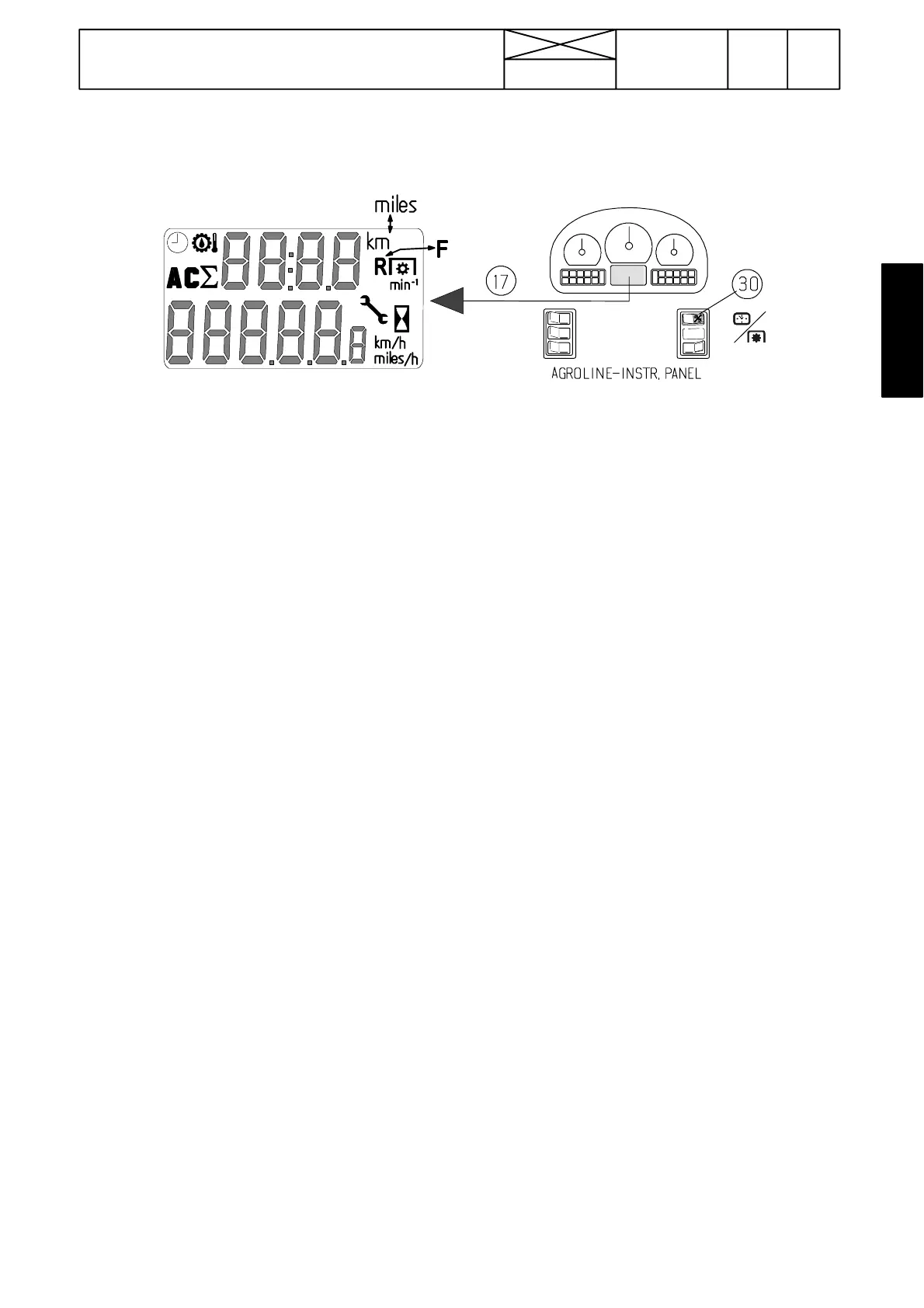
The display (17) can monitor the following functionst:
Upper row shows:
(the function can be changed by pressing the RH side edge
of the switch 30):
--- distanc e travelled (m, km or miles) (max. 999 km)
--- r e a r P T O r e v s ( R ) ( r / m i n )
--- front PTO revs, option (F) (r/min)
--- t i m e
--- gearbox oil temp. (in display LO, when temperature below
+40˚C).
--- position of lower links (0--- 100) AC.
--- SigmaPower % (8950Hi only). Shows in percent how much
power is transmitted via rear PTO.
--- f a u l t c o d e s
--- Service interval indication
Lower row shows:
(the lower row has two functions and cannot be affected with
switch (30)):
--- running hours (visible, when the ignition is on and the en-
gine is not running)
--- driving speed (km/h or miles/h) (visible when the ignition is
on and the tractor is moving). When the speed is below 3
km/h,symbolL is visible.
When the ignition is switched on, the lower row shows first the
running hours and in the upper row there is the functio n which
was selected before the ignition was switched off.
Zeroing distance travelled
:
--- select the “distance travelled” to the upper row by pres-
sing the right edge of the switch (30).
--- press the switch (30)leftedgeaslongasthedistance
value is zeroed.
Setting time:
Do not pause for over 10 sec. while setting, because the
display is then switched into the normal mode.
--- Switch on ignition. Select the time in the upper row by
pressing the right edge of switch (30).
--- press the right edge for about 3sec., then the minutes
start to flash.
--- set minutes by pressing the switch (30)leftedge
--- select hours in the display by pressing the switch (30)
right edge
--- set hours by pressing the switch (30) left edge.
--- time is now set and the display is switched to the normal
mode after 10 seconds or by pressing the right edge of
switch (30) for over 3seconds.



 To Next Page