VIVOTEK
User's Manual - 33
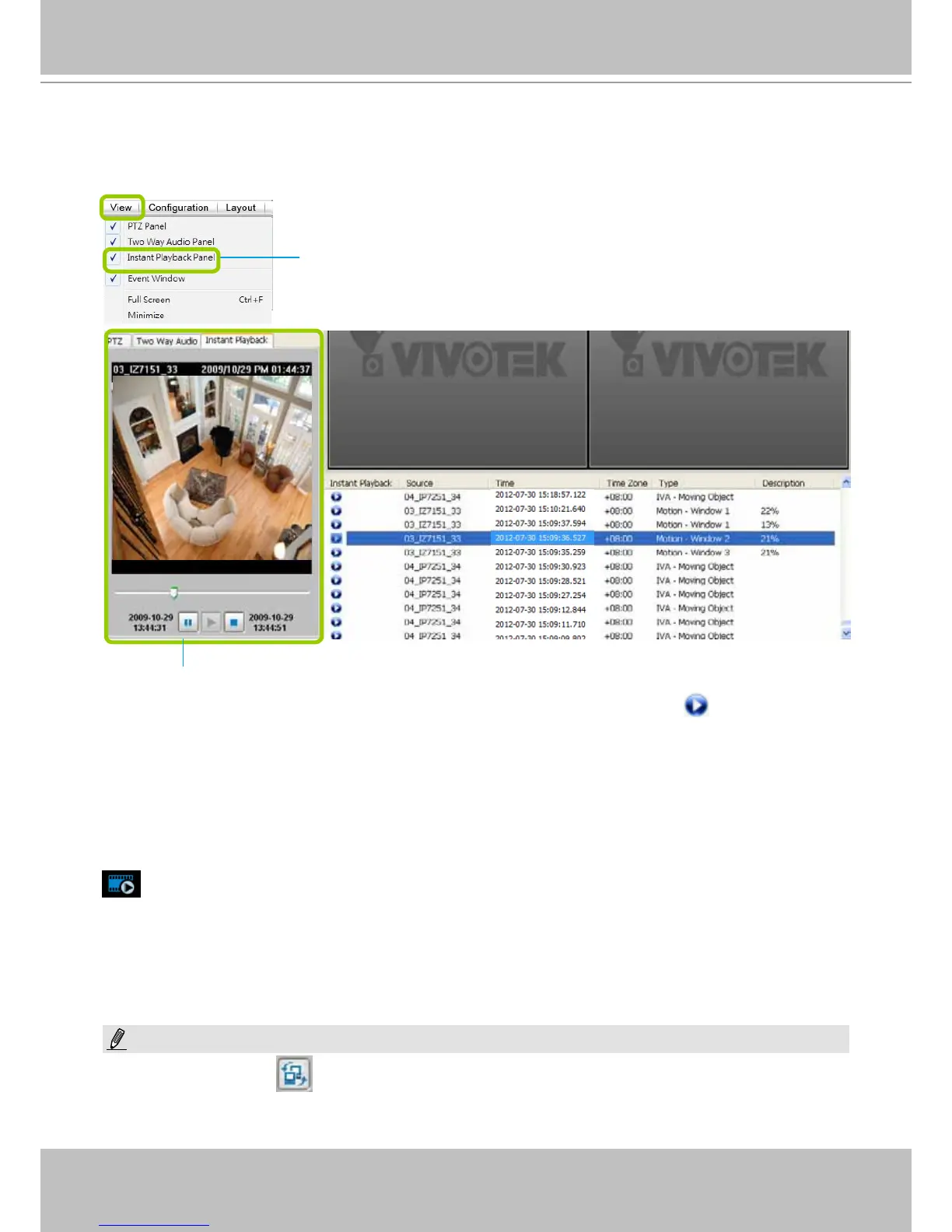
Instant Playback (on Remote LiveClient)
Instant Playback is available on a remote LiveClient console. Check View > Instant Playback to
open the window on the panel. The entries are the short recordings made from triggered events.
The recorded media that was triggered by an event will be indicated by an
icon.
You can double-click an event on the list to playback the recorded video. Each event contains a
video clip of about 20-seconds in length. (The default recording data of an event is 20 seconds.
For more information about event recording, please refer to page 86.)
Instant Replay (on Remote LiveClient)
If a camera is currently recording to the NVR, then a Replay button will be available at the
lower left corner of its view cell. This allows you to immediately retrieve the video recording in
the past 30 seconds.
The Instant Replay function enables you to quickly retrieve videos of what has just happened (20
seconds to 15 minutes ago), without the need to open the Playback utility for the past videos.
Instant Playback Window with a slide bar, play, pause, and stop function
Uncheck this item if you want to hide this window.
NOTE:
The Switch Monitor button is available on an independent LiveClient instance installed on a remote PC. For a
direct connection with the NVR, this button is not available.



 To Next Page