VIVOTEK
User's Manual - 93
Add New Time Frames
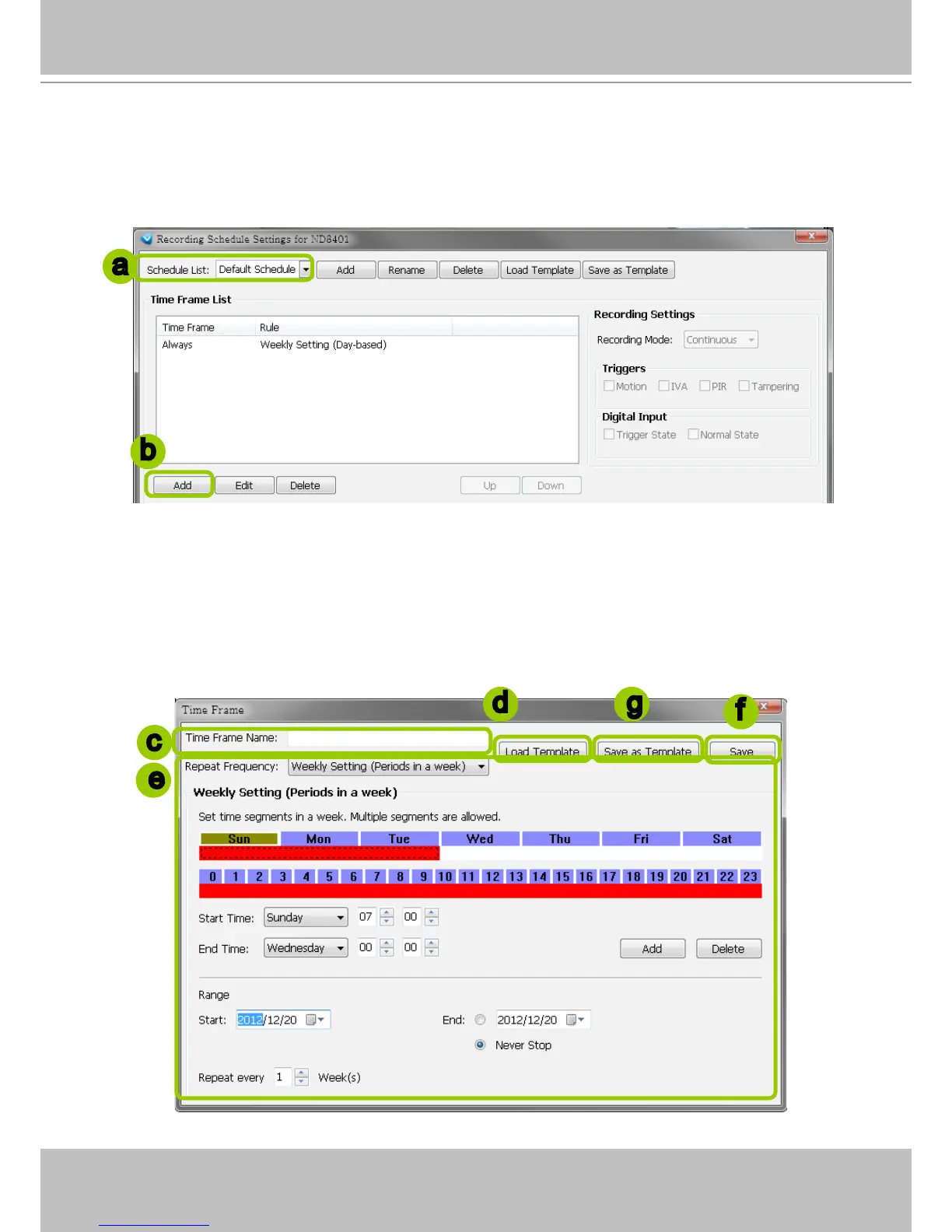
Please follow the steps below to add new time frames to a schedule:
a. Select a recording schedule from the drop-down list.
b. Click Add to open the Time Frame Settings window.
c. Enter a name for the new time frame.
d. If you have a time-frame template, you can upload it to simplify the editing of the schedule. Click
Load
Template and the Load File dialog box will pop up. Select the template le to load.
e. To edit the new time frame, select a Repeat Frequency from the drop-down list and edit the time
segments, applicable days, applicable period of time, and repeat time interval. For the
detailed settings
of each repeat frequency, please refer to The Concept of Repeat Frequency on page 95.
f. When completed, click Save to enable the settings.
g. If you want to save this time frame as a template for future use, click Save as Template. A Save le
dialog will pop up for you to save the template.
a
b
c
d
f
g
e



 To Next Page