VIVOTEK
70 - User's Manual
How to Set up Association Management
The LiveClient supports association management which allows the user to configure relative
event trigger notifications of the connected network devices. (E.g., DI/DO status on the
management tree, motion detection windows appearing in the video cell, or the event list in the
event window)
Association Management
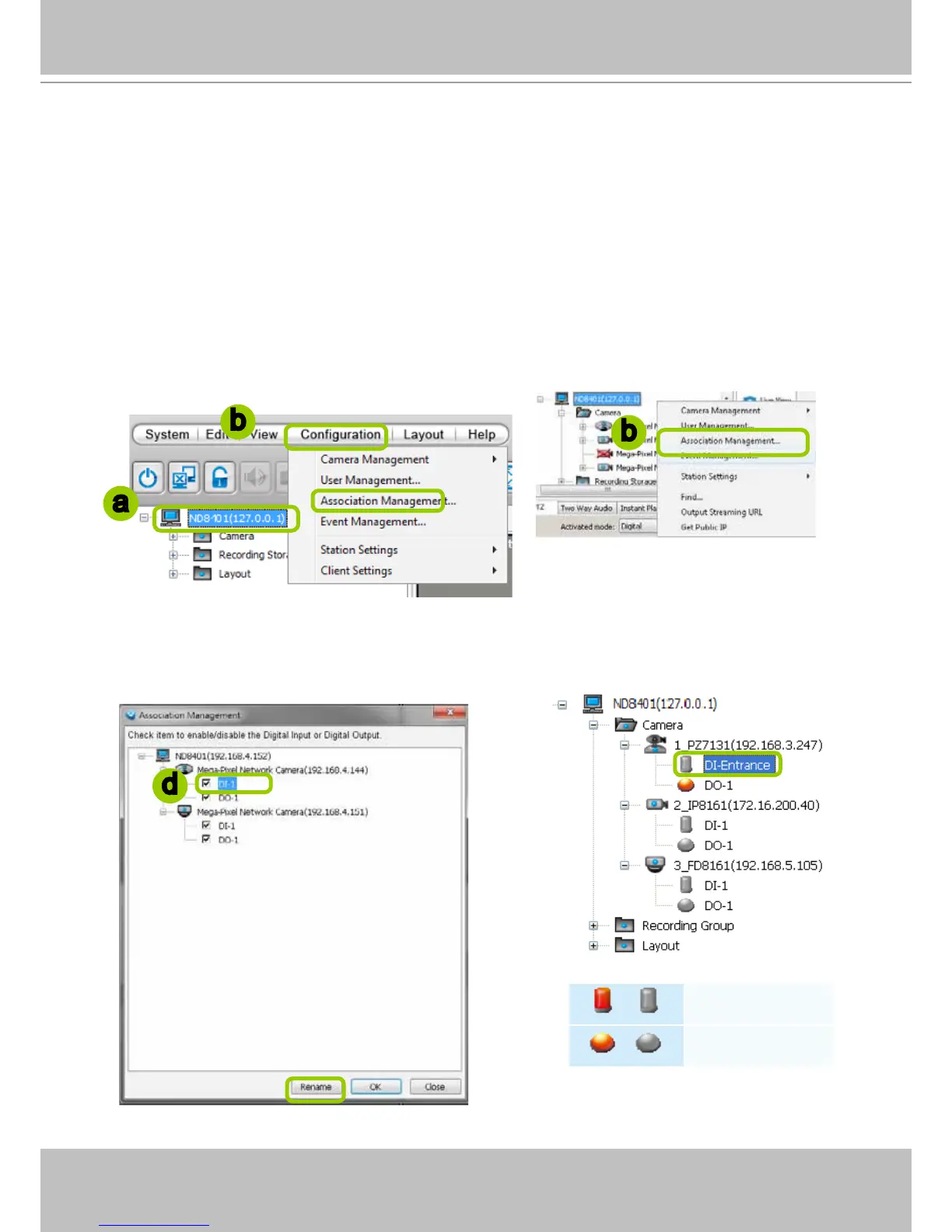
Please follow the steps below to congure assocation settings:
a. Select the station from the hierarchical management tree.
b. Click Configuration > Association Management on the menu bar (or right-click the station and
select Association Management).
c. The Association Management window will pop up. Check or uncheck the items and click Save
to enable the settings. The items you've selected will also be displayed under the hierarchical
management tree.
For example:
d. If you want to rename the DI device, select the DI item and click the Rename button. It will be very
convenient for you to recognize the target DI device.
/
Digital input on / off
/
Digital output on / off
a
b
b
d



 To Next Page