VIVOTEK
48 - User's Manual
g. At the bottom of the window, there is a eld for you to alter the camera settings including Connection
Settings and Recording Settings. You can apply the new settings to each camera on the list, or
click Apply to All to apply the same congurations to all the cameras. For more information about
Connection Settings and Recording Settings, please refer to Insert Device on page 36 for detailed
information.
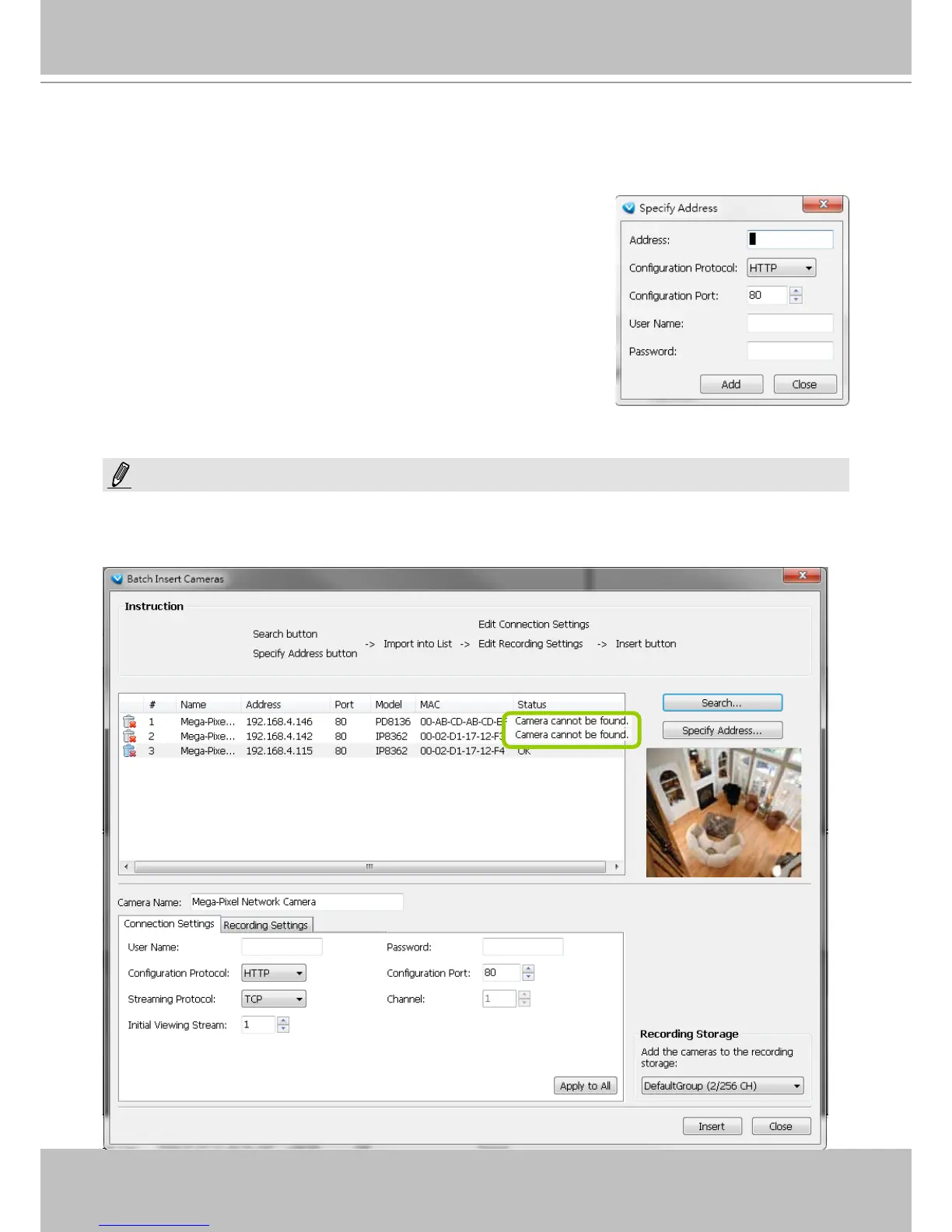
When you modify the camera settings, and when the connection information (Conguration Protocol and
Conguration Port) does not match the current network environment, the camera will be disconnected and the
status of the camera will become “Camera cannot be found” as shown below.
h. Specify host: If you want to add a camera to the list, click Specify
Address to directly add a wanted camera. Click Add after lling in
the correct information. The camera will be added to the list of the
Batch Insert Camera window.
i. By default, all inserted devices will be applied to the default
recording storage. Deselect the Add checkbox if you do not want
to assign the selected devices to the default recording storage.
j. Click Insert when all the settings are done. Cameras will be added.
NOTE:



 To Next Page