VIVOTEK
User's Manual - 97
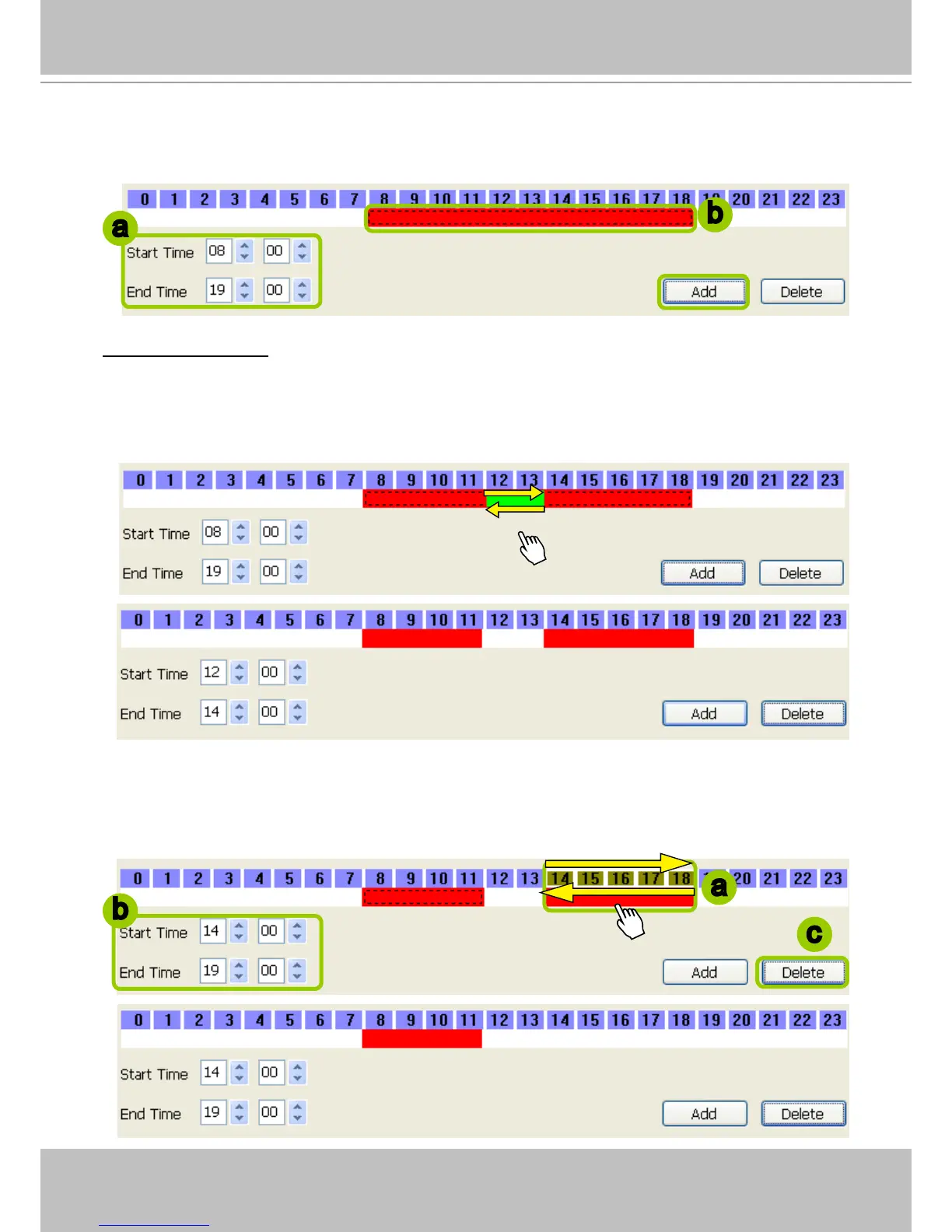
2. Fill in the precise Start Time and End Time:
a. Directly enter the value in the Start Time and End Time fields, then click Add.
b. The corresponding red timeline bar will automatically appear as shown below.
Delete time segments: Choose either step 1 or step 2 to set up
1. Use the mouse to erase the timeline bar: Right-click on an existing red timeline bar and drag the
mouse. A green timeline bar representing the deleted part of the time segment will erase the red bar as
shown below.
In the following illustration, the green arrows show the dragging direction of the mouse. You can drag it
from left to right or the opposite.
2. Use the delete button to remove the entire timeline bar:
a. Click an existing red timeline bar or left-click the daily timeline control bar (the purple rectangles)
and drag the mouse.
b. The corresponding time segment will appear in the Start Time and End Time fields.
c. Click Delete, and the selected timeline bar will disappear.
a
b
a
c
b



 To Next Page