VEHICLE INFORMATION
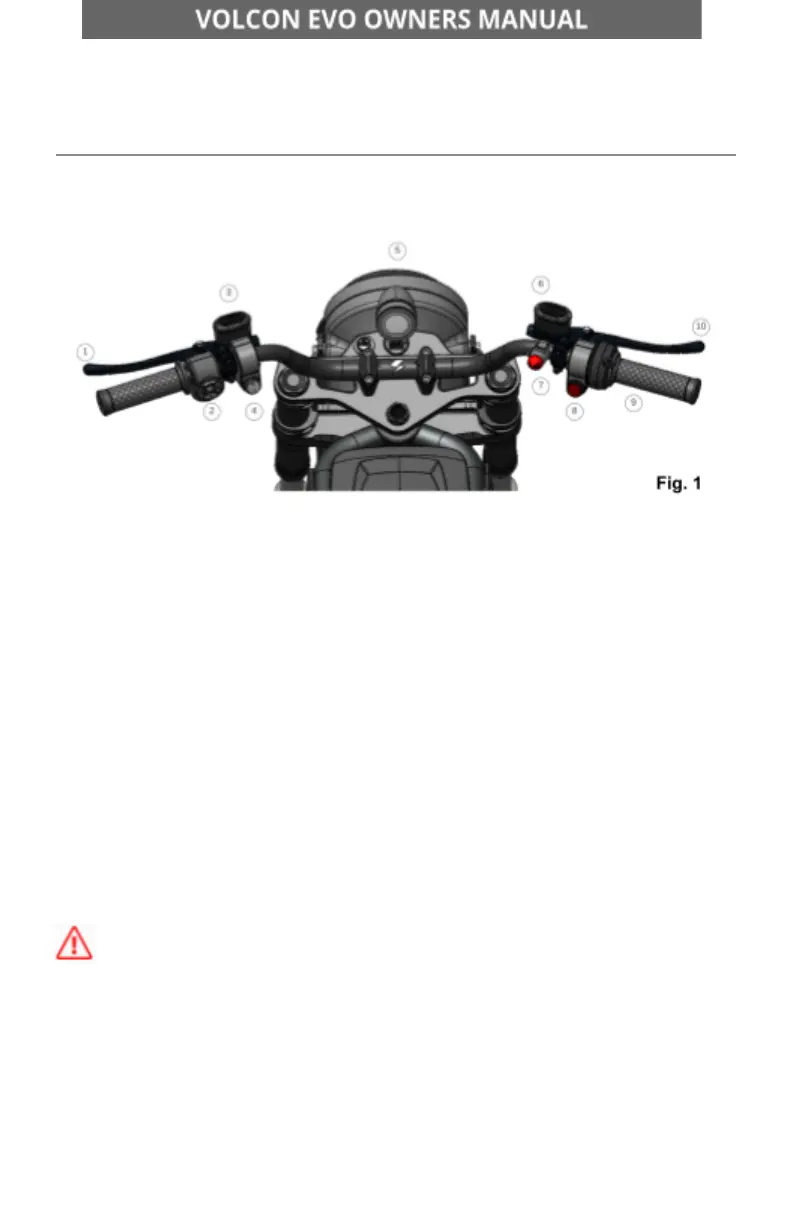
Controls
1. Rear Brake Lever
2. D-Pad
3. Rear Brake Fluid Reservoir
4. Headlight Switch
5. Display
6. Front Brake Fluid Reservoir
7. Safety Tether
8. Power Switch
9. Throttle
10. Front Brake Lever
**E-Mode button (not shown), in line with the battery harness, located in the
battery compartment.
Handlebar
Grip the handlebar with both hands. Steer the handlebar in the direction you
want to go.
Adjusting the handlebar
WARNING It is important that all controls must be fully accessible and
easy to operate at all times. Take time to adjust controls to the operator
before riding. Make sure the power switch is off and the battery is
disconnected BEFORE performing any adjustments to controls.
960-101086 Rev B Page 16 of 69


 To Next Page