VEHICLE INFORMATION
Emergency Mode (E-Mode) Button
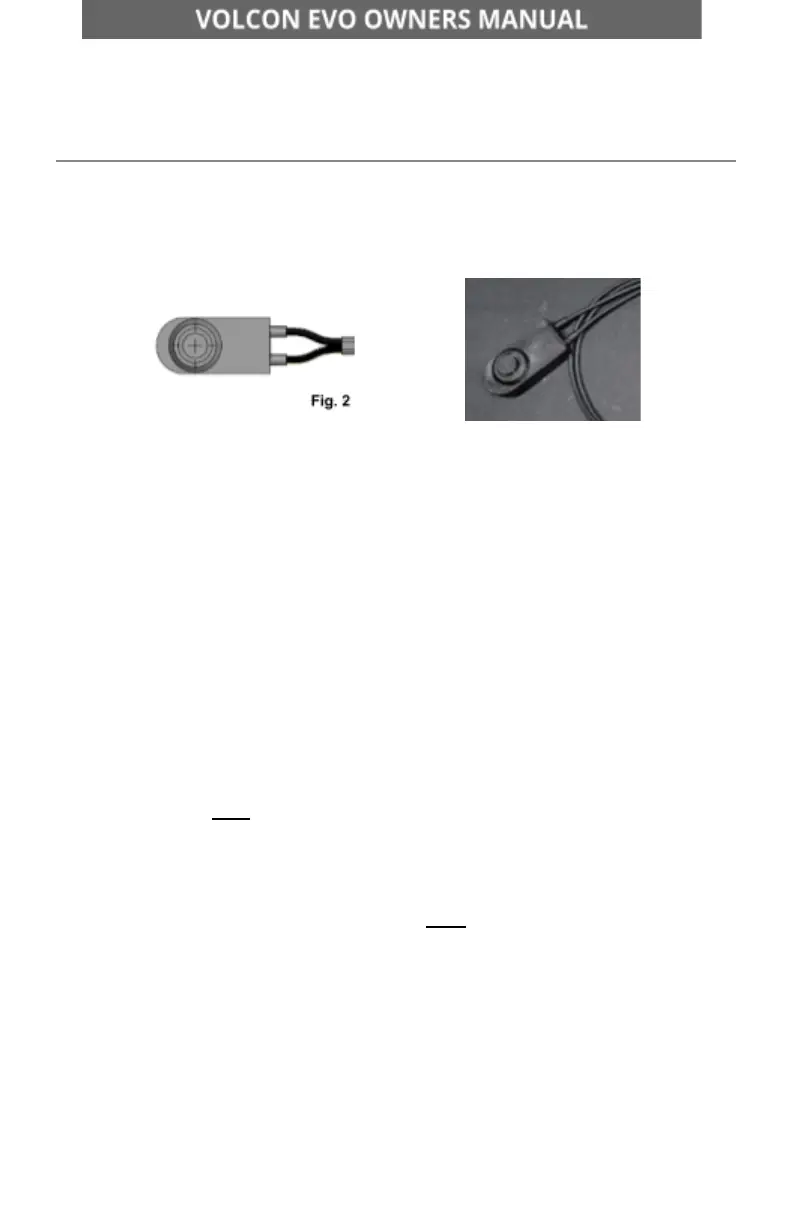
Located in the battery compartment, the E-mode button [Fig. 2] is in line with
the battery harness.
The E-mode button [Fig. 2] functions just like the “OK” button on the D-Pad.
It is designed to help cycle the modes manually if the motorcycle loses
communication with the D-Pad or Vehicle Control Unit (VCU).
Loss of communication may occur due to component damage, as a result of
an accident, faulty components, or wiring.
Should you encounter a loss of mode function for any reason, we
recommend the following:
1. Remove the top cover, and ensure the battery is connected.
2. Power the motorcycle ON.
3. Try to engage the modes via the D-Pad. If you can cycle through the
modes successfully via the D-Pad, do not engage the e-mode button.
If you are NOT able to cycle through the modes, proceed to step 4.
4. Press and hold the E-mode button until the display moves from
Neutral to Stroll. Once a mode is engaged, you may use the E-mode
button to toggle through the modes.
NOTE: The E-mode button will NOT engage reverse. The E-mode
button will automatically return to Neutral after 60 seconds of no
throttle movement.
5. To return to Neutral, press and hold the E-mode button down until
mode reverts to Neutral.
960-101086 Rev B Page 22 of 69


 To Next Page