7-16 OM ET18/20/24 us 1.3 * et18_20_24w700.fm
7
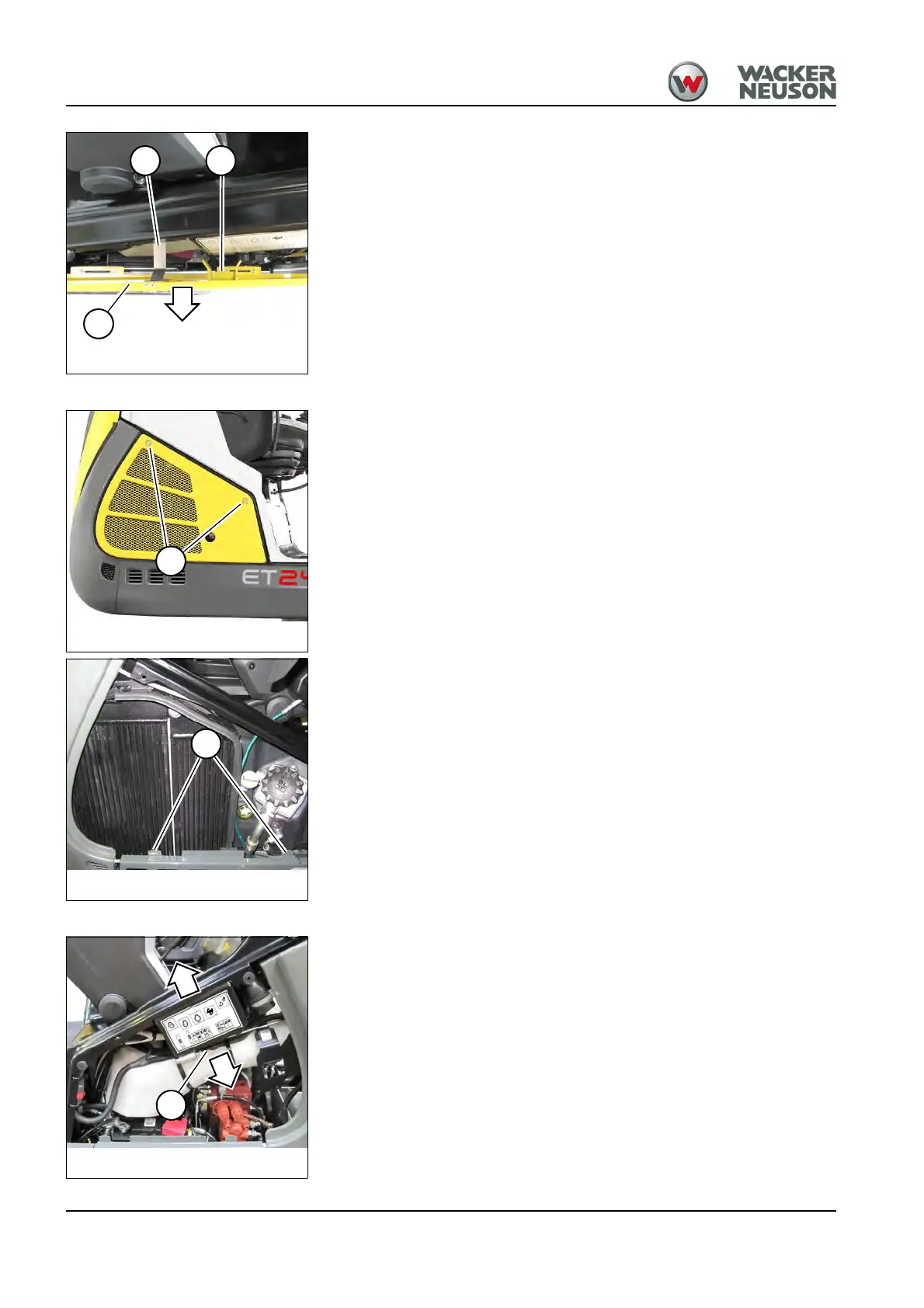
2. Press bow clip B downward and hitch it.
3. Position lock D opposite notch B.
4. Press side cover C toward the machine with both hands until it
engages with an audible click.
5. Close the engine cover.
Right-hand cover
Opening:
1. Stop and park the machine. Stop the engine. See “Preparing
lubrication”.
2. Unscrew both screws A.
3. Fold down the side cover.
4. Remove the side cover.
Closing:
1. Hitch the side cover on the lower side into both shackles B.
2. Fold up the side cover.
3. Tighten both screws A.
Fuse box
Opening:
1. Stop and park the machine. Stop the engine. See “Preparing
lubrication”.
2. Open the left-hand cover.
3. Loosen screws A and lower the cover.
Closing:
1. Install the cover and tighten screws A.
2. Close the side cover.
Fig. 228: Hitching the side cover
B
C
D
Fig. 229: Opening the right-hand cover
A
Fig. 230: Right-hand cover
B
Fig. 231: Opening the fuse box
A











 To Next Page