SPEEDGATE Installation and Maintenance Manual Revision 1 - MAY 2023
11
INSTALLATION AND COMMISSIONING CHECKLIST: SETTING GATE LIMITS
Installaon and Commissioning Checklist: Seng Gate Limits
Complete Step Descripon
5.3.1 STEP ONE OF SETTING GATE LIMITS
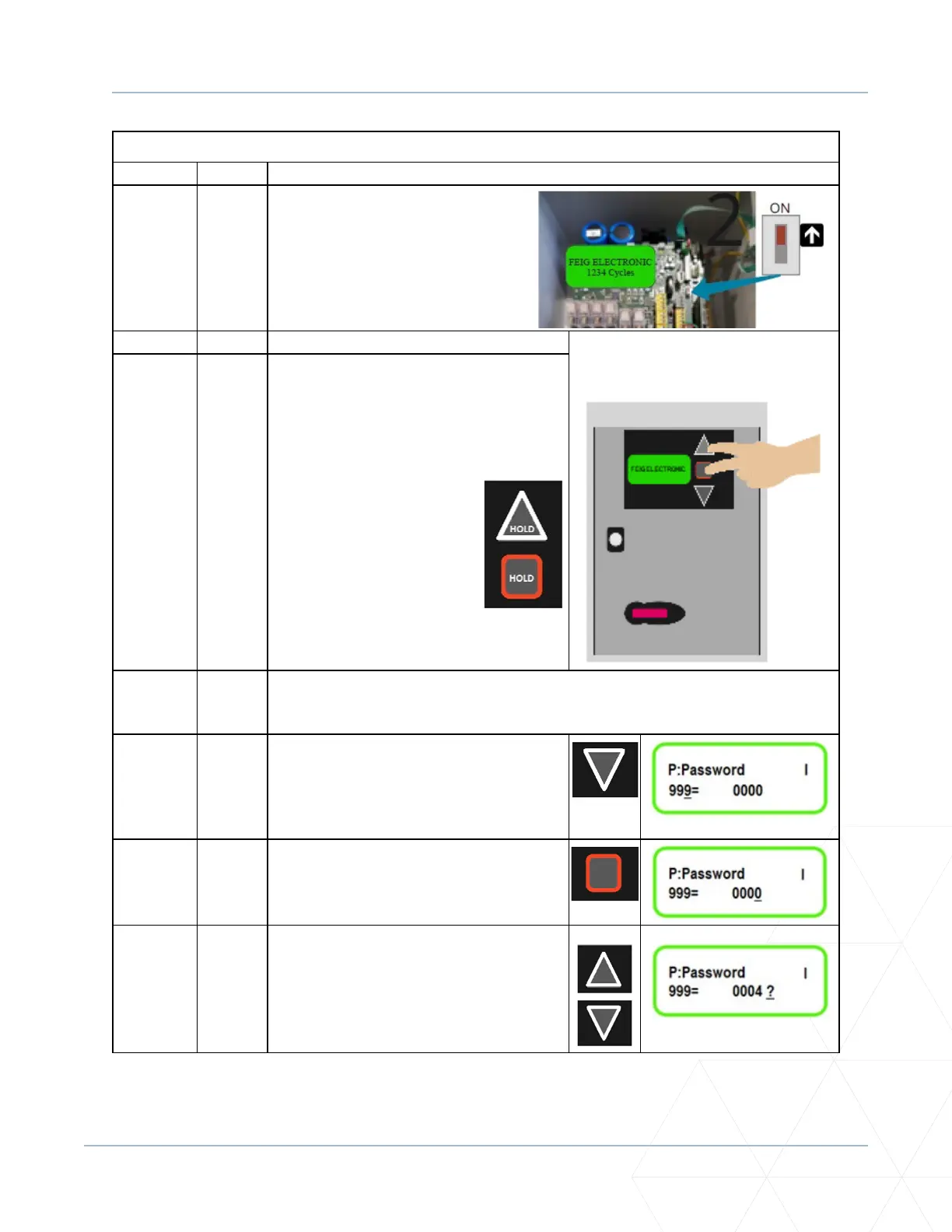
Ensure internal seng is ON.
5.3.2 STEP TWO
5.3.2-A. Using the foil keypad buons (UP arrow,
DOWN arrow, STOP buon) which are
located to the right of the LCD display:
Press and hold UP arrow and STOP buon
simultaneously.
5.3.2-B. On the LCD display there will be a descripon of the parameter on the top le, the
parameter number located on the boom le and the parameter value located
on the boom right.
5.3.2-C. Use the DOWN arrow to scroll down unl
parameter number 999 is located. This
parameter is used to input the password
to enable accessing the parameters which
need to be changed.
5.3.2-D. At parameter 999 use the STOP buon by
pressing it once to move the underscore
to the parameter value on the right.
5.3.2-E. Use the UP and DOWN arrows to scroll
to the master password. [4 is the Gate’s
Master Password. Call Wallace Perimeter
Technical Support at 1 (866) 300-1110 if a
password reset is needed.]



 To Next Page