124
wallaceperimetersecurity.comPhone: 866.300.1110
TROUBLESHOOTING
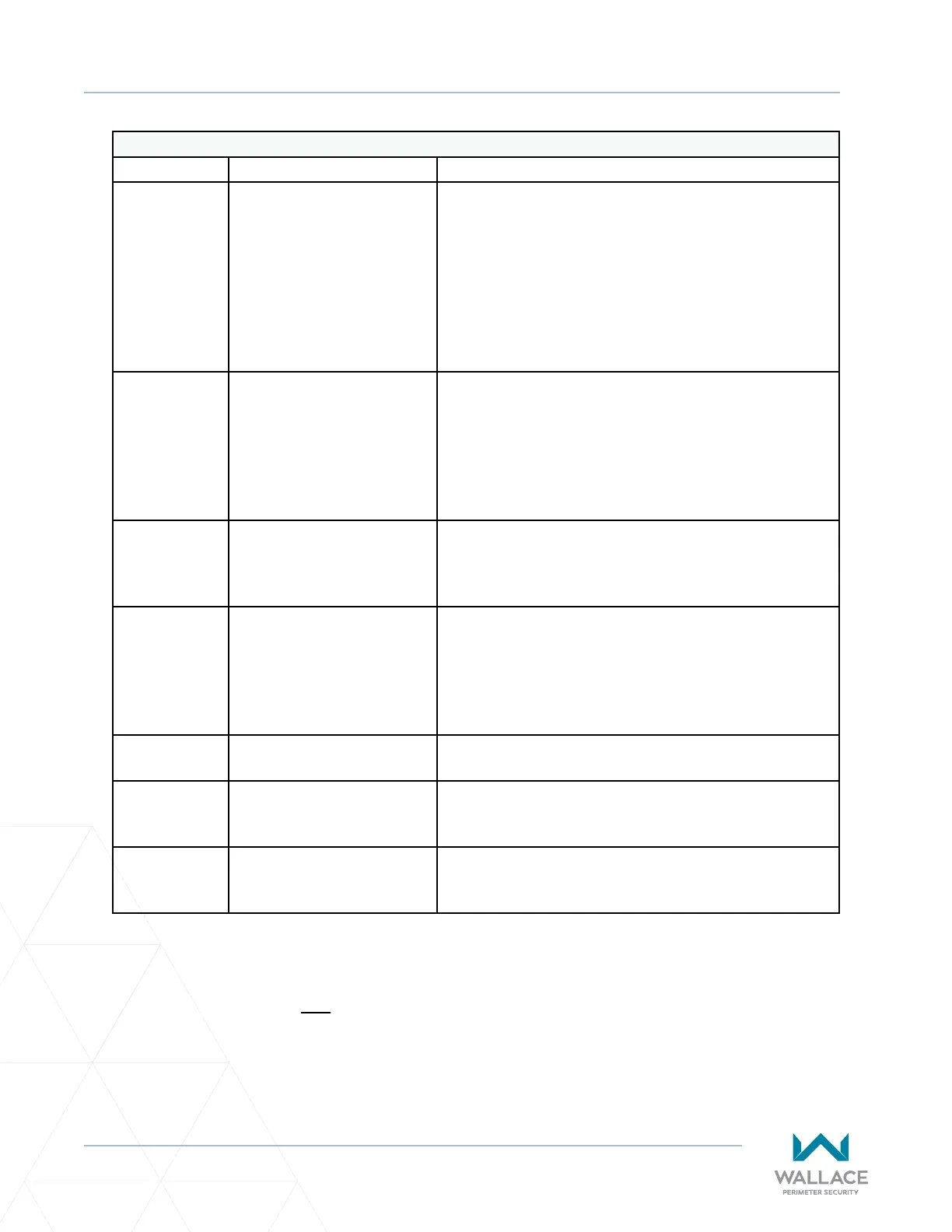
Posioning System Faults
Error Descripon Cause
F.752
Timeout with protocol
transmission.
‒ Interface cable defecve / interrupted.
‒ Absolute encoder processor electronics
defecve.
‒ Defecve hardware or electrically noisy
environment.
‒ To resolve, use a shielded control cable and/or.
adjust an RC element (100Ω +100nF) at the
brake.
F�760
Posion outside of window. ‒ Posion encoder drive defecve.
‒ Absolute encoder processing electronics
defecve.
‒ Defecve hardware or electrically noisy
environment.
‒ Encoder baery dead.
F�761
Distance Channel 1 <->
Channel 2 outside allowed
window.
‒ Posion encoder drive defecve.
‒ Defecve hardware or electrically noisy
environment.
F�762
Electronic limit switch
posions incorrect.
‒ Upper limit switch E0 or intermediate limit
switch E1 has exceeded the valid limit range.
‒ Controller not yet inialized.
‒ Posion values during calibraon not correct or
values are no longer valid.
F�763
DES-B Error Posion encoder drive defecve -> make a reset.
F�770
Gate transmission rao is
set too high.
The value of Parameter P�202 is not 13.
F�7A2
Communicaon failure
between COM boards.
Soluon is to add ferrite cores at either end of cable; twist
cable ve mes (or more, as required) around ferrite.
Error F�7A2 may occur when there is a communicaon error between primary and secondary gate
controllers commonly caused by noise; i.e., electromagnec interference (EMI) from other sources.
The recommended soluon to this problem is to apply EMI shielding. SpeedGate factory installaons that
occurred aer March 2023 may already include electromagnec interference shielding (Ferrite EMI Cable
Core - Laird Part Number LFB259128-000), available through Wallace Perimeter Security.



 To Next Page