IntroductIon
© WASP S.r.l.
2
16
Description of the printer
2
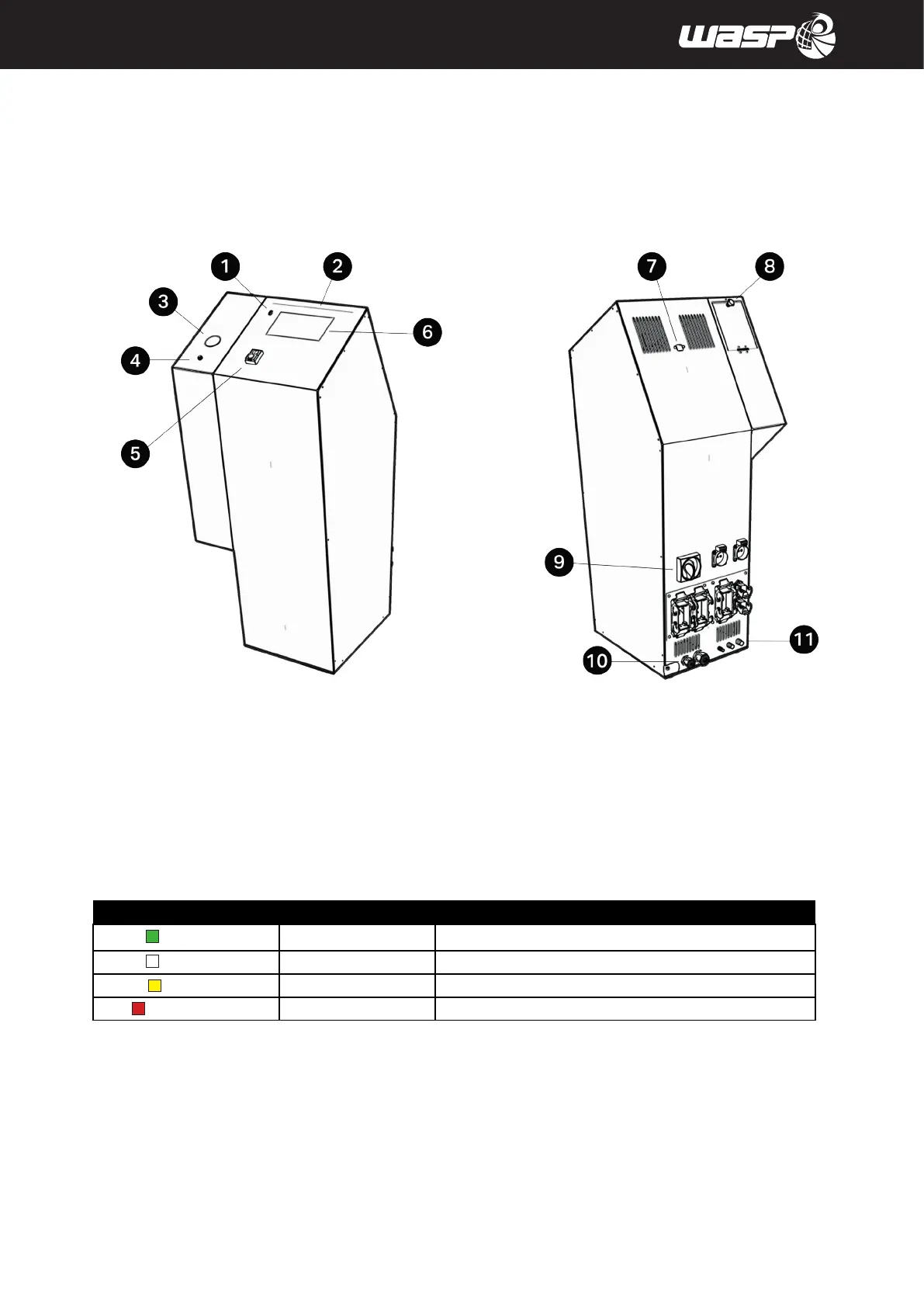
Fig. 2.1 - Control panel / Material storage
2.1. Control panel / Material storage
Legend:
1. USB port
2. LED stripe: the color of the light changes with the status of the printer, allowing a quick visualization:
LED color State Situations
Green Operational
Machine turned on and ready to operate or print concluded
White Printing
Machine busy in a printing process
Yellow Paused
Machine paused or waiting for a material refill
Red Cancelling/error
Machine cancelling an operation or sending an error message
3. Pressure input indicator
4. Loading material button
5. ON/OFF switch
6. TFT touch Operator display (see paragraph 5.2 “User Interface”)
7. Ethernet port
8. Tank opening handle
9. General power switch
10. Power cables
11. Compressed air inlet



 To Next Page