IntroductIon
© WASP S.r.l.
3
36
Preparing to use the printer
3
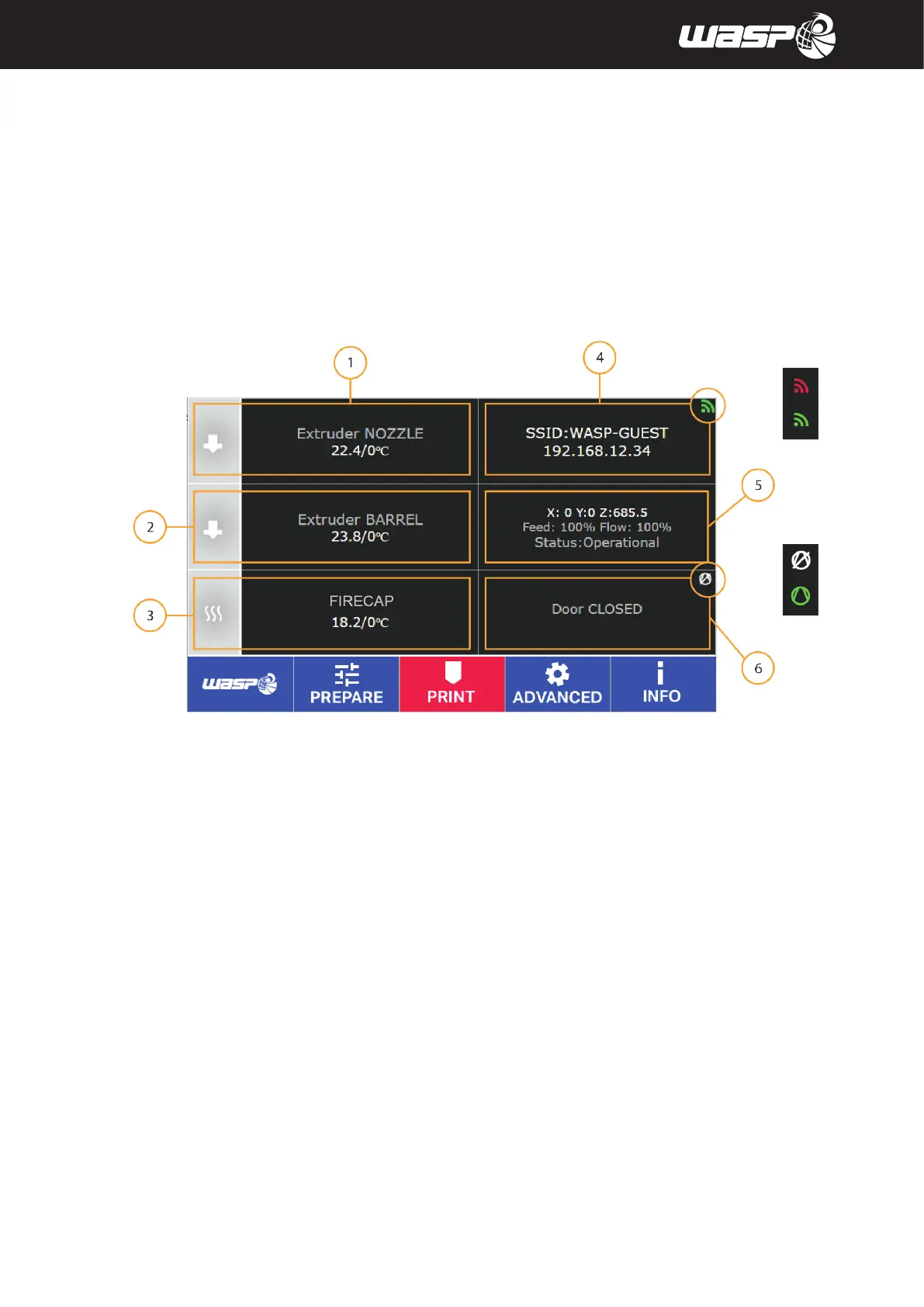
5.2.7. PRINTING board
During the print the board will be very similar to the Main board.
The toolbar changes introducing commands for printing: TUNE, PAUSE, STOP&SAVE, STOP.
Legend:
1. Nozzle temperature (click to set new target temperature)
2. Barrel temperature (click to set new target temperature)
3. Firecap temperature (click to set new target temperature)
4. Name of the gcode printed, time count and estimated print time left, percentage of layers processed.
When the machine is connected the WIFI icon is green, when disconnected the icon is red.
5. State of the machine: OPERATIONAL/PRINTING/PAUSE/CANCELLING, Autocalibration ENABLED/DISABLED
6. Heated chamber (click to set new target temperature) - Door OPEN/CLOSED
When VACS is active VACUUM icon is green, when disabled the icon is white.
PAUSE: Pause the print with the possibility to resume it afterwards.
STOP&SAVE: Stop the print with the possibility to resume it afterwards with Resurrection System.
STOP: Abort the print without the possibility to resume it. Temperatures won’t cool down after stopping.
Fig. 5.2.7 - Printing board



 To Next Page