To remove the diverter valve assembly:
1. Stop the flow from the LC, ensure that the QDa detector is in standby mode, and
disconnect the ACQUITY diverter valve power cable from the power supply.
2. De-stack the instruments and devices in the system to obtain sufficient access to the QDa
instrument case.
Notice: To avoid damaging the QDa or other instruments and devices, you must
first de-stack the system. Take the steps necessary to disable each instrument
and device in the system before de-stacking it.
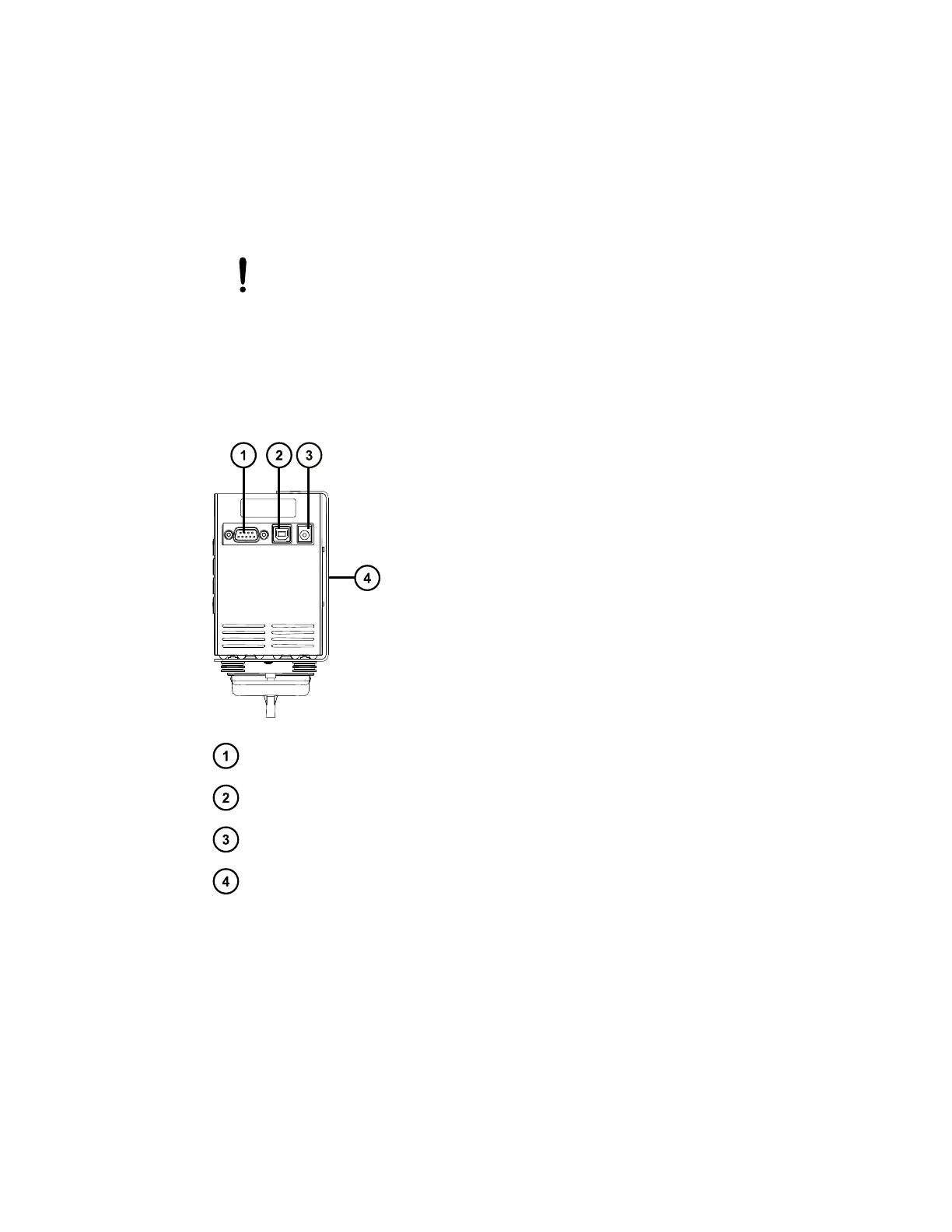
3. Disconnect the power cable and the contact closure cable from the sockets at the rear of
the valve.
Figure E–15: Diverter valve rear-view cable connections
9-pin D-type contact closure cable socket
USB socket (not used)
Power cable socket
Diverter valve mount
4. Detach the fluidics connections from the front of the diverter valve, including the following
(depending on your valve configuration):
• Tygon waste tube attached to the drip-tray spur.
• PEEK tubing connector from the LC, in position 2 on the valve (see Diverter valve
tubing considerations).
• Red probe assembly connector to the QDa, in position 3 on the valve.
June 15, 2017, 715003956 Rev. F
Page 135











 To Next Page