www.Wayne-Dalton.com
349981 REV2_05/17/2016
©
Copyright 2016 Wayne Dalton, a division of Overhead Door Corporation
38
MENUS (continued)
3. Prole Selection Menu
The prole selection is done at the factory by default. Proles can be selected based on the door the
controller is operating. The prole is protected by a passcode, and can only be changed by Overhead service representative. All
settings are lost and reverted back to defaults when the prole is changed. Proles can be accessed through the main menu under Prole
Selection.
4. Limit Setup Menu
Individual limits can be updated manually, however; the best option is to use the quick setup process as discussed earlier. The door will not be
operational when settings limits. Limit settings are as described:
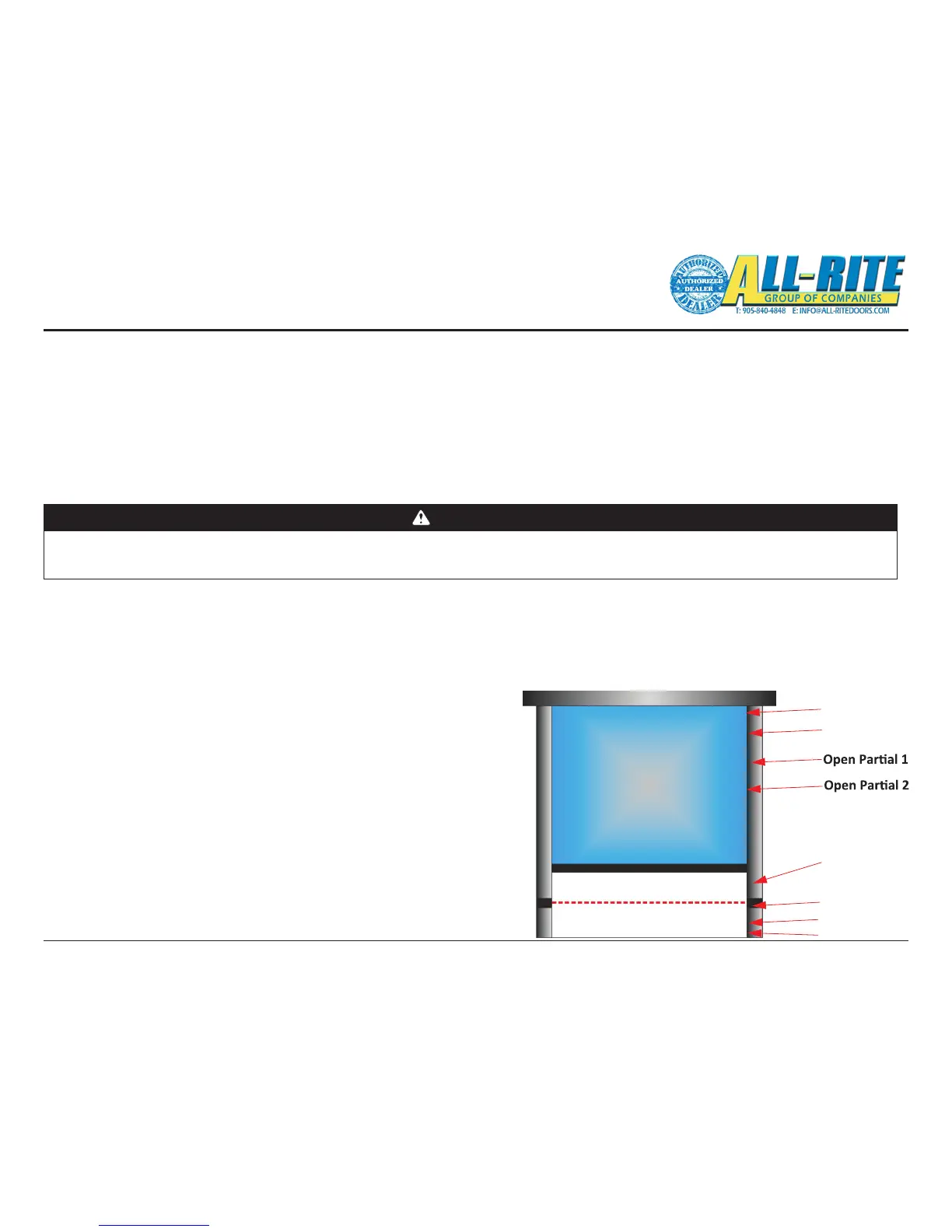
To congure the Limit Settings manually after using Quick Setup, select each
individual position listed below from the Limit Setup menu, then move the door to the
desired position. Store the position by pressing STOP or ENTER
when nished. The display shows Stored and returns to the previous menu.
• Closed: Door fully closed.
• Pre Closed: Position where door changes to pre-closing speed during close.
• Pre Open: Position where door changes to pre-open speed during open.
• Open: Door fully closed.
• Open Part 1: Partially open position 1. Door opens to this position when a part 1
open input is active. (default: 75% of door open limit)
• Open Part 2: Partially open position 2. Door opens to this position when a part 2
Fully Open
Pre-Open
Fully Closed
Rev Edge OFF
Photocell OFF
Pre-Closed
open input is active. (default: 50% of door open limit)
• Rev. Edge OFF: Sets door position where safety edge check is turned o: the limit
where the reversing safety edge should be ignored.
• Photocell O: Sets door position where photocell should be ignored.
Fig 6–B
WARNING
All Entrapment Protection Devices are OFF when setting limits. Devices OFF while setting Limits include: Edge Contact, Photoeye, Wall push buttons,
Radio Control, Limit Sensors, Loop Detector, or any motion sensor used as either an actuator or an Entrapment Protection Device. Only the Interlock
remains active.USE CAUTION! Do NOT use for general door operation when setting limits.




 To Next Page