EasyManua.ls Logo

Webdyn WebdynSunPM - Date & Time

Webdyn WebdynSunPM
168 pages
Print Icon
To Next Page IconTo Next Page
To Previous Page IconTo Previous Page
Loading...
104
USER MANUAL WebdynSunPM
Version 2.05
préliminaire
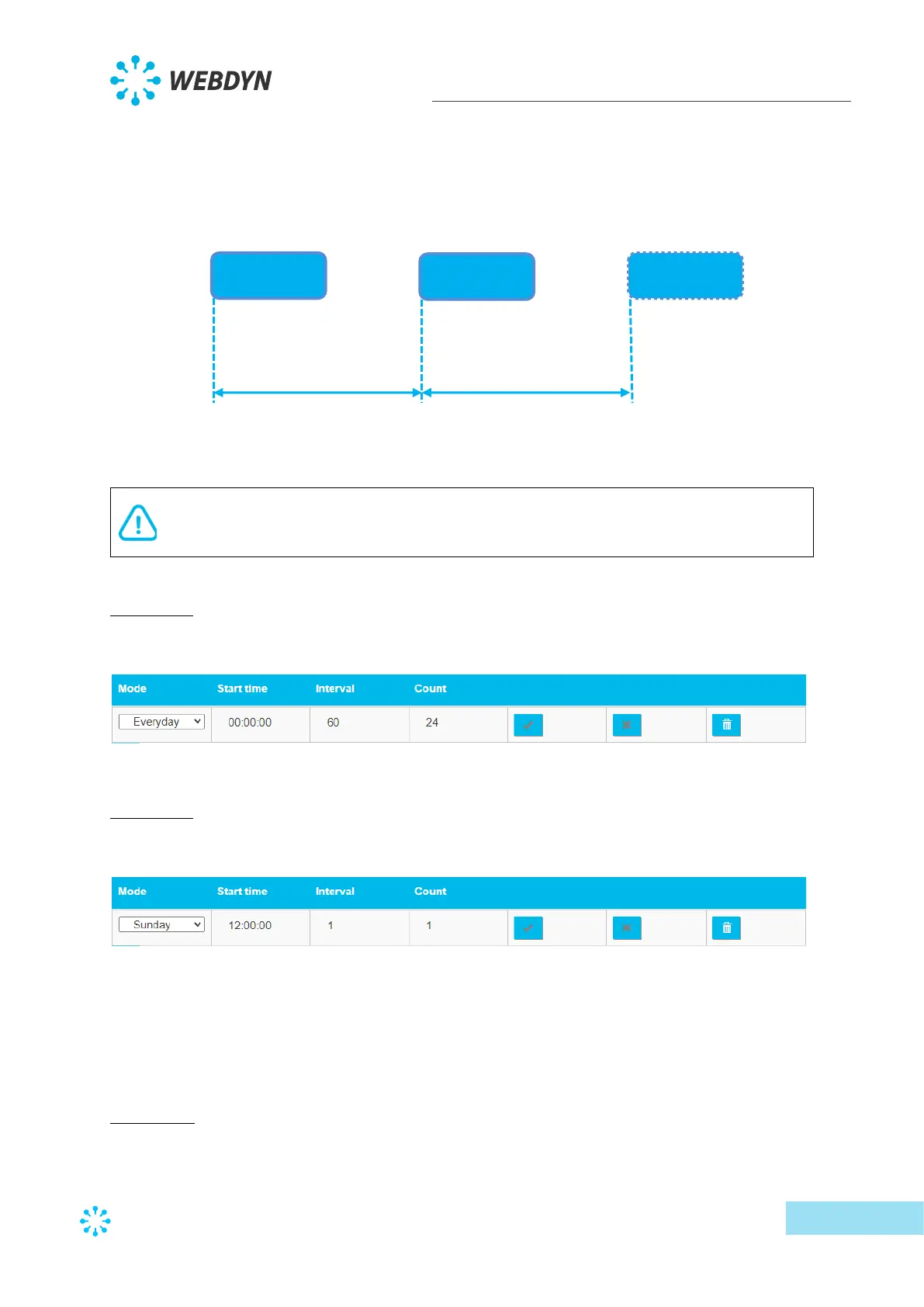
Every day, the first occurrence is given by the time entered in the “Start time” field. The
number of events in the day is given by the “Count” field and the interval between each event
by the “Interval” field
"Count”
If the schedule is to be triggered all day at regular intervals, you can enter a value of
more than “1440” in “Count”.
Example 1:
For a regular file upload every hour, the schedule should be configured as follows:
Example 2:
For a regular file upload every Sunday at midday, the schedule should be configured as follows:
3.2.2.6 Date & Time
The “Date & Time” part is used to configure the concentrator’s date and time and the NTP
servers.
Time zone:
Schedule
Schedule
Schedule
Start time
“Start time”
Count 1
Count 2
Number of occurrences
Count” X
Interval between
each schedule
“Interval (s)”
“Interval (s)”

Table of Contents

Other manuals for Webdyn WebdynSunPM