40 | CFW500
Troubleshooting and Maintenance
English
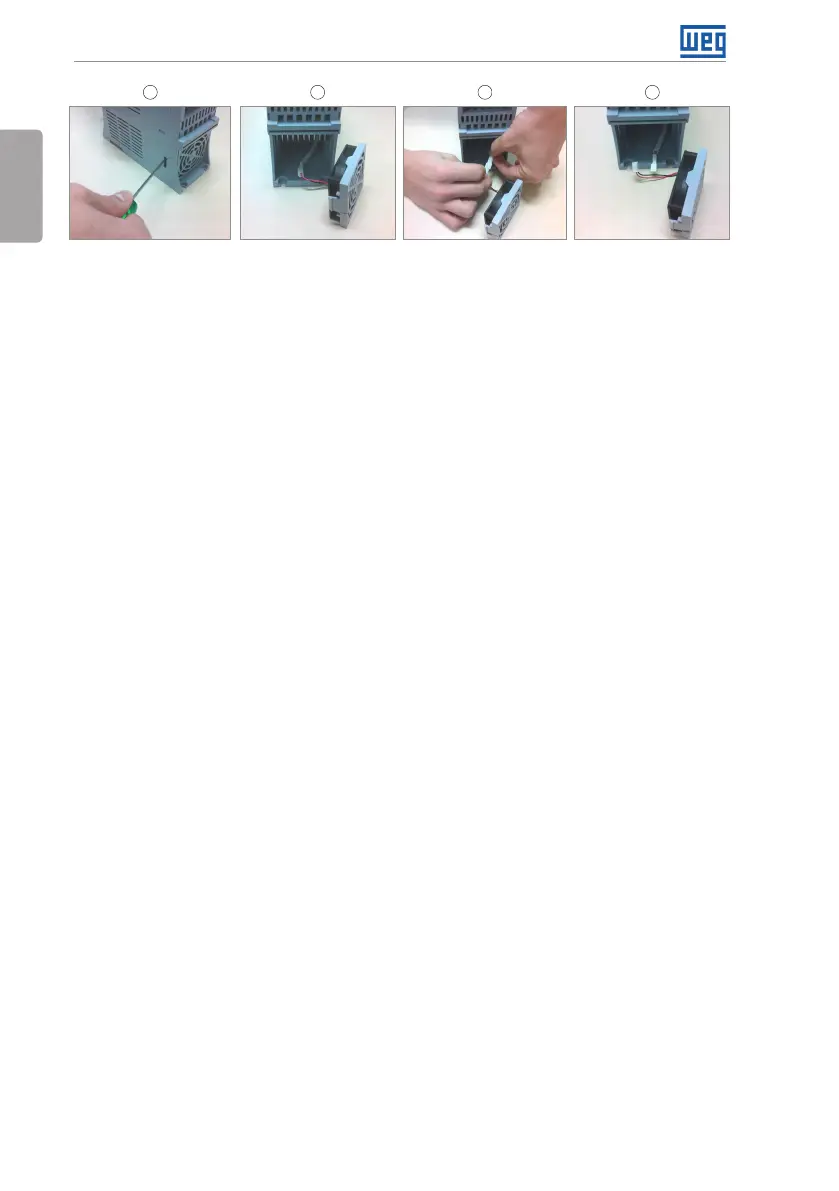
1 2 3 4
Release of the locks of
the fan cover
Cable disconnectionRemoval of the fan Cable disconnected
Figure 6.1: Removal of the heatsink fan
Cards:
Disconnect the power supply of the inverter and wait for 10 minutes.
Disconnect all the cables of the inverter, identifying all of them in order to reconnect them
correctly.
Remove the plastic cover and the plug-in module (refer to Chapter 3 INSTALLATION AND
CONNECTION on page 13 and APPENDIX B - TECHNICAL SPECIFICATIONS on page
157).
Remove the dust accumulated on the cards using and anti-static brush using and/or ion
compressed air gun.
Always use grounding strap.





 To Next Page