CFW500 | 29
HMI (Keypad) and Basic Programming
English
4.3 OPERATING MODES OF THE HMI
The monitoring mode allows the user to view up to three variables on the main display, secondary
display and bar graph. Such fields of the display are defined in Figure 4.2 on page 28.
The setting mode is composed of three levels: Level 1 allows the user to select the Menu
items to direct the browsing of the parameters. Level 2 allows browsing the parameters of the
group selected by level 1. Level 3, in turn, allows the modification of the parameter selected in
Level 2. At the end of this level, the modified value is saved or not if the key ENTER or ESC is
pressed, respectively.
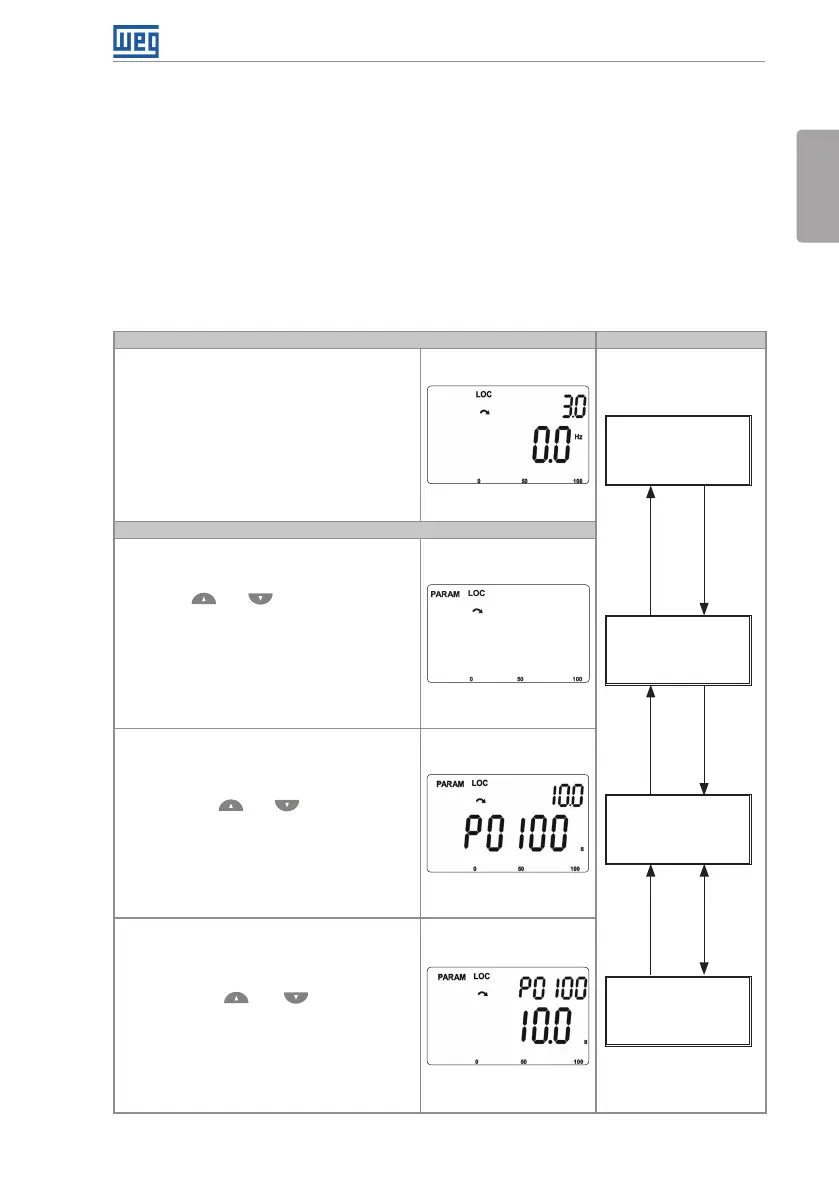
Figure 4.3 on page 29 illustrates the basic browsing of the operating modes of the HMI.
Monitoring Mode
It is the initial status of the HMI after the
powering up and of the initialization screen,
with default values
The field Menu is not active in this mode
The main display, secondary display and bar
graph indicate the values of three parameters
predefined by P0205, P0206 and P0207
From the monitoring mode, when you press
the key ENTER/MENU, you commute to the
setting mode
Monitoring
Setting
Level 1
Setting
Level 2
Setting
Level 3
BACK
ESC
BACK
ESC
BACK
ESC
ENTER
MENU
ENTER
MENU
ENTER
MENU
Setting Mode
Level 1:
This is the first level of the setting mode. It is
possible to choose the parameter group using
the keys and
The main display, secondary display, bar
graph and measurement units are not shown
in this level
Press the key ENTER/MENU to go to level
2 of the setting mode - parameter selection
Press the key BACK/ESC to return to the
monitoring mode
Level 2:
The number of the parameter is shown on the
main display and its content on the secondary
display
Use the keys and to find the desired
parameter
Press the key ENTER/MENU to go to level
3 of the setting mode - modification of the
parameter content
Press the key BACK/ESC to return to level 1
of the setting mode
Level 3:
The content of the parameter is shown on the
main display and the number of the parameter
is shown on the secondary display
Use the keys and to configure the
new value for the selected parameter
Press the key ENTER/MENU to confirm the
modification (save the new value) or BACK/
ESC to cancel the modification (not save the
new value). In both cases, the HMI returns to
level 2 of the setting mode
Figure 4.3: Operating modes of the HMI





 To Next Page