EasyManua.ls Logo

Wieland SP-SDIO - Enable Switch

Default Icon
110 pages
Print Icon
To Next Page IconTo Next Page
To Previous Page IconTo Previous Page
Loading...
Connecting devices
Wieland Electric GmbH | BA000966 | 07/2016 (Rev. C)
41
Enable switch
888442507
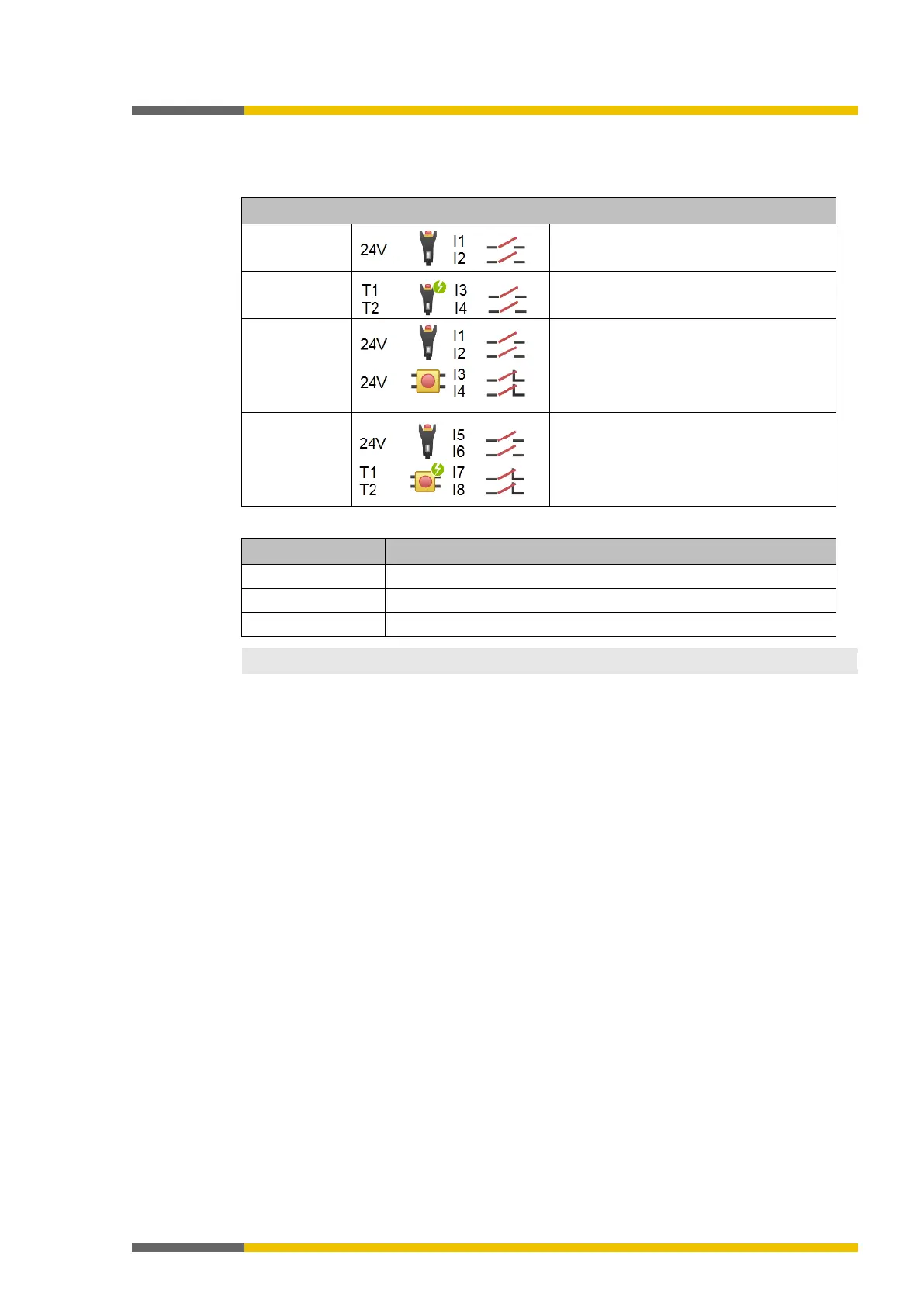
Table 20: Enable switch connection
Electrical connection: Example from samosPLAN5+
2 positions,
without testing
NC 1: between Ub and I1
NC 2: between Ub and I2
2 positions,
with testing
NC 1: between T1 and I3
NC 2: between T2 and I4
3 positions,
without testing
NC 1: between Ub and I1
NC 2: between Ub and I2
NO 1: between Ub and I3
NO 2: between Ub and I4
3 positions,
with testing
NC 1: between Ub and I5
NC 2: between Ub and I6
NO 1: between T1 and I7
NO 2: between T2 and I8
Table 21: Functions
Function
Info
Testing Possible
Series connection
Not possible
Synchronous time
4 ms30 s
NOTICE
You can find additional information in the operating instructions for the respective devices.
4.1.4

Table of Contents

Related product manuals