Appendix
Wieland Electric GmbH | BA000966 | 07/2016 (Rev. C)
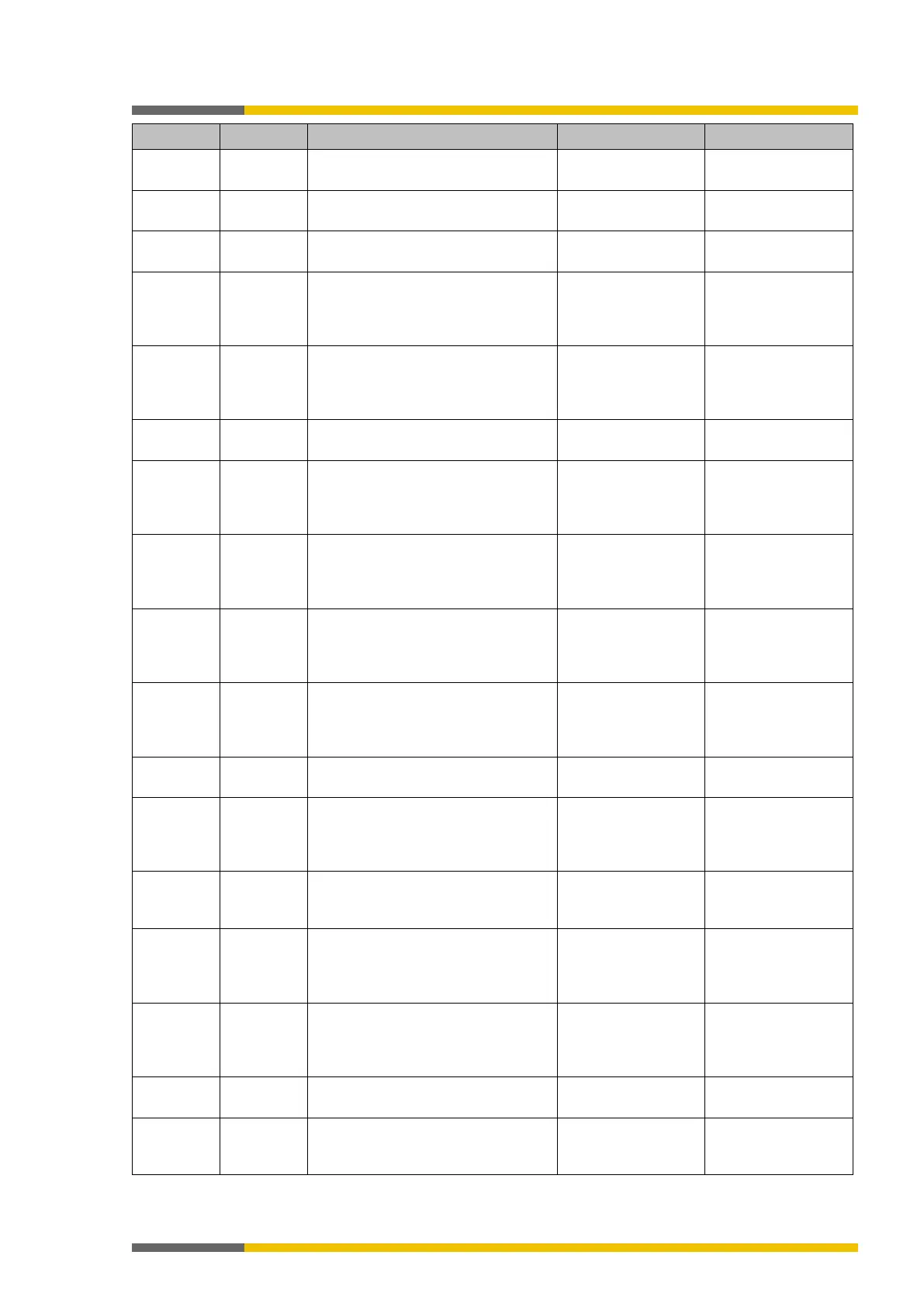
10600001 Error This user already exists. Please
choose another user name.
Use other name
10600002 Error Could not import user list. Retry
10600003 Warning The following users have not been
imported because they already exist.
10700001 Error
Project File could not be opened. File
format is incorrect.
Update
samosPLAN5+ and
retry
10700002 Error Creating project from module confi-
guration failed!
Update
samosPLAN5+ and
retry
10700003 Error Project file could not be saved! Check Windows file
10700004 Error
Project File could not be opened. File
format is incorrect.
Update
samosPLAN5+ and
retry
10700005 Error Library file could not be opened. File
format is not correct.
Update
samosPLAN5+ and
retry
10700006 Error Project structure is incorrect. Update
samosPLAN5+ and
retry
10700008 Error Could not load settings file. File is
corrupt.
Update
samosPLAN5+ and
retry
10700009 Error
Failed to import library. Elements are
already exist.
1070000A Error File cannot be opened. Signature is
not correct.
Update
samosPLAN5+ and
retry
1070000B Error Cannot load gateway configuration
because the configuration is for
1070000C Error Version of the project file is not sup-
ported by this version of the pro-
gram. Please try it with the current
Update
samosPLAN5+ and
retry
1070000D Error The configuration data for a module
can't be loaded correctly.
Update
samosPLAN5+ and
retry
10800001 Warning Forcing more than 10 values is not
11000000 Error The HTML help could not be found.
Please check if it is installed cor-
Repair or reinstall
samosPLAN5+



 To Next Page