GLP/TOOLS OxiTop
®
Control OC 100
54 ba31114e06 06/2012
7.6.1 Erasing finished samples
Here you can erase the data of finished samples that are already evaluated or
no longer required in order to free memory in the controller.
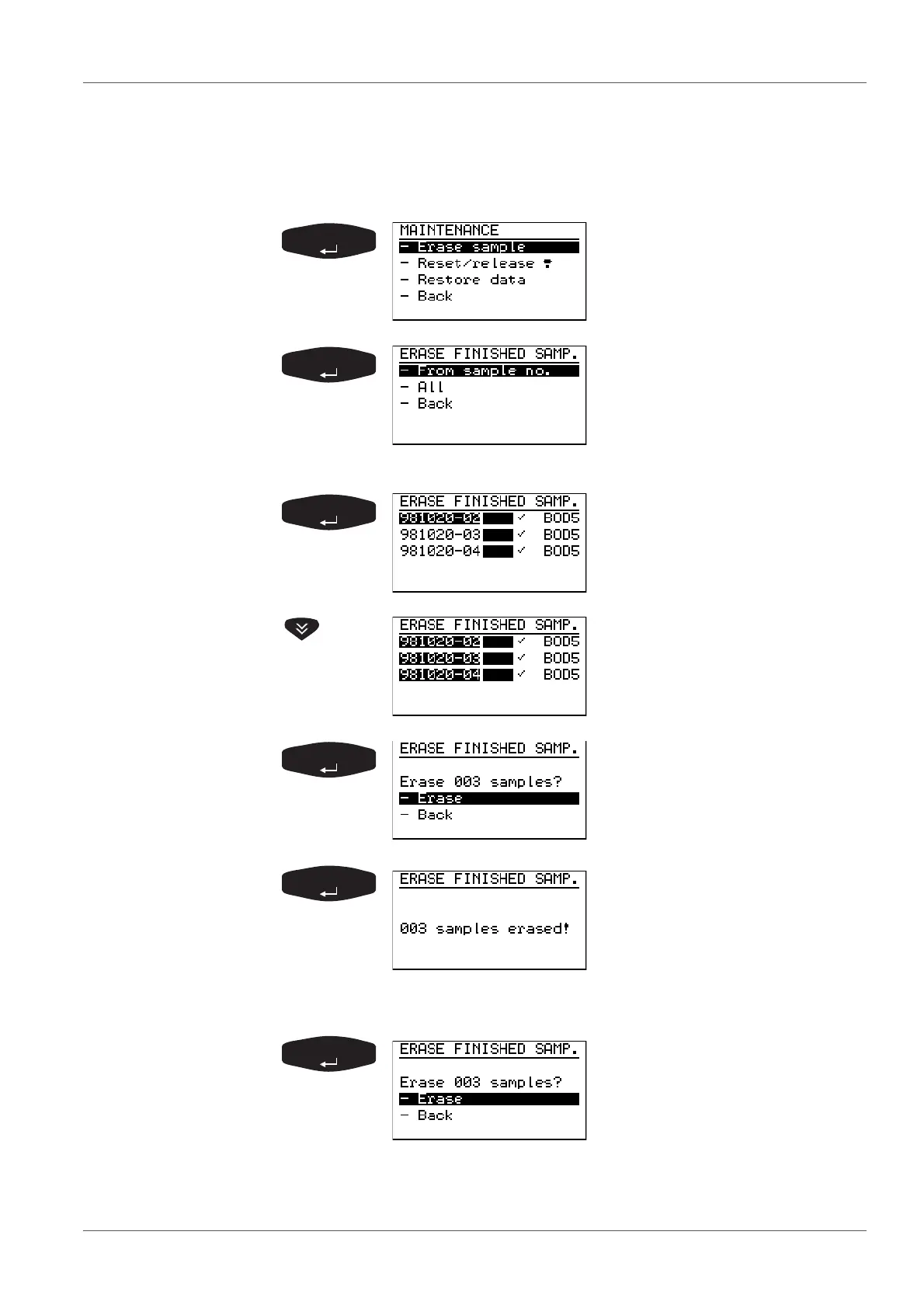
MAINTENANCE menu:
- Erase sample preselected
ERASE FINISHED SAMP.
menu:
Preselected: - From sample no.
-all
-Back (to the MAINTENANCE
submenu)
The controller displays the list of
the finished samples.
The oldest finished sample is
marked.
With <>, you can mark further
samples.
With <>, you can remove the
marking again.
The controller asks if you
really want to erase the marked
samples from the memory.
After confirmation, the display
message shown here appears
for 2 seconds and then the con-
troller returns to the menu
ERASE FINISHED SAMP..
In the selection of erase “All“ samples, the following display
appears:
The controller asks if you
really want to erase the samples
from the memory.
Continue: see above.
If no finished samples are available in the memory, the follow-
ing display appears:



 To Next Page