OxiTop
®
Control OC 100 Operating mode: BOD Standard / BOD Routine
ba31114e06 06/2012 29
5.4.5 Calling up data - Stop
The controller continues to search for missing measuring
heads in the scanner mode. Without having to press another
key, you can continue the data queries at other locations
(e.g. other stirring platforms or other thermal cabinets).
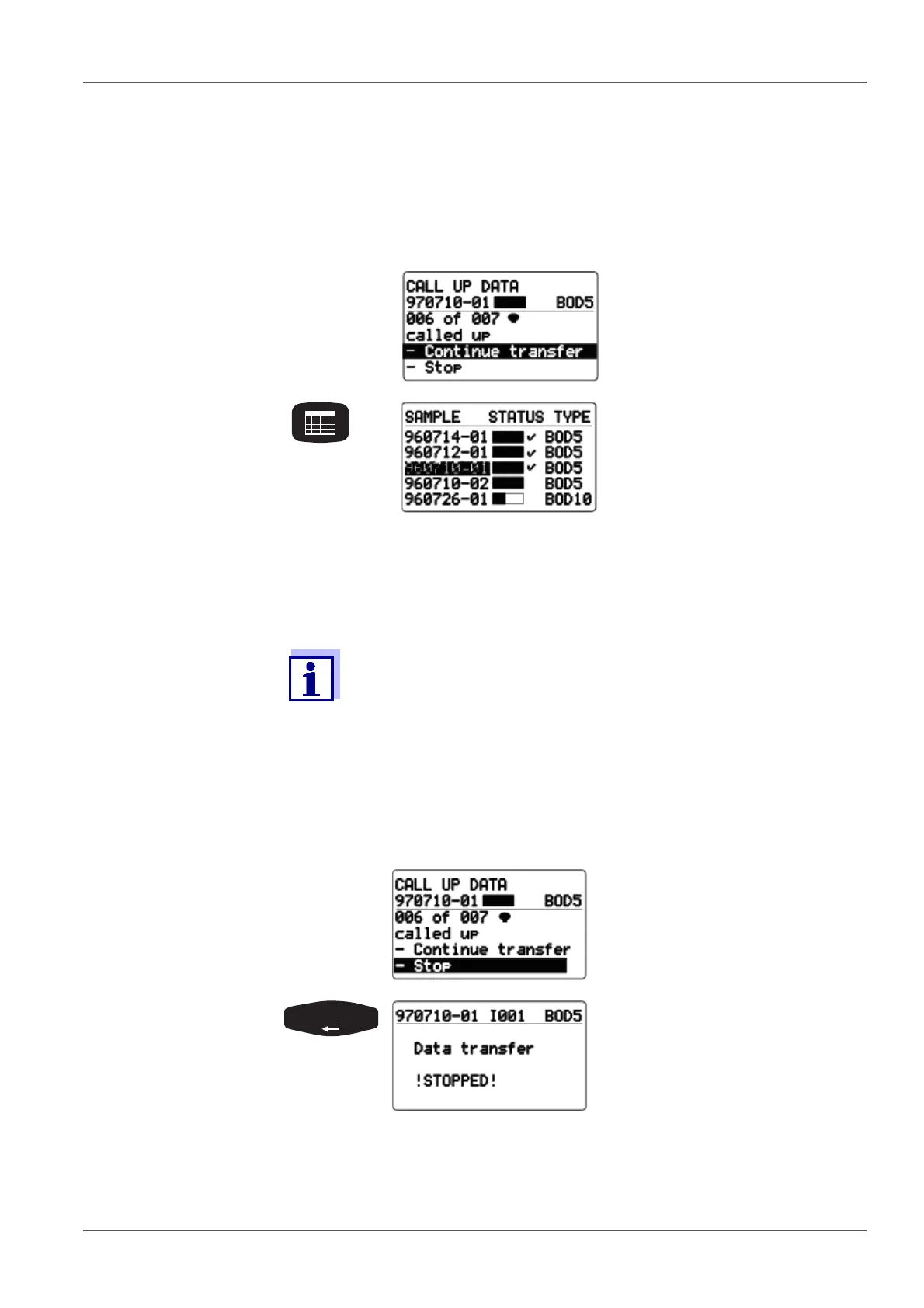
Approximately 7 seconds after the last call up was per-
formed, the scanner mode breaks off and the following dis-
play appears:
Use <RUN/ENTER> to restart
the data transfer (see above).
Return to the
SAMPLE STATUS TYPE list
(sample management).
Transferred and completed
samples appear with a check-
mark next to them.
(The complete measurement
data records of all finished
measuring heads of the sam-
ple have been procured.)
Immediately after the successful data transfer of a sample, the allo-
cated measuring heads are given the free status. The measuring
heads can be used for a new measurement.
The user administration function is not active in the delivery condi-
tion.
If a measuring head is missing
or defective and the controller
cannot completely call up the
sample as a result, the menu
item -Stop is provided to stop
the data transfer.
After confirmation, the display
message shown here appears.
Three displays are then possible:



 To Next Page