OxiTop
®
Control OC 100 Operating mode: BOD Standard / BOD Routine
ba31114e06 06/2012 27
5.4.3 Showing the measuring head list
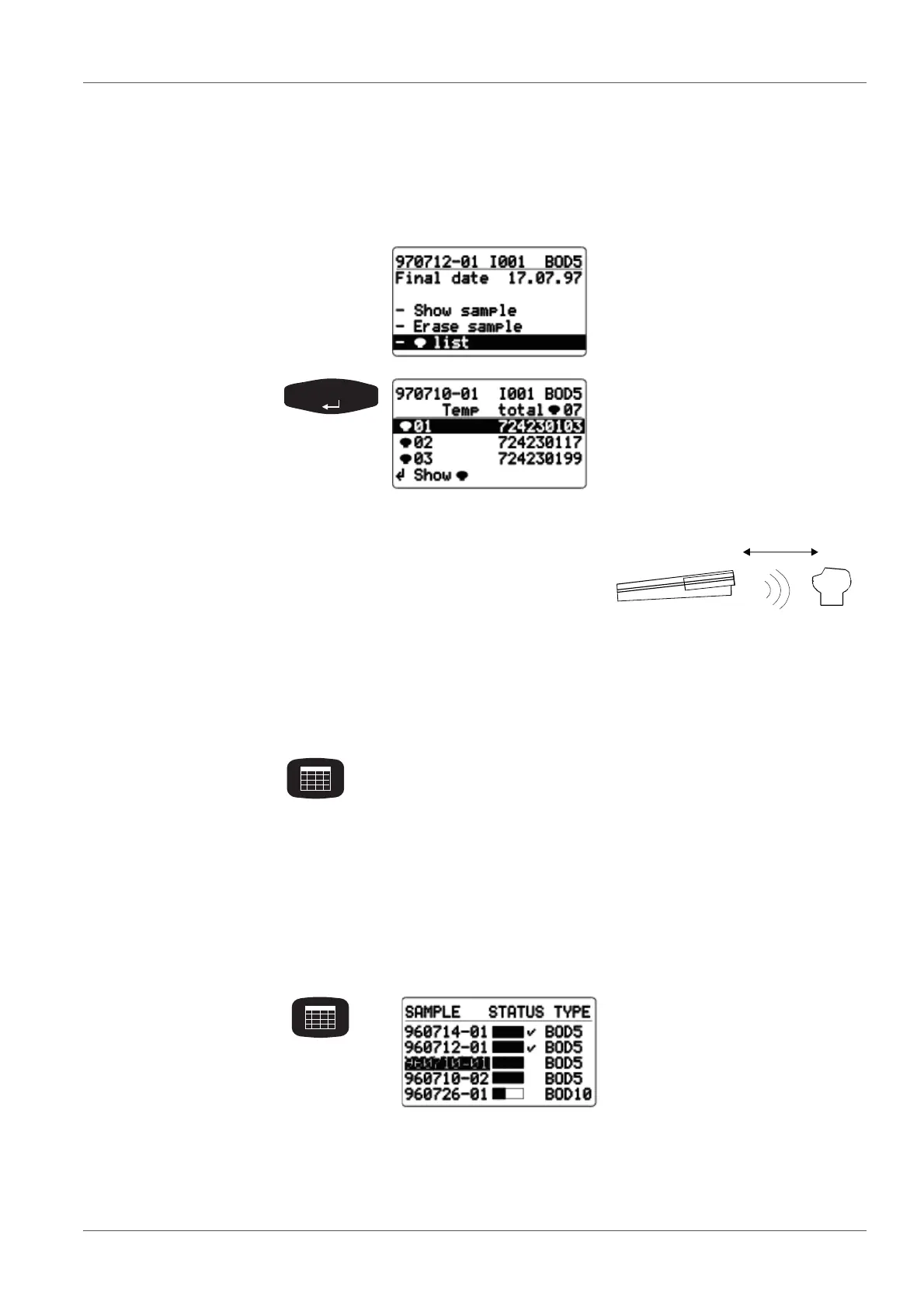
This function is used to allocate individual measuring heads to the relevant
sample in the SAMPLE STATUS TYPE list (sample management) and to find
individual measuring heads.
5.4.4 Calling up data
This function is used to call up the data of individual samples.
To call up the data of all samples, see section 5.3 C
ALLING UP ALL DATA, page
22.
Select the - list menu item
with <><>.
The list of measuring heads of
the selected sample is displayed
together with the serial numbers
of the measuring heads.
(In the BOD Routine operating
mode, this list always contains
only one measuring head.)
Point the controller at the measuring
heads:
Use <><> to select a measuring head and confirm with
<RUN/ENTER>.
The controller repeatedly transmits the call up of the selected
measuring head. The measuring head flashes for approx. 5
seconds.
Use <ORG> to return to the SAMPLE STATUS TYPE list
(sample management).
SAMPLE STATUS TYPE list
(sample management)
Use <><> to select a sam-
ple whose
run duration is not yet com-
pleted (bar not yet full)
data after complete mea-
surement that have not yet
been called up (bar full, no
checkmark)



 To Next Page