Xtreme Power Conversion Corporaon
TX90 6kVA & 10kVA Service Manual
Page 14
Uninterrupble Power Supply
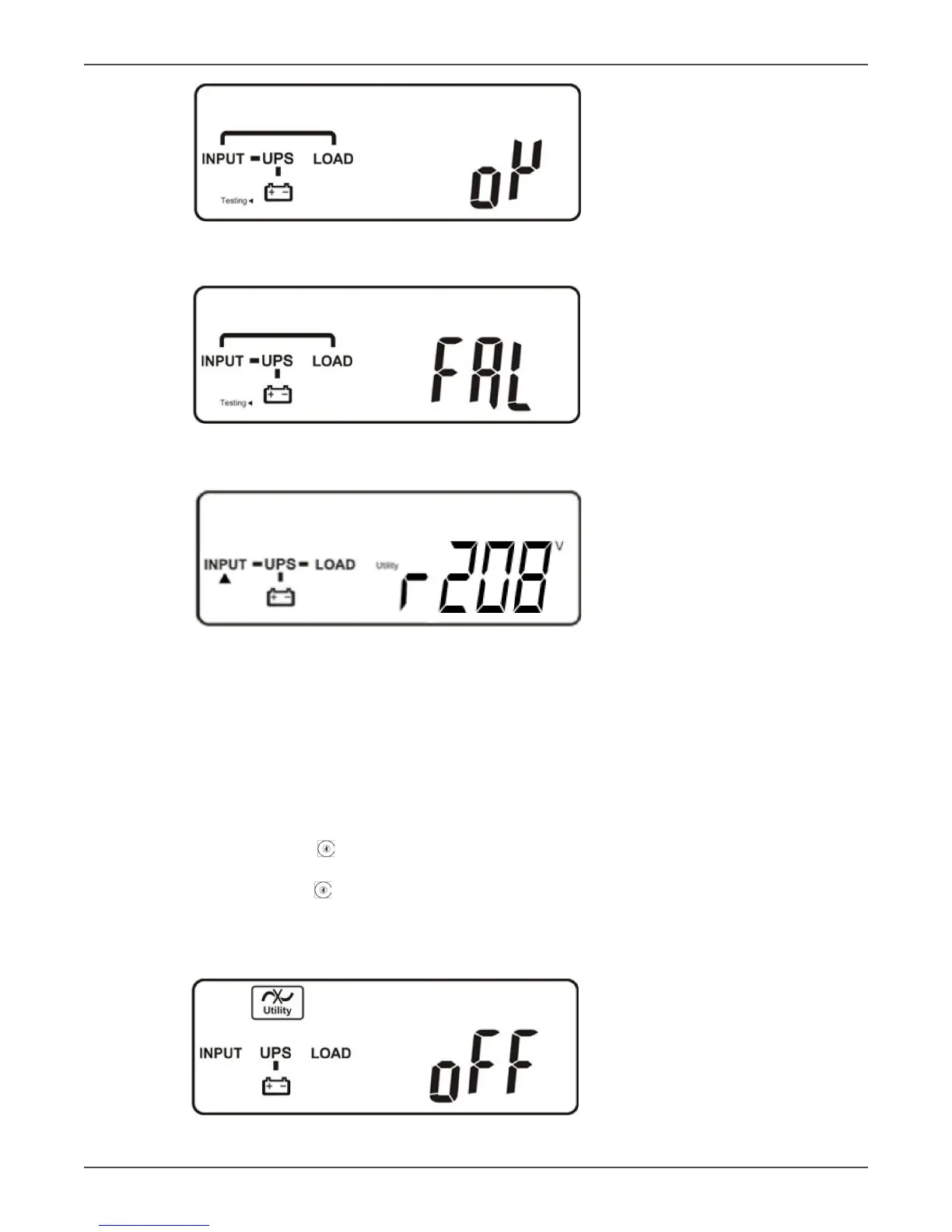
E1
“OK” in self-test
E2
“Fail” in self-test
F
“208 VAC” in Ulity Input
• If the self-test fails the LCD display will change from gure D to gure E2. Then an error code or error status
will appear on the screen.
• Your start-up operaon of the UPS is complete now. Make sure the UPS is connected to ulity and charging
at least 8 hours and the baeries are fully charged before connecng the device to be protected.
Start-up in Baery Mode (Cold Start)
• Make sure the UPS has at least one string (20 pcs) of baeries.
• Push the UPS On switch once for approximately 5 seconds to wake the UPS. The buzzer will sound
twice. The LCD display will change from gure A to gure G for approximately 15 seconds.
• Press the UPS On switch again for about three seconds unl the LCD display changes from gure G to
gure H. Then the UPS will be in self-test mode. The UPS may oer energy to the output in a minute, and
the LCD displays gure I. In case of failure in pushing the UPS On switch for 15 seconds, the UPS will auto-
macally turn o. You must then repeat steps.
G
“O”, which means the UPS pre-start was successful



 To Next Page