Xtreme Power Conversion Corporaon
TX90 6kVA & 10kVA Service Manual
Page 8
Uninterrupble Power Supply
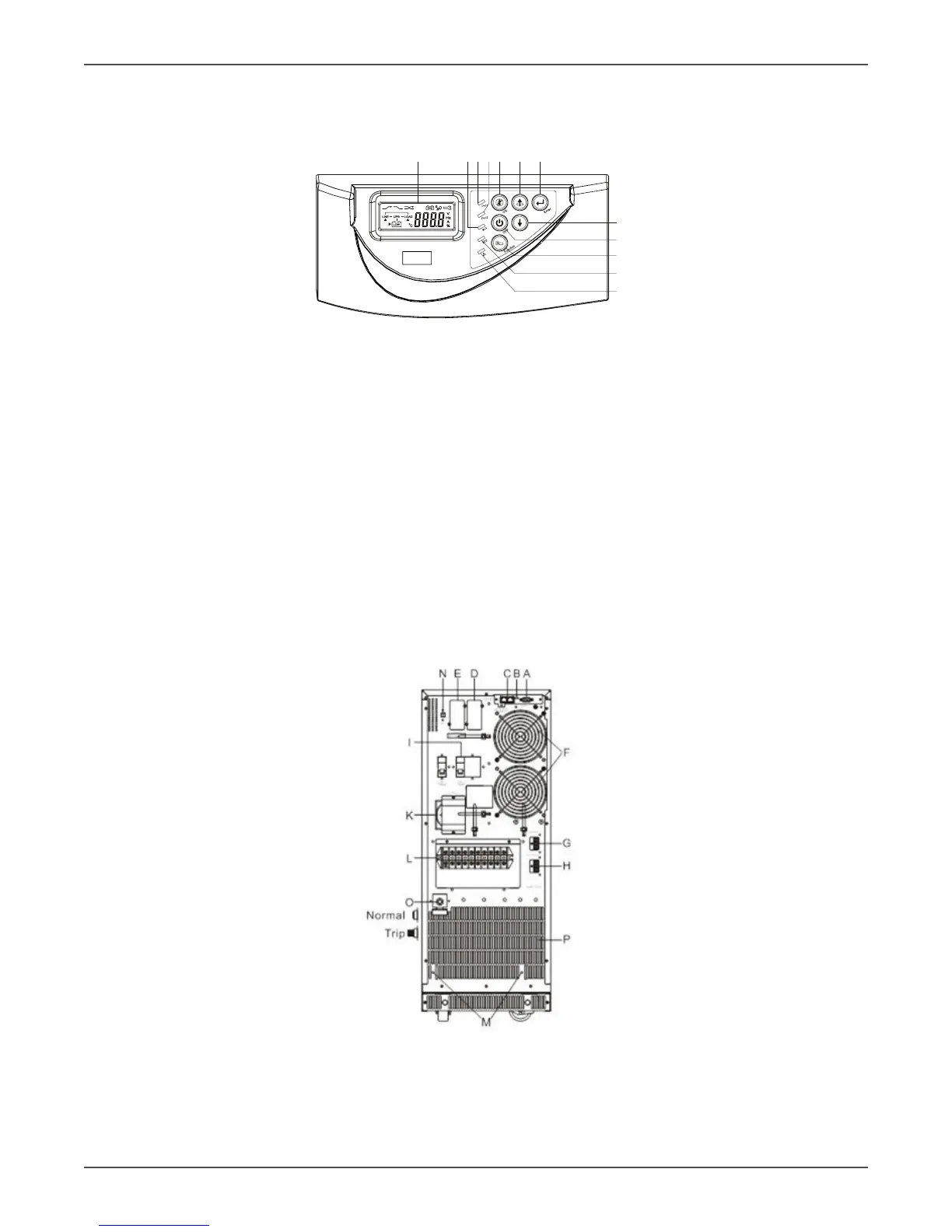
Panel Explanaon
Front Panel Funcon Explanaons
1 3 4 2 11 12
5 9 7 10 6 8
1. LCD
2. Green LED indicates that the UPS is able to run under redundancy mode.
3. Solid green LED indicates that the ulity input voltage is within the acceptable window. Flashing green LED
indicates that the ulity input voltage is outside the acceptable window.
4. Green LED indicates that Bypass Input is normal.
5. UPS ON/Alarm Silence
6. Go to previous page or change the seng of the UPS.
7. Conrm a changed seng.
8. Go to the next page.
9. UPS OFF Switch
10. Special funcons log in/out
11. UPS is working under ECO (Economy) mode.
12. UPS Fault or Abnormal
Rear Panel Explanaon
A. RS-232 Port
B. Terminal Resistor for Parallel funcon
C. CAN Bus Connecon Port for Parallel System
D. Oponal Communicaon Slot 1
E. Oponal Communicaon Slot 2



 To Next Page