Xtreme Power Conversion Corporaon
TX90 6kVA & 10kVA Service Manual
Page 5
Uninterrupble Power Supply
Product Informaon
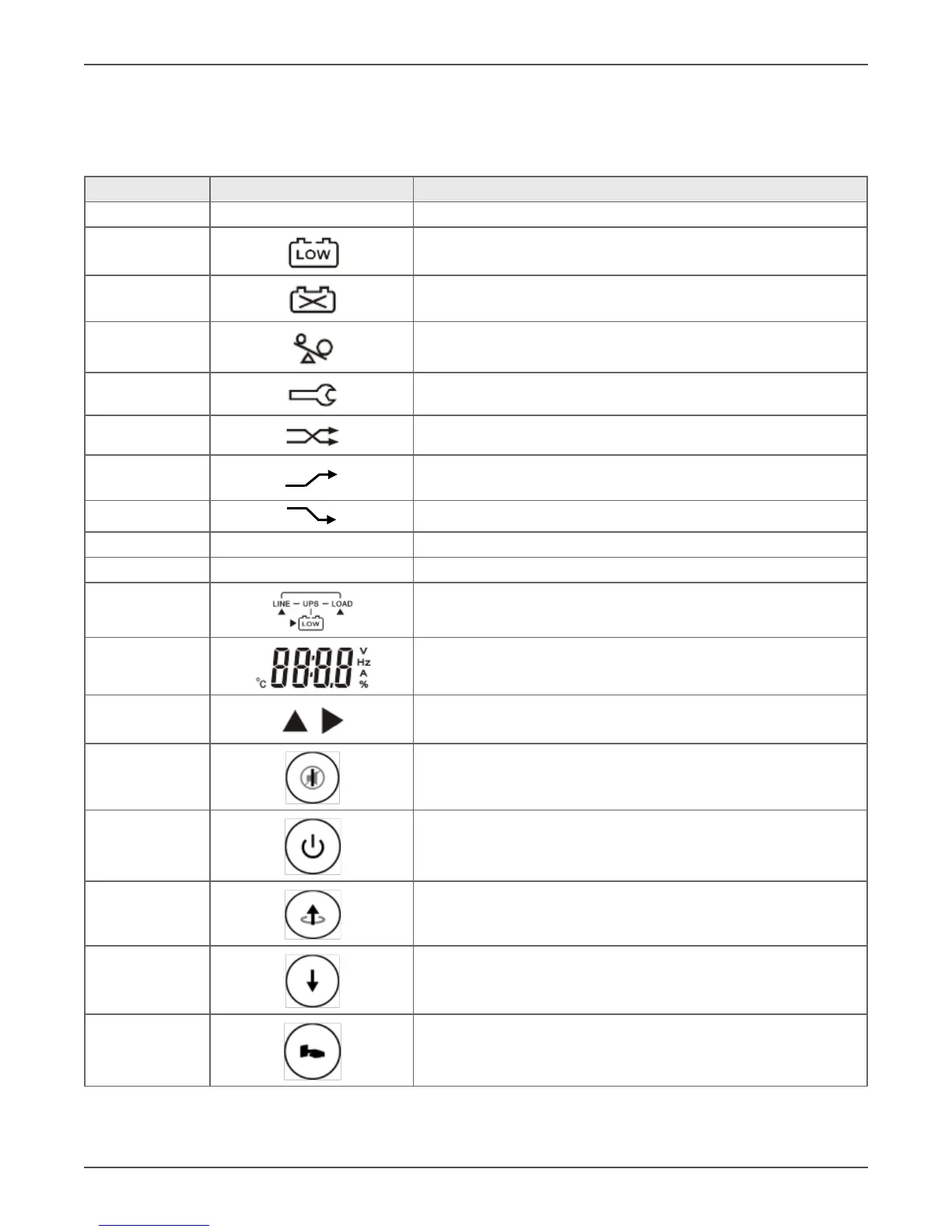
Symbols on the LCD Display Panel
Item Symbol Descripon
1 LINE Ulity or Bypass Source
2 Baery Low
3 Baery Abnormal
4 UPS Overloaded
5 UPS Working in specied mode*
6 A Blackout Transfer occurred in UPS Output.
7
Bypass Input Abnormal, UPS fails to transfer to bypass, Bypass
Abnormal at ECO mode
8
Ulity Input Abnormal
9 OFF UPS Shut o
10 LINE OFF UPS Abnormal Lock
11 UPS Flow Display
12 4-Digit Measurement Display
13 Indicates the item to be measured
14 UPS ON Switch or Alarm Silence
15 UPS OFF Switch
16 Previous Page or Seng Change
17 Next Page
18 Special Funcon Log In/Out



 To Next Page