Xtreme Power Conversion Corporaon
TX90 6kVA & 10kVA Service Manual
Page 13
Uninterrupble Power Supply
Start Up in Normal Mode
• Open the terminal block cover on the rear panel. Before starng the installaon make sure the wiring is
connected properly.
• Make sure the ulity input breaker and the UPS’ input breaker are in the “O” posion.
• Switch on the ulity input breaker on the distribuon panel and the UPS input breaker. Then the UPS will
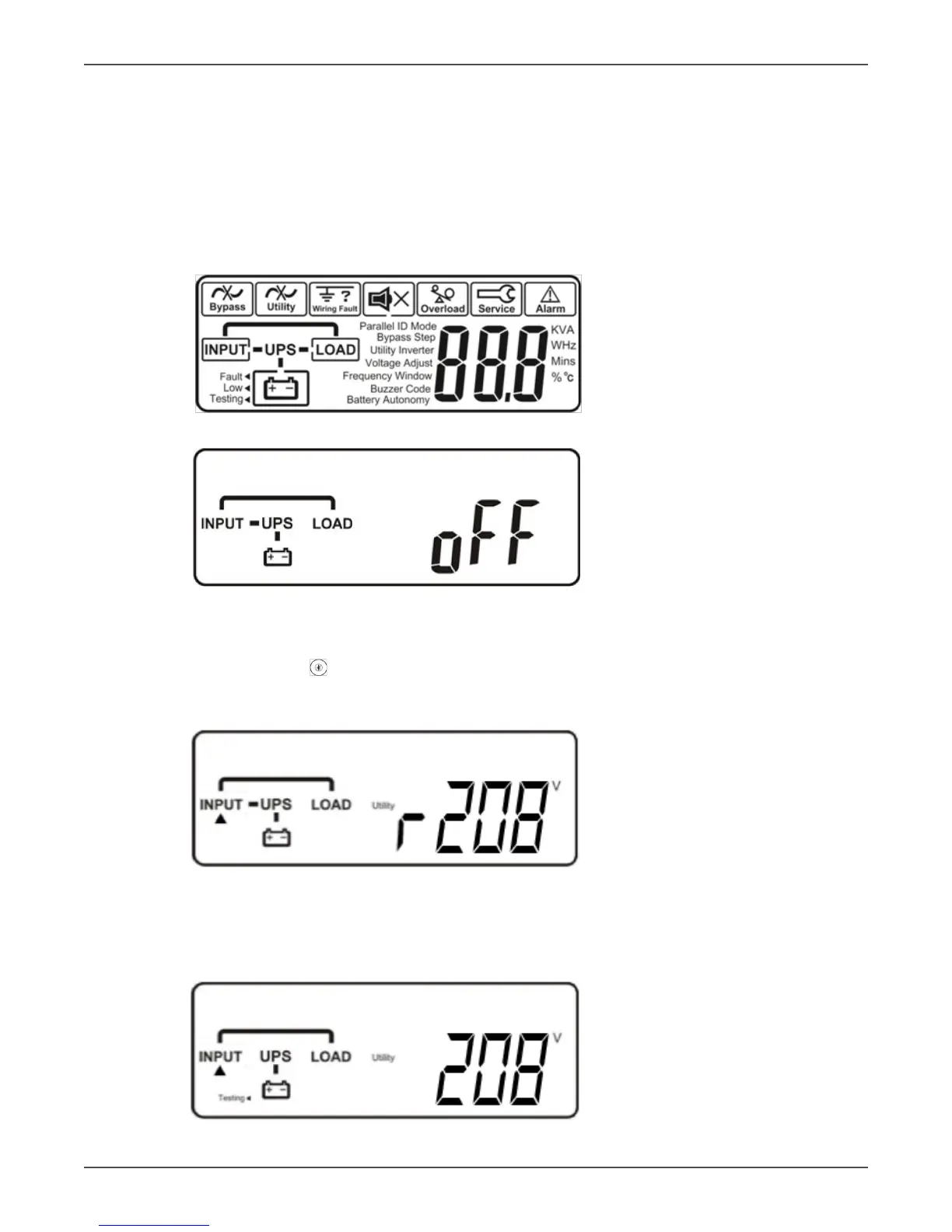
start up. Green LEDs and show that the Ulity and Bypass inputs are normal. UPS will display rst gure
A1 and then gure B.
A1
B
• The UPS is now in Bypass Mode. It will proceed to self-test automacally. If no abnormal message appears
then the pre-startup of the UPS was successful and the charger begins to charge the baeries
• Press the UPS On switch for approximately three seconds. The Buzzer sounds twice and the LCD display
changes from gure B to gure C.
C
• The UPS is in self-test mode again. The LCD display will change from gure C to gure D, and the UPS will
remain in baery mode for approximately four seconds. Then the display will change from gure E1 to
gure F if the self-test was successful.
D
“test”



 To Next Page