110
Functions Used As Needed
Set Mode
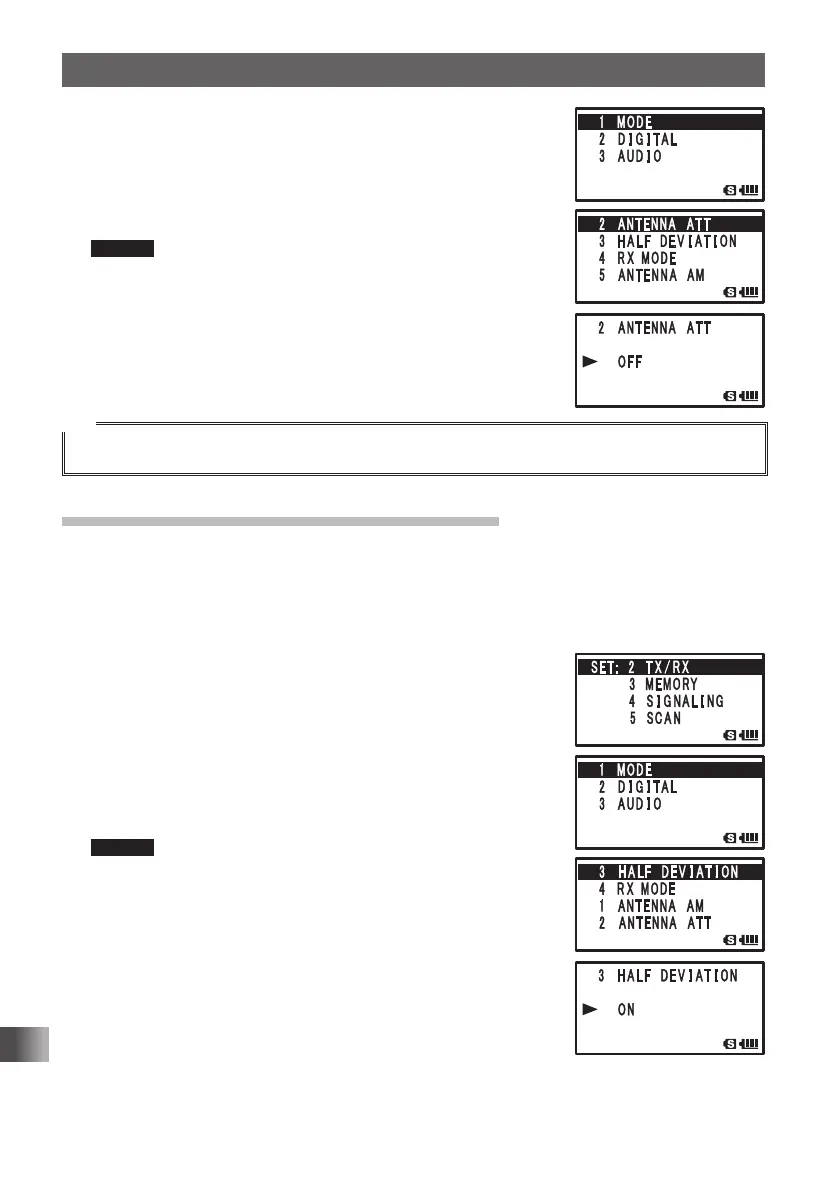
4 Turn O to select [1 MODE].
5 Press H.
6 Turn O to select [2 ANTENNA ATT].
7 Press H.
8 Turn O to select [ON].
Remark Default: OFF
9 Press p to save the attenuator function setting, and exit
the Set mode.
Tip
• The amount of attenuation by the attenuator (ATT) is about 10 dB.
Setting the transmission modulation level
You can set the transmission modulation level to half of its usual level.
Set [OFF] for normal amateur operation.
Enter the Set mode:
1 Press and hold M for over 1 second.
2 Turn O to select [2 TX/RX].
3 Press H.
4 Turn O to select [1 MODE].
5 Press H.
6 Turn O to select [3 HALF DEVIATION].
7 Press H.
8 Turn O to select [ON]
Remark Default: OFF
9 Press p to save the transmission modulation level is set,
and exit the Set mode.
FT1DRDEEng.indb110FT1DRDEEng.indb110 13/06/2815:1713/06/2815:17



 To Next Page