72
Using the GPS Function
Explanation of GPS Screen and Operation
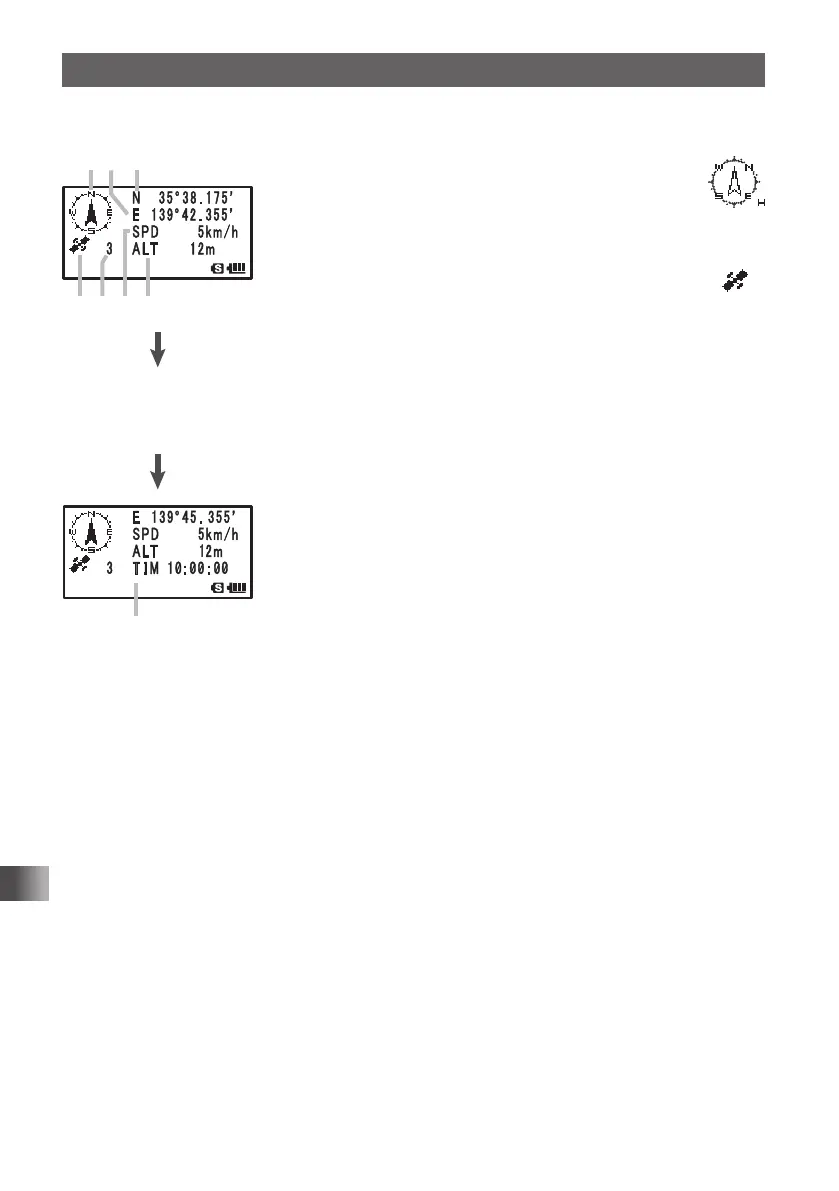
Activating the GPS function displays the following information on the LCD.
①
②
⑧
③ ⑥ ⑦
⑤ ④
Press A to scroll the
screen until the current
time appears.
a Compass:
North-UP (North is always up)
Heading-UP: Heading-UP: (When B is
pressed, the direction in which
you are heading is always up. A
white arrow icon appears. [H]
appears at the lower right of the
compass icon.
b Positioning:
When at least three satellites have been acquired,
appears.
This icon does not appear on the LCD if the transceiver
cannot acquire at least three satellites.
c Number of
satellites:
Displays the number of acquired satellites.
d Latitude:
The current position appears using north (N) or south (S)
latitude.
Display format: X DD° MM. MMM
X: X=N: North latitude, X=S: South latitude
DD: Degree
MM.MMM: Minute
Example: N 35° 38.250 (35 degrees, 38 minutes, 15
seconds north latitude)
e Longitude:
The current position appears using east (E) or west (S)
longitude.
Format: X DDD° MM. DMMM
X: X=E: East longitude, X=W: West longitude
DDD: Degree
MM.MMM: Minute
Example: E 139° 42.500 (139 degrees, 42 minutes, 30
seconds east latitude)
f Speed:
The speed at which you are moving appears.
Format: SPD aaakm/h
Example: SPD 5 km/h
g Altitude:
The altitude of the current position of your radio station
appears.
Format: ALT aaaaam
Example: ALT 20m
h Time:
The current time set by GPS appears.
Format: aa (hour): bb (minute): cc (second)
Example: 23:59:59 (23 hours 59 minutes 59 seconds)
* When an external GPS device is connected to the data
terminal, the time appears as follows:
aa (hour): bb (minute)
FT1DRDEEng.indb72FT1DRDEEng.indb72 13/06/2815:1613/06/2815:16



 To Next Page