47
Using the Memory
A Wide Variety of Memory Functions
Assigning a Name to a Memory Channel
Example: Assignment of name [YAESU]
1 Switch to the Memory mode.
2 Recall the memory channel to assign a name.
3 Press and hold M for over 1 second to enter the Set
mode.
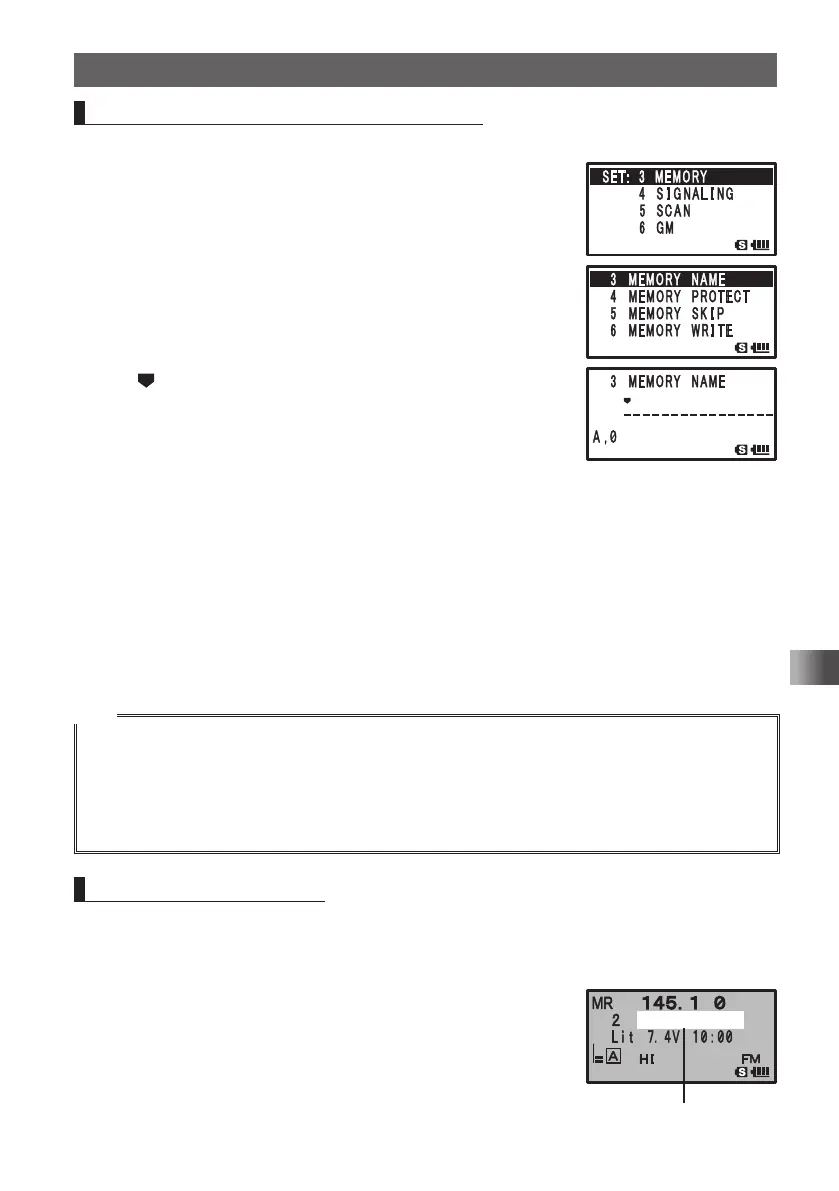
4 Turn O to select [3 MEMORY].
5 Press H.
6 Turn O to select [3 MEMORY NAME].
7 Press H.
The
cursor appears on the LCD.
8 Press 9 8 times to select the numeric character [Y].
9 Press H to move the cursor to the next character
position.
10
Press 2 5 times to select the numeric character [A].
11
Press H to move the cursor to the next character position.
12
Press 3 6 times to select the numeric character [E].
13
Press H to move the cursor to the next character position.
14
Press 7 9 times to select the numeric character [S].
15
Press H to move the cursor to the next character position.
16
Press 8 6times to select the numeric character [U].
17
Press p to save the memory tag to the memory channel and exit the Set mode.
Tips
• To delete a character, press F. The character is deleted and the cursor moves to left.
• Pressing
0
while entering alphanumeric characters (A,0) allows you to select 0, (space), –, /, ?,
!, ., : and #
• When entering the same character repeatedly, press H to move the cursor.
• When assigning a name to a home channel, recall the target home channel by first executing step 1
(see above).
Displaying Memory Tag
During mono band operation, the tag (name) of the memory channel or home channel
can be displayed using the following procedure:
1 Switch to the Memory mode.
2 Press and hold A for over 1 second.
The operating band is displayed in Mono band, and a tag
(name) appears under the frequency.
䎼䎤䎨䎶䎸䎼䎤䎨䎶䎸䎃 䎦䎯䎸䎥
Tag (name) display
FT1DRDEEng.indb47FT1DRDEEng.indb47 13/06/2815:1613/06/2815:16


 To Next Page