91
Communicating with a Specific Remote Station
Using the Tone Squelch Function
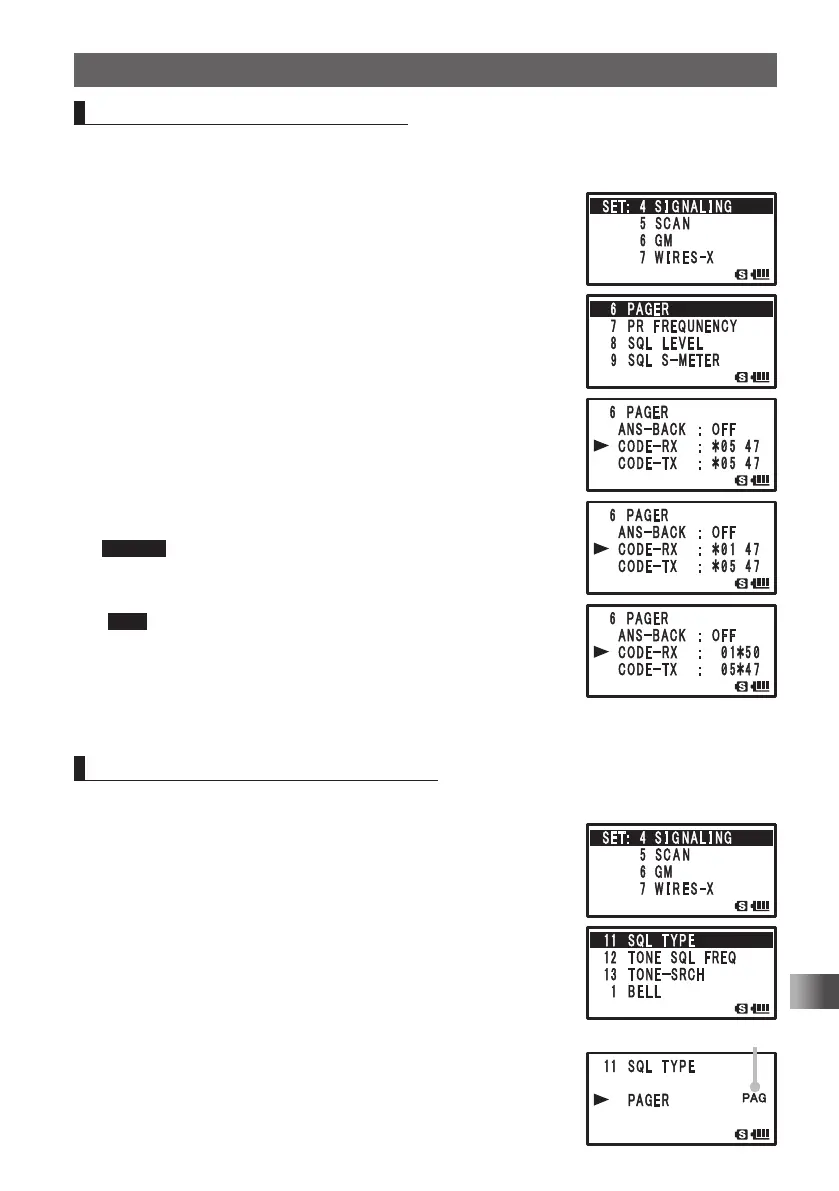
Setting the Code of Your Station
Set the personal code (your code) to be called by other stations.
Enter the Set mode:
1 Press and hold M over 1 second.
2 Turn O to select [4 SIGNALING].
3 Press H.
4 Turn O to select [6 PAGER].
5 Press H.
6 Turn O to select [CODE-RX].
7 Press H.
8 Turn O to select a code.
Select the first code from among 1 to 50.
9 Press H.
The cursor [¼] moves.
10
Turn O to select a code.
Select the second code from among 1 to 50.
Caution The second code must be different from the first code.
11
Press p to set your station code and exit from the Set
mode.
Tips • Default: 05 47
• The first and second codes contained in your personal code
may be reversed, i.e., [47 05] from [05 47] but recognized as
the same code.
• If the same personal code (group code) is specified for all
persons, all persons can be called at the same time.
Turning on the New Pager Function
Enter the Set mode:
1 Press and hold M over 1 second.
2 Turn O to select [4 SIGNALING].
3 Press H.
4 Turn O to select [11 SQL TYPE].
5 Press H.
6 Turn O to select [PAGER].
7 Press p to set the new pager function and exit from the
Set mode.
You can make a call, or wait for a call from a remote
station, using the new pager function.
PAG appears.
FT1DRDEEng.indb91FT1DRDEEng.indb91 13/06/2815:1613/06/2815:16



 To Next Page