89
Communicating with a Specific Remote Station
Using the Tone Squelch Function
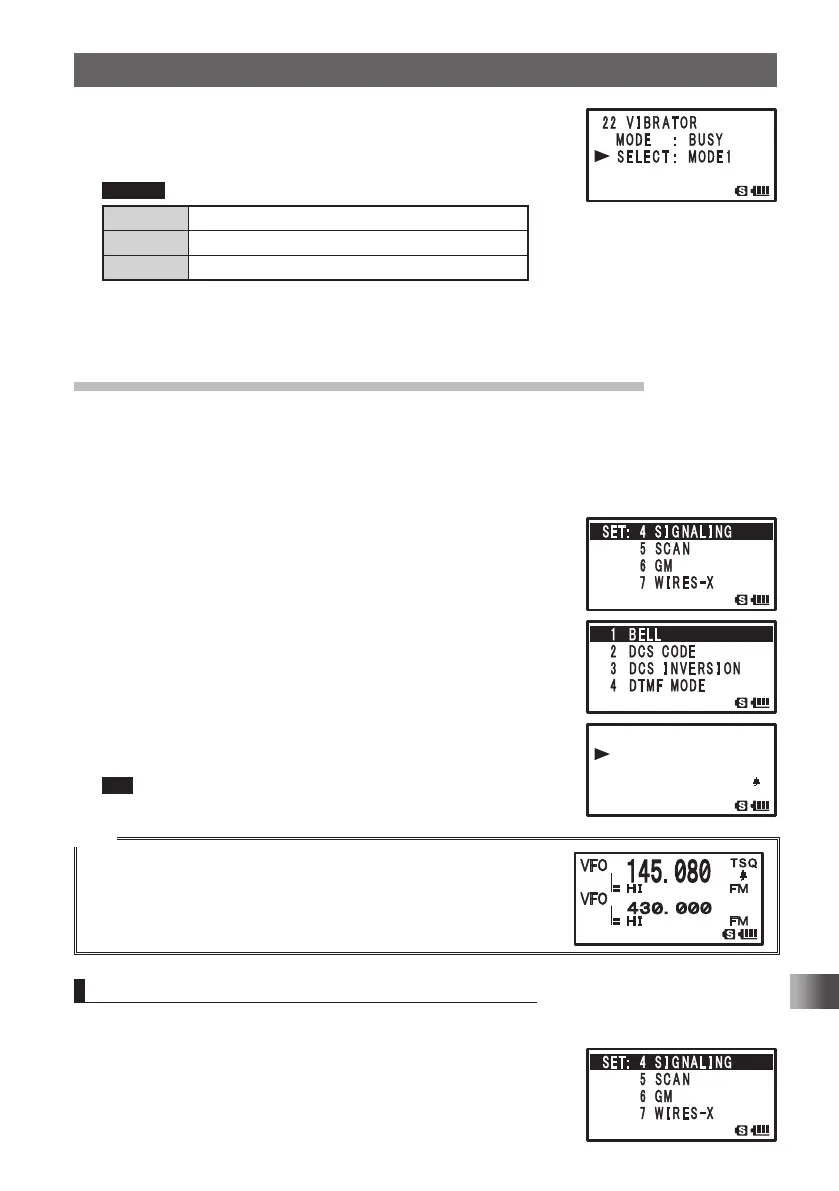
6 Turn O to select [SELECT].
7 Press H.
8 Turn O to select a vibrator operation mode.
Remark Default: MODE1
MODE1 The vibrator vibrates continuously.
MODE2 The vibrator operates at long intervals.
MODE3 The vibrator operates at short intervals.
9 Press p.
Sets the Vibrator mode and exits from the Set mode.
Notification of a Call from a Remote Station by the Bell
Set the Bell sound and the blinking b icon on the LCD, to alert you of a call from a
remote station containing a corresponding CTCSS tone or DCS code.
Enter the Set mode:
1 Press and hold M over 1 second.
2 Turn O to select [4 SIGNALING].
3 Press H.
4 Turn O to select [1 BELL].
5 Press H.
6 Turn O to select [SELECT].
7 Press H.
8 Turn O to select [BELL].
When the tone squelch or DCS function is turned on, the
b icon appears.
9 Press p to set the bell function and exit Set mode.
Tip To turn off the bell function, select [OFF] in step 6.
Tips
• To use the bell function, turn on the tone squelch or DCS
function.
• The bell function cannot be used via the repeater.
• The b icon appears when the bell function is turned on.
Upon receipt of a signal from a remote station, the b icon blinks.
Changing the Number of Times the Bell Rings
Enter the Set mode:
1 Press and hold M over 1 second.
2 Turn O to select [4 SIGNALING].
3 Press H.
䎔䎃䎔䎃䎃 䎥䎨䎯䎯䎥䎨䎯䎯
䎃 䎃
䎶䎨䎯䎨䎦䎷䎃䎃䎶䎨䎯䎨䎦䎷䎃䎃䎃䎝䎃䎃䎥䎨䎯䎯䎝䎃䎃䎥䎨䎯䎯
䎃 䎃䎵 䎬 䎱䎪䎨 䎵 䎃 䎝䎃䎃 䎔 䎃 䎃
䏗 䏌 䏐䏈
䎔䎃䎃 䎥䎨䎯䎯
䎃 䎃䎶䎨䎯䎨䎦䎷䎃䎃䎃䎝䎃䎃䎥䎨䎯䎯
䎃 䎃䎵 䎬 䎱䎪䎨 䎵 䎃 䎝䎃䎃 䎔 䎃 䎃
䏗 䏌 䏐䏈
FT1DRDEEng.indb89FT1DRDEEng.indb89 13/06/2815:1613/06/2815:16



 To Next Page