64
Scanning Function
Using the Scanning Function
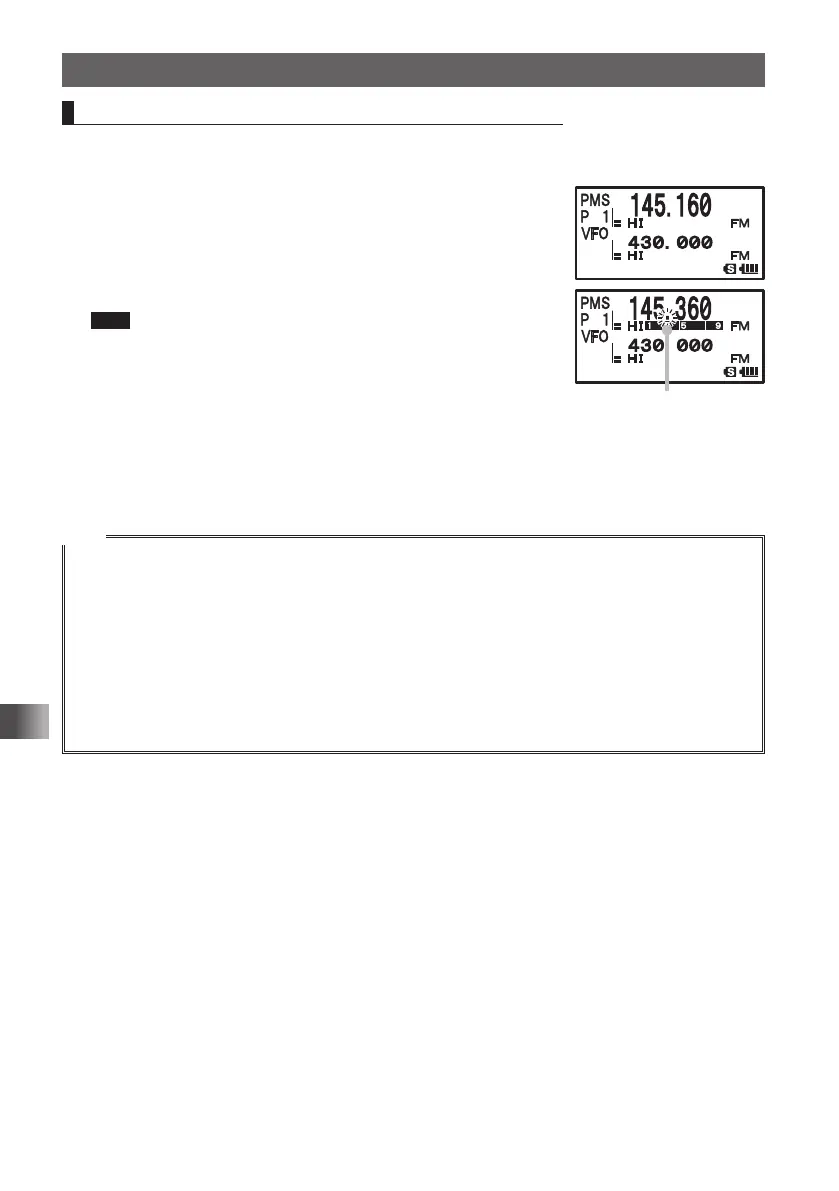
Performing Programmable Memory Channel Scan
The programmable memory channel scan allows you to scan a specified frequency
range within the same frequency band.
1 Switch to the Memory mode.
Recall a PMS memory channel to which the lower limit
frequency or upper limit frequency is registered.
2 Press F and then 2.
Programmable memory channel scanning starts.
Tips • Turn O clockwise: Scanning is performed toward higher
frequencies.
Turn O counterclockwise: Scanning is performed toward
lower frequencies.
• When a signal is received during scanning, scanning stops for
5 seconds and this frequency is received.
• When scanning is suspended, the decimal point blinks and the LCD stays lit.
• After receiving the frequency for 5 seconds, scanning resumes.
• To stop scanning, press p.
Tips
• When a skip memory channel is specified for [L½] or [U½] or when the lower/upper limit frequency
is not properly specified, program memory channel scanning is not performed properly.
• Press and hold M over 1 second to select the Set mode option and then select the following
setting items for more convenient use:
[8 CONFIG] [3 BEEP] [EDGE]: Emits a beep when the frequency band edge is reached.
[5 SCAN] [2 SCAN LAMP]: Prevents the LCD from being lit when scanning stops.
• Even during scanning, you can adjust the squelch in the following procedure:
Press F Press T Turn O to adjust the squelch.
• During scanning, you can finish the squelch adjustment in the following procedure:
Press F Press T.
Decimal point blinks.
FT1DRDEEng.indb64FT1DRDEEng.indb64 13/06/2815:1613/06/2815:16



 To Next Page